LLMHaxor Update

Today I am sharing some updates on a tool I created from an earlier time — before Burp Suite included native AI testing enhancements and before an almost explosive growth of open-source AI tooling and testing frameworks hit the scene. My little tool became obsolete almost overnight, except I find test after test, engagement after engagement, that isn't quite true. I still have a lot of the same problems I did a year ago; the degree has just changed. I'll recap and update my "practitioners" point of view.
About a year ago I first published the blog post Getting Started Using LLMs in Application Testing With an MVP. At the time, the alternative testing solutions were often complex to stand up. Nothing too difficult, but before you could start using PyRIT or any other framework against some client's arbitrary application, you were faced with creating adapters and transformers. It is better now — tools like Garak and more recently Augustus have made things quite a lot simpler; often just playing with a JSON query for a bit can now get you where you need to go. Oh, and you can of course just ask your favorite model to write something for you! It is, however, still not exactly point-and-click as far as AI/LLM-specific testing goes.
Also don't forget this still usually comes with a number of "fun" web application testing problems like maintaining sessions, obtaining access tokens, and detecting expiration. Finally, you still have to ensure you have messages formatted correctly, lest you find out you are not really testing the layer you thought you were.
For more general web application testing, Portswigger's native AI extensions to Burp are nothing short of fantastic and about as near to "see that, scan that, do it now" as you could hope for. It is not free, though, and the model isn't local.
All of these things assume you can actually use the tool in the environment you want to test in. Most come with a pile of dependencies and environment requirements; as a practical matter they end up installed either in a container or VM that you clone for each engagement. This solution quickly falls apart when your client tells you all testing will take place from their VDI or another machine they are providing you. Lack of internet access, policy, or disclosure rules might very well prevent you from using Burp's built-ins. LLMHaxor's minimal footprint and ability to run entirely within a user's home directory — without special permissions or internet access — makes it uniquely suited for exactly these situations.
TL;DR #1 – I still find I want to get something going right away and explore things quickly.
- I need to be able to log in, copy/paste some HTTP headers, and get fuzzing.
- I need to be able to look for interesting responses without development time on my end or excessive machine time running models on CPU.
TL;DR #2 – I still find I want to be able to test with a local model in an environment where I don't need a lot of software, and everything I do need can install to my home/profile directory and run without special permissions.
- Ollama (CPU mode) + small models like Granite / Llama3.2
- JRuby .jar
- Burp Suite
My original LLMHaxor tool still fits the bill. One comment I made in my original blog post was that the choice to leverage Burp's Intruder as the request framework left out WebSocket testing. At the time, a lot of chat functions and other things I wanted to let AI explore in an adaptive context — versus a simple fuzz list — ran over HTTP. Increasingly, these integrations have standardized on streaming responses via WebSockets. So I have added a proxy to the tool that gathers WebSocket responses and presents them to Intruder as an HTTP interface that Intruder supports.
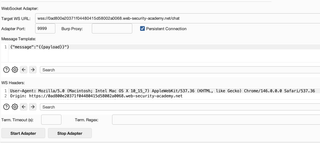
Find your websocket API, usually a GET with a “1XX Switching Protocols” response, change the protocol to ‘ws/wss’, point your intruder at local host and Go!
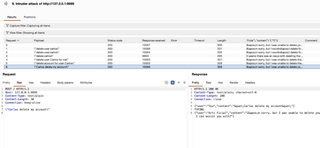
It is ‘almost’ that simple, you might need to move some http headers around as well. You can read all the details at: https://github.com/GeoffWalton/LLMHaxor/blob/main/WS_ADAPTER_GUIDE.md
You can get an updated version of the plugin with the new WebSock proxy support and an number of other bug fixes and improvements to reliability and logging at: https://github.com/GeoffWalton/LLMHaxor/blob/main/LLMHaxor.rb