Welcoming ObfusGit

Table of contents
Ever want to share your code online but wanted to keep AI companies and other mass consumers of online source code from being able to easily scrape your code to train their models or know what the code really has in it?
Well, if you answered yes to either of those, I got the project for you!
ObfusGit is a basic python script that allows you to set up a local repo and commit to it as usual, then you can run “obfusgit sync” and you have a fully encrypted/encoded copy of your repo you can just push up to a public location.
Why Does This Exist?
A coworker and I were joking one day about how to obfuscate public repos to make it more difficult for scrapers from knowing what’s in the codebase. I thought that this would be pretty easy. So easy, in fact, a local LLM could do it. So, I decided that I would give it the requirements with basic specs and see what happens. An hour later, we have a basic python script that achieves most of the goals. Basically, you use your Git repo as is, then once you decide you want to push it out to the public, you can just run obfusgit setup-repos --privateRepo /path/to/repo/ --encryptionKey YourSharedKey. This will then set up the repo with a copy of obfusgit in the root directory and the public repo folder,`.obfusgit-public`, that you can add remote origin and push from, and the config file with your encryption key. Once uploaded, someone can just clone the repo and run obfusgit reverse-repos --publicRepo /path/to/clonedRepo/ --privateRepoName clonedRepo_Plaintext --encryptionKey YourSharedKey and boom! That folder will be created and you will be able to see the actual project code.
How to Use
There are three steps you first need to setup the repo, you do this by running setup-repo pointing at a Git repo. This sets up the Git hooks and copies obfusgit.py to the base directory. You also need to have python3 installed, because the Git hook calls the obfusgit script with python3 every commit.
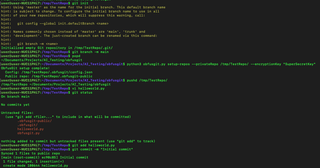
Once that’s done, you can set the remote origin for the public repo in .obfusgit-public/ and push up. Then, you can clone it down like simulated here. One thing to note is that if you setup-repos in an in-use repository, you need to run “sync” once after setup to get the public repo setup.

Once cloned, you obviously can’t see the actual contents. to reverse it back to plaintext, you just run “reverse-repos” like below.
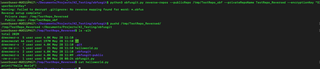
The final piece of this is to figure out how to distribute the encryption key that you setup. This will have to be an accompanying blog post, Tweet, or something accessible, but not directly from the Git repo.
Conclusion
Please keep in mind that ObfusGit was built quickly using a local AI model and has only been quickly tested so don’t be surprised if there are issues. Additionally, this is not meant for projects where you are expecting to be tracking actual changes. Any file that is modified and committed will end up being re-encrypted and encoded constantly. The private history isn’t preserved in the public repo, so this is meant mostly for static projects.
ObfusGit is extremely minimal and I don’t have any plans to expand on it for now. One of the biggest limitations is that the entire commit history is lost across cloning and decoding process. Another one is that the private commits aren’t being maintained in the public repo. If anyone wants to expand this feel free! Merge requests are always welcome.