waf-fu, or Some Log Replay Nonsense

Table of contents
1 waf-fu Your Way to Better Credential Access
So, a gig or two ago I was reviewing CloudWatch logs to search for any credentials that I may be able to use, in order to gain additional access to the environment. Various Web Application Firewalls (WAFs) were configured so that all headers were captured in the log, which was pretty convenient!
The part that wasn’t so fun was trying to replay multiple requests across multiple WAF logs, each with their own required content, just to see if at least one may provide a way to hopefully gain additional access into the applications the WAFs were configured to protect. It’s possible to do it all manually, but I found it to be a frustrating process when reviewing dozens or hundreds of log groups or individual log entries that needed to be checked to find out which may get me where I wanted to go.
Soo, I figured that there must be a better solution to handle building AWS WAF log replay traffic more at scale and that’s what was built. Feel free to jump to Replay With waf-fu if you want to see the tool that’s being released. But for everyone else, we’ll first talk about what WAF does and doesn’t capture by default.

2 Straight From the Horse’s Docs
Okay, so what does an AWS WAF capture with the default configuration? Surprisingly a lot, and none of it is automatically redacted. So…good news for us. You may see some cutoff if dealing with logs of exceptional size, but for most cases it’s probably the whole hog. Here’s a small table with the details to look professional about it.
Field | Source | Details |
|---|---|---|
HTTP Method | httpRequest.httpMethod | Request operation, such as GET, POST, PUT, DELETE, etc. |
URI Path | httpRequest.uri | Path identifying the requested resource |
Query String | httpRequest.args | Query parameters and their values |
All Headers | httpRequest.headers[] | Header names and values supplied with the request |
HTTP Version | httpRequest.httpVersion | HTTP protocol version used for the request |
Client IP | httpRequest.clientIp | IP address of the client sending the request |
Country | httpRequest.country | Country associated with the request's origin or a literal ‘-‘ when AWS WAF cannot determine it |
Timestamp | timestamp | Request timestamp recorded in milliseconds since the Unix epoch |
It’s a lot of neato stuff. And as seen with the CAPTCHA log example on the AWS WAF logging examples documentation, their examples show that logged content can certainly include session cookie data.
To be fair, some of WAFv2 documentation does recommend redacting common headers, but I only found this mentioned in the WAFv2 Best Practices documentation, which is not part of their main documentation site at https://docs.aws.amazon.com/.
“Common headers to redact include Authorization, Proxy-Authorization, Cookie, Set-Cookie, X-API-Key, and X-Amz-Security-Token.” |
While full POST request body details aren’t captured, we can still find use for everything else. After all, just because a POST request uses body content doesn’t mean the service will fully validate it.
3 Hunting to be Repetitive
So, the logs may be used to re-create a replay attack, which is pretty darn nice. But where do we find them and how difficult is it to do that. Honestly, it’s not too bad. For our use case we looked at three that can be used to pull logs from that can potentially be replayed.
But, as can be seen below, obtaining WAF logs doesn’t require too many permissions overall, and because it’s made of mostly read permissions, it’s more likely to be part of an overly permissive principal.
3.1 CloudWatch Logs Groups
By default, all WAF logs set to store logs in CloudWatch are configured with the prefix aws-waf-logs-, followed by whatever name is desired. Most deployments seem to just use the WAF name for this. Either way, the required prefix makes it super simple to search for any CloudWatch Log Groups that are configured for WAF logging. And just two actions are needed to list the log groups and then read log group data.
{
  "Effect": "Allow",
  "Action": [
    "logs:DescribeLogGroups",
    "logs:FilterLogEvents"
  ],
  "Resource": "*"
}
3.2 S3 Buckets
Similarly, all WAF logs configured to store logs in an S3 bucket use the same prefix aws-waf-logs-, again followed by whatever name is desired. Here we only need three actions to find and download WAF logs delivered to an S3 bucket.
{
  "Effect": "Allow",
  "Action": [
    "s3:ListAllMyBuckets",
    "s3:ListBucket",
    "s3:GetObject"
  ],
  "Resource": "*"
}
3.3 WAF Sample Pulling
The last method we’re looking at for pulling WAF logs is to get them from the WAF directly, which can have a few benefits, but also some disadvantages. The big one is that the WAF’s logging configuration RedactedFields element “has no impact on request sampling”. This means that any fields configured for redaction using the RedactedFields element will not be redacted when retrieved directly from the WAF through request sampling.
The downside is that sampling only pulls up to 500 log entries of sampled log data, which is randomly pulled from a 5,000 log sample set. This time we just need four actions to complete WAF log sampling requests.
{
  "Effect": "Allow",
  "Action": [
    "wafv2:ListWebACLs",
    "wafv2:GetWebACL",
    "wafv2:GetLoggingConfiguration",
    "wafv2:GetSampledRequests"
  ],
  "Resource": "*"
}
4 Replay With waf-fu
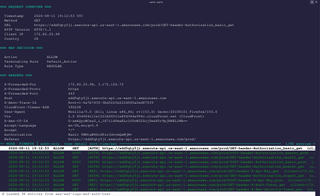
But that’s enough fancy talk! Now for the new toy: waf-fu. We’ll leave additional details of the tool to the markdown files in the repo. But it’s a simple tool that pulls AWS WAF log data to store in a local sqlite database for cache, analysis, review, and replay of a logged session. All done with a nifty TUI so nobody is required to leave their favorite shell.

waf-fu --profile $PROFILE --region $REGION --log-group aws-waf-logs-$WEBACL
Once started, you're dropped into the interactive TUI, where you can browse, filter, and search until you find a log to replay as curl commands, through Chrome or Firefox with full header injection, or as a batch HAR (HTTP Archive) export for Burp Suite import.
5 Plugging the Gaps
New toys are fun and all, but what can be done to help prevent this? AWS has two redaction mechanisms to choose from. But, as mentioned before, one doesn’t really provide great coverage if request sampling is achievable.
5.1 RedactedFields Configuration
As the docs say, RedactedFields on PutLoggingConfiguration accepts four FieldToMatch types: UriPath, QueryString, SingleHeader, Method. No Cookies option, you use SingleHeader with Name: cookie.
Three things it doesn’t cover:
- SingleHeader vs. Headers. From the AWS API reference: SingleHeader redaction doesn’t apply to rules using the Headers aggregate match type. A rule inspecting all Headers logs those values unredacted even with SingleHeader redaction configured for the same header name.
- Sampling. From AWS: “This setting has no impact on request sampling.” So GetSampledRequests returns full, unredacted headers regardless.
- Amazon Security Lake. consumes an independent WAF log stream and only respects DataProtectionConfig, not RedactedFields. We didn’t include that as a source to look for WAF logs, but I still felt it was worth including in this list of limitations.
5.2 DataProtectionConfig Configuration
Released in February 2025, this option provides better web ACL-level data protection. Like is talked about, this setting provides actual redacting of content for CloudWatch, S3 buckets, request sampling, and others. Yeah, the three destinations for logs we talked about here aren't all that’s supported. It’s better, but it still has these quirks to keep in mind:
- aws-waf-token is explicitly exempt, so you can’t protect it.
- SINGLE_HEADER protection doesn’t cover rules inspecting all Headers. Same caveat as RedactedFields.
6 Live, Log, (Replay), Laugh
So that's the end of our story. WAF logs are undoubtedly useful for troubleshooting, building and firing detections, and analysis when tracking down what a bad actor may have done. But they can also reveal a lot about the applications they protect, including exposing sensitive authentication details for their users.
There's nothing inherently wrong with keeping such logs to get work done, but it's worth locking down who can access the data, making sure nothing gets written to the logs that shouldn't be there, and that redaction is working how it is intended. After all, anything readable in logs, wherever they live, could be the final piece of the puzzle we need to get the access we're after.