The Quiet Phase: Why Active Directory Group Enumeration Deserves Your Attention

Table of contents
Watching the Door, Ignoring the Window
Almost every security team alerts when someone is added to Domain Admins, but almost no one alerts when someone asks who is in Domain Admins.
By the time an attacker changes group membership, they already hold privileged access and the damage is underway. The reconnaissance that led them there (mapping who the admins are and which accounts to target) happened days or weeks earlier. It was quiet but visible to anyone who had turned on the right auditing.
This post explains why group enumeration deserves a place in your Active Directory (AD) monitoring, how to audit it with native Windows features, and how pairing it with honeypot groups turns a noisy signal into a high-confidence alarm.

Why Enumeration is the Signal Worth Catching
Enumeration is how an attacker turns one compromised account into a plan. After the first foothold, often a phished user or an exposed service, the attacker wants to know:
- Who holds Domain Admin, Enterprise Admin, or other Tier 0 rights?
- Which service accounts or Help Desk groups have a path to those rights?
- Which of those accounts are worth stealing credentials from next?
MITRE ATT&CK tracks this as Permission Groups Discovery: Domain Groups (T1069.002). Tools like BloodHound’sSharpHound collector, PowerView, and plain ActiveDirectory PowerShell cmdlets gather it in minutes. Any authenticated user can read group membership by default, which is why it is valuable to detect. It happens early, before privilege escalation, lateral movement, or data theft. An alert at this stage buys time to respond while the attacker still holds only low-privilege access.
Watching group changes tells you a breach is in progress, but watching group reads can tell you one is being planned. The auditing described here uses built-in Windows features, requires no new product, and targets the phase where response is cheapest.
How Enumeration Auditing Works
Two (2) pieces must be in place before a domain controller logs enumeration attempts. Many environments have one, almost none have the second:
- An Audit policy on every domain controller. Enable Audit Directory Service Access (Success) under Advanced Audit Policy > DS Access, ideally in a GPO linked to the Domain Controllers OU.
- A System Access-Control List (SACL) must be defined on each group you care about. Add an audit entry for Everyone (or Authenticated Users), type Success, applied to This object only, for Read member.
You can confirm the policy on a domain controller with one (1) line:
auditpol /get /subcategory:"{0CCE923B-69AE-11D9-BED3-505054503030}" Adding the SACL to a group takes a few lines of PowerShell.
Note the .psbase calls, which bypass PowerShell’s DirectoryEntry adapter:
$dn = 'CN=Domain Admins,CN=Users,DC=contoso,DC=com'
$de = [ADSI]"LDAP://$dn"
$de.psbase.Options.SecurityMasks = 'Sacl'
$rule = [System.DirectoryServices.ActiveDirectoryAuditRule]::new(
    [System.Security.Principal.SecurityIdentifier]'S-1-1-0',   # Everyone
    'ReadProperty', 'Success',
    [guid]'bf9679c0-0de6-11d0-a285-00aa003049e2',              # member attribute
    'None')
$de.psbase.ObjectSecurity.AddAuditRule($rule)
$de.psbase.CommitChanges()
Once both pieces are active, each read of the group’s membership produces Event 4662 (An operation was performed on an object) in the security log of the domain controller that answered the query.
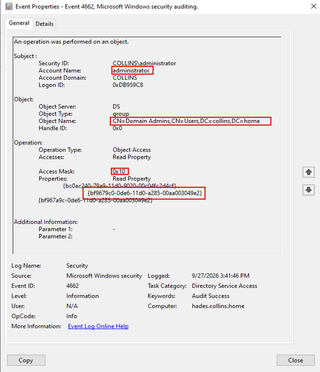
These fields identify an enumeration event:
Field | Value to Match | Meaning |
|---|---|---|
ObjectName | %{<objectGUID of the group>} | Which group was read |
Properties | {bf9679c0-0de6-11d0-a285-00aa003049e2} | The member attribute |
AccessMask | 0x10 | Read Property |
SubjectUserName / SubjectUserSid | Account name and SID | Who performed the read |
SubjectLogonId | e.g. 0x3A7F21 | Joins to Event 4624 for source IP and workstation |
In the case of built-in groups such as Administrators, Event 4799 is how enumeration appears instead. To ensure these are captured, the following is required:
- An Audit policy on every domain controller. Enable Audit Security Group Management (Success) under Advanced Audit Policy Configuration > Audit Policies > Account Management > Audit Security Group Management, ideally in a GPO linked to the Domain Controllers OU.
- Like before, a a System Access-Control List (SACL) must be defined on each group you care about. Add an audit entry for Everyone (or Authenticated Users), type Success, applied to This object only, for Read member.
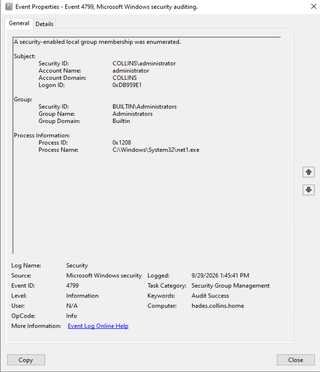
The 4662 event does not record where the request came from. In order to determine the source, match the event’s SubjectLogonId to the TargetLogonId of a 4624 logon event on the same domain controller to recover the source IP address and workstation name.
Noise and Blind Spots
On real privileged groups, this signal is noisy. Plenty of legitimate software reads group membership. For example:
- Directory sync tools such as Entra Connect, plus identity governance and PAM platforms
- Microsoft Exchange and other applications that authorize users by checking group membership over LDAP
- Inventory, monitoring, and security assessment tools
- Administrators opening a group in ADUC, and every script that runs Get-ADGroupMember
Each read produces a 4662/4799 per group on the domain controller that served it. On a busy domain, scheduled jobs alone can generate thousands of events a day. Here are some things to keep in mind as you explore enumeration auditing.
Plan for the Log Volume Before Adding a SACL
The audit policy alone is fairly quiet. Every SACL you add creates new events on every domain controller, and that volume lands in your Security logs, your log forwarders, and your SIEM licensing. Size the Security log on each domain controller so events don’t roll over before they are collected and confirm your SIEM can absorb the increase. For this reason, this monitoring configuration goes against CIS recommendations. Be prepared.
Filtering in the SIEM is Not Optional
Without filtering, analysts drown in legitimate reads and the real reconnaissance hides in plain sight. Baseline your environment for a month, identify the service accounts and hosts behind the normal traffic, and build allowlists in the SIEM. Filter there rather than removing the audit rule, so the raw evidence still exists for an investigation.
Other Gaps to Plan Around
Events are logged only on the domain controller that answered. A domain controller without the audit policy is a blind spot an attacker can use without knowing it.
Reading memberOf on user objects or querying tokenGroups can reveal membership without touching the group’s member attribute. Security Account Manager Remote Protocol (SAMR)-based tools such as net group /domain bypass this signal entirely, unlike Lightweight Directory Access Protocol (LDAP) queries. Cover SAMR-based enumeration with separate detections and test the tools you care about in a lab.
- Endpoints: process creation logging (Event 4688 with command lines, Sysmon Event 1, or EDR) for
net.exeandnet1.exerunning group ... /domain - Network: Microsoft Defender for Identity detects SAMR reconnaissance natively, and IDS sensors can flag the SAMR RPC interface over SMB
Groups with adminCount=1 block inheritance and are reset from the AdminSDHolder roughly every 60 minutes. Add the audit rule to AdminSDHolder as well as the group, or it may disappear.
Noise and gaps are why enumeration auditing works best when it is paired with something no legitimate process should ever touch.
Honeypot Groups: Turning Noise Into a Tripwire
A honeypot group is a decoy that looks valuable and does nothing. No application uses it, no administrator manages it, and no legitimate process has a reason to read its membership. Any 4662 event against it is a true positive and therefore worth investigating.
On Domain Admins, a membership read is one event among thousands. On a decoy named Tier0-Server-Admins, SQL-Prod-Admins, or VMWare ESXi Admins (IYKYK), a single read is an alert.
Design tips that make a decoy believable and clean:
- Make it attractive - Use a name, description, and OU placement that match your real naming conventions. Attackers skim for words like admin, prod, backup, and DBA.
- Give it members - Add one (1) or two (2) decoy user accounts with realistic names, set logon hour restrictions or populate the allowed workstations list in such a way that disables/severely restricts logon rights, and use a fake SPN to bait Kerberoasting (Event 4769).
- Keep legitimate readers away - Place it in an OU excluded from directory sync and from inventory tool scopes, then allowlist any sweep you cannot exclude.
- Audit broadly on the decoy - Because volume is near zero, you can audit Success reads of all properties, not just member, and still get a clean signal.
For further information on making honeypots, check out The Art of the Honeypot Account: Making the Unusual Look Normal, written by Sean Metcalf.
The real payoff comes from correlation. Collectors like SharpHound read every group they can find. When the same SubjectLogonId reads your decoy and your real admin groups within a few minutes, you are almost certainly watching reconnaissance, and the 4624 join tells you which machine to isolate.
$decoy = Get-ADGroup 'Tier0-Server-Admins'
Get-WinEvent -ComputerName $dc -FilterHashtable @{ LogName='Security'; Id=4662; StartTime=(Get-Date).AddHours(-1) } |
    Where-Object { $_.Message -match $decoy.ObjectGUID }
In production, move this logic into your SIEM as a high-severity rule. The PowerShell above is for proving it works in a lab.
What’s Next?
A phased rollout keeps log volume manageable and proves value quickly:
- Enable the audit policy on all domain controllers through GPO and verify it with auditpol on each one.
- Deploy one (1) or two (2) honeypot groups with SACLs and a SIEM alert. This delivers a high-confidence detection early in the process.
- Baseline and filter legitimate readers in your SIEM for a month before alerting on real groups, then build correlation rules that combine decoy reads with real group reads.
- Add SACLs to your top Tier 0 groups, specifically any custom privileged groups. Remember that when the SACL is applied to AdminSDHolder, it will also be applied to all other groups containing adminCount=1, such as Domain Admins and Enterprise Admins. Remember to do this in a phased approach, filtering legitimate events as they hit your SIEM.
- Test with the attacker’s tools. Run SharpHound or PowerView from a test account and confirm your alerts fire.
They call it the quiet phase because nobody is listening, but you can change that. A single read of a decoy group is an attacker announcing themselves, and every alert raised before privilege escalation is a breach that never happens.
Resources to help you on your way
QuietPhase
QuietPhase is a PowerShell script designed to assist with getting started on this journey. It checks whether your domain's auditing is configured to detect group enumeration, evaluates both well-known administrative groups and custom privileged group SACLs to determine if auditing is enabled, and proposes fixes where there are gaps. It reports by default, changes nothing unless you ask it to, and can apply the fixes during runtime.
Download:https://github.com/d3lightfu1/QuietPhase
Requirements: PowerShell 7.2 or later, the ActiveDirectory module (RSAT), and an elevated session as Domain Admin (Enterprise Admin for forest-root groups). The script requires and installs Microsoft.PowerShell.ConsoleGuiTools from the PowerShell Gallery if it is missing. Checking remote domain controllers requires WinRM.
What it does:
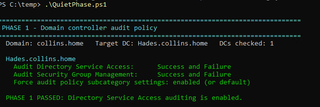
1. QuietPhase checks each domain controller for Audit Directory Service Access (required), Audit Security Group Management (recommended, for 4799 on built-in groups), and Force audit policy subcategory settings. If Directory Service Access is off, it prints the GPO and auditpol fixes and stops.
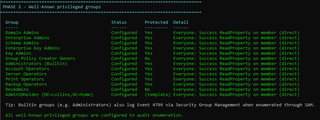
2. QuietPhase checks the SACL on Domain Admins, Enterprise Admins, Schema Admins, Key Admins, Enterprise Key Admins, Group Policy Creator Owners, the Builtin operator groups (Account Operators, Server Operators, Print Operators, and Backup Operators), Administrators, and DnsAdmins. Groups are located by SID, so it works in any language. Groups that are already appropriately configured to audit enumeration show green; groups that need changes show yellow. AdminSDHolder is checked too, because protected groups are reset from it.
3. After evaluating the well-known groups, QuietPhase prompts for a partial group name, thus allowing you to select custom privileged groups (including your honeypot!). It then checks the SACL of those groups and either confirms readiness or suggests modifications.
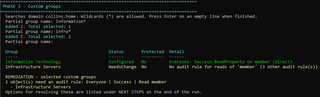
A group counts as configured when its SACL audits Success reads of the member attribute (or all properties) by Everyone or Authenticated Users.
Next Steps
When anything is flagged as NeedsChange, the script lists the affected objects, then ends with a NEXT STEPS block of ready-to-paste commands that repeat the parameters you ran with. You can apply the changes with -Apply (preview first with -WhatIf), export them with -FixScriptPath, or follow the manual ADUC steps it shows). The remediation code itself is written only to the exported fix script, labeled by section and by group, so the console stays readable.
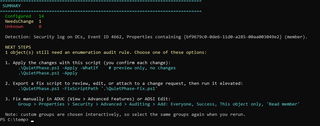
Script Parameters:
Parameter | Default | Purpose |
|---|---|---|
-Server | A discovered DC | Domain controller or domain to target |
-AllDomainControllers | Off | Check audit policy on every domain controller, not just the target |
-AuditPrincipal | Everyone | Principal for proposed rules: Everyone or Authenticated Users |
-Apply | Off | Apply proposed changes, with a confirmation prompt for each |
-SkipCustomGroups | Off | Skip phase 3 |
-FixScriptPath | None | Export all proposed remediation to a .ps1 file for review, editing, or change approval |
-WhatIf / -Confirm | Standard | Preview changes, or control prompts, when used with -Apply |
Example Usage
- Run it with no parameters to see whether enumeration would be detected today. The report works well as evidence for an audit or a leadership briefing.
.\QuietPhase.ps1 -AllDomainControllers- Export the proposed fixes, trim them to the groups approved for this phase, and submit the file with your change request.
.\QuietPhase.ps1 -AllDomainControllers -SkipCustomGroups -FixScriptPath .\EnumAuditFix.ps1- After creating a decoy group, run QuietPhase, and during phase 3, search for it by name, and apply the SACL.
.\QuietPhase.ps1 -Apply -WhatIf   # preview first
.\QuietPhase.ps1 -Apply- Schedule a report-only run to catch new domain controllers that are missing the audit policy, or SACLs that were removed.
- Apply the SACLs in a lab, run your enumeration tools, and confirm the 4662/4799 events appear before you touch production.