The Art of Hunting Azure Cloud Secrets

Finding secrets in the cloud is what can turn a normal cloud test into a privilege escalation game changer. The approach to finding secrets is what may separate your next cloud penetration test from a finding expedition into a subscription or global administrative takeover.
In this blog, I am going to introduce two tools that I am making public. The purpose of each tool is to minimize your time looking for secrets in Azure that probably should not be there.

Microburst, a public tool made by NetSPI, allows you to enumerate Azure Assets using an authenticated account in Azure. To get the maximum benefit out of tools such as Microburst, subscription reader access is normally recommended prior to running. Microburst can be found at the following GitHub URL: https://github.com/Netspi/Microburst
Once collection is finished, penetration testers will typically pivot to the data and pull secrets that may be stored in logic applications, VM extensions, automation accounts, and Azure resource deployment logs. The downside is that these actions require time and, in larger environments, you could inadvertently miss some secrets that could gain you privilege escalation in the cloud.
I had AI assist me into building a fully functional toolset that would search for secrets collected by Microburst. You don’t need something powerful like Claude Mythos to come up with these actions. You just need to plan how you want to build it, ask the right questions, do code review, and ensure you are not introducing a tool that may produce several false positives. Microburst Secrets Hunter is meant to be a companion post exploitation tool to Microburst collection. It is done entirely offline using the data that was collected during Microburst enumeration. I have also included actional reporting with redactions that you can easily import into reporting tools with very little effort.
Microburst Secrets Hunter can be downloaded at the following GitHub URL: https://github.com/rootsecdev/MicroburstSecretsHunter
This blog would not be complete without a demonstration. To protect any guilty cloud environments, I have made a sample pack of tests that are comparable to output produced by Microburst. This will give basic command use syntax and how the sample output looks.

I have added two separate options for usage depending on the environment you are operating in and how paranoid you are when importing modules versus running PowerShell directly.
Sample usage:
# Clone / copy this folder, then from a PowerShell prompt:
.\Scan-MicroBurst.ps1 -Path .\MicroBurst-2026 -Verbose
#Import Module and use cmdlet directly
Import-Module .\MicroBurstSecretsHunter.psd1 -Force
Invoke-MBSecretScan -Path .\MicroBurst-2026By default, all scans are redacted for reporting purposes. There is a switch you can use that will export full unredacted secrets data if you choose to do so.
Sample Syntax to export redacted secrets:
.\Scan-MicroBurst.ps1 -Path .\MicroBurst-2026 -ShowSecretsWhen running a scan, there will be an overview of findings by category.
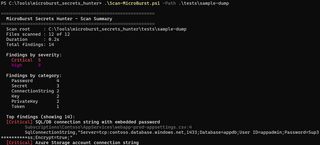
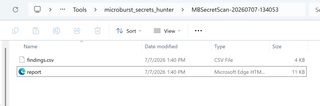
Two output formats are on by default. A CSV file will automatically generate. The CSV will help alleviate reporting when it comes to documenting where secrets are living and what they are providing access to. An .html file will also be in the output directory.
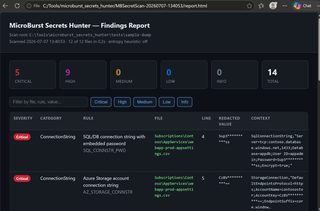
The .html file is beneficial to use as a dashboard as you validate your secrets found in plaintext. You can filter by rule and severity. Severity should not be taken as gospel. I simply use it to prioritize secrets hunting based upon strategic value.
To expand upon initial secrets hunting discovery, this blog will go into more depth around client secrets and how to determine if third-party applications living in Azure have some expanded cloud access.
You've found a client secret. Does the application compromise get you into Azure or the Graph API?. To do this, the secret would have to be validated along with manual enumeration. Enumeration can get very noisy when you must run certain tooling such as AzureHound to see what type of access at scale the compromised application has. This can obviously be very time consuming. To aid in this process, I am releasing a second free public tool called, Secrets Stalker. Secrets Stalker is located at the following URL: https://github.com/rootsecdev/SecretsStalker
To get started, it is highly recommended that you install all requirements through a virtual environment and not break any system packages that may be installed on your machine.
Example:
virtualenv -p python3 venv
source venv/bin/activate
pip3 install .
Once installation is completed, you can run secrets stalker a few different ways. I recommend passing credentials with environment variables, so as to keep it out of your shell history.
export SS_TENANT=contoso.onmicrosoft.com
export SS_CLIENT_ID=11111111-2222-3333-4444-555555555555
export SS_SECRET='<client-secret>'

python -m secret_stalker
To begin, I have already exported my secrets into an environment variable and have issued the following command:
python -m secret_stalker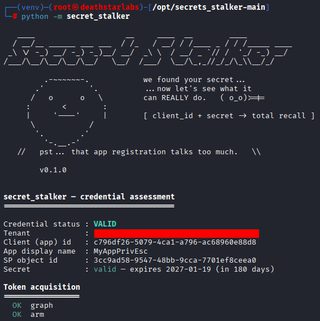
You can see that a valid secret has been returned along with the expiration date. There is also a token acquisition between Graph and Azure Resource Manager (ARM). At this time, these tokens are not exportable. This is simply meant to show that we have acquired a valid client secret to an application.
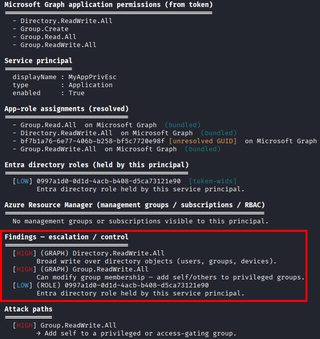
Moving down further, this this application does have Graph permissions. I thought it was equally important to show in ARM if the applications have management groups or subscriptions that are visible to the application. It’s an important data point if the application would have expanded access into an Azure subscription. I have also included privilege escalation paths. The example below shows the application can write to directory objects such as users and groups. This is probably my favorite escalation path because you can generally take over subscriptions if there is an assigned group with ownership access. I consider subscription take over more of a high-value target than global administrator RBAC roles. This is because subscriptions can sometimes be less monitored and you can perform privilege escalation with a better chance of going undetected.
I did stop short of fully weaponizing Secrets Stalker. The public release will simply give penetration testers and Red Teamers the ability to see how much access a client secret has. If you want to explore actual privilege escalation, I would visit the BloodHound Attack Research Toolkit located at the following URL: https://github.com/BloodHoundAD/BARK
Happy cloud secrets hunting and hacking!