Policy as Code: Stop Writing Policies and Start Compiling Them

Table of contents
The Problem Nobody Wants to Talk About
Let me paint a picture most security leaders will recognize.
You have 30+ policies living as Word documents on SharePoint. Half of them have filenames like Acceptable_Use_Policy_FINAL_v3_revised_FINAL.docx. Nobody is confident which version is current. The formatting is different in every document because six (6) different people authored them over four (4) years. Cross-references say things like "see the other policy" without specifying which one or which version.
Annual review time rolls around. Someone downloads all the docs, opens each one in Word, makes tracked changes, emails them to a reviewer, waits, gets them back, accepts changes, re-uploads. Repeat for every policy. The whole cycle eats weeks of billable time from people whose time is not cheap.
And then an auditor asks: "When was this policy last reviewed? Can you show me the change history?" And you're digging through SharePoint version history hoping the metadata is intact, knowing it probably isn't.
That was us. A company that does security for a living, and our own policy management was a mess. Not because anyone was lazy, but because Word docs on a shared drive is a fundamentally broken model for managing living documents. The tooling fights you at every step.
The Idea: If We Can Version-Control Code, Why Not Policy?
The idea was simple and maybe obvious in hindsight: treat policies like source code:
- Markdown files in a Git repository
- YAML front matter for metadata (policy number, revision, date, reviewer, approver)
- A standard structure enforced across every document
- GitLab merge requests for review workflows
- CI/CD to generate output
Here's what that looks like in practice. Every policy starts with front matter like this:
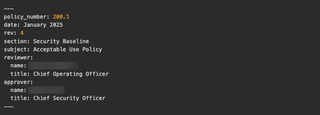
Pandoc reads this metadata and injects it into the PDF template's header block. The body is plain Markdown—no proprietary format, no binary blobs, no lock files.
The contribution workflow is the same merge request process our engineers already know:
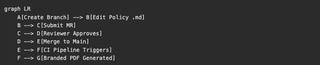
Every change has a commit hash, a diff, an author, a timestamp, and an approval record. There is no ambiguity about what changed, when, or who signed off.
The Build System
The PDF generation pipeline is four (4) components chained together:
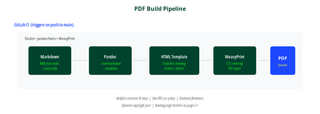
Markdown goes into Pandoc, which applies an HTML/CSS template, then WeasyPrint renders the final PDF.
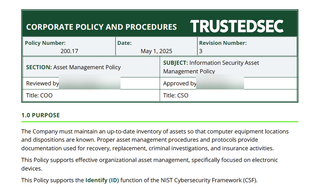
The HTML template (pdf-template.html) handles all the branding: TrustedSec logo in the header, policy number and subject in running page headers (pages 2+), dynamic copyright year in the footer, page numbers, "Confidential" marking, and consistent table styling with dark green headers and alternating row shading.
The build script is 18 lines of shell:
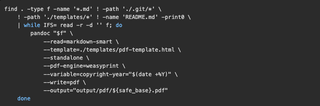
GitLab CI picks this up on every push to main. The pipeline uses pandoc/latex Docker image with WeasyPrint installed, generates all 47 PDFs, and stores them as artifacts with a 30-day retention. Push a one (1) line fix to a policy, and two (2) minutes later the updated PDF is waiting in the pipeline output.
For local builds, a Docker wrapper mounts the repo and runs the same script—same container, same output, regardless of what's on your laptop.
The CSS template was one of the more interesting pieces to get right. WeasyPrint supports @page rules, so we have proper running headers and footers that pull from the YAML front matter variables. The first page suppresses running headers (it has the full metadata block instead), and every page after that shows the policy number on the left and the subject on the right, separated by a hairline border.
The Scale: 47 Policies, 3 Series, 1 Standard Format
The repository holds 47 policies organized into three (3) series:

Every policy follows a mandatory eight (8) section structure:
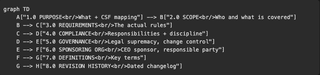
This consistency matters more than it sounds. When an auditor opens any policy in the set, they already know where to find the scope, the compliance language, and the revision history.
Cross-references use explicit section numbers throughout. Instead of "see the incident response policy," we write "per Section 3.4 of the Incident Response Policy (200.6)," and that reference is verifiable. If someone changes 200.6's numbering, the cross-reference in the source will be stale and visible in review.
Framework Alignment
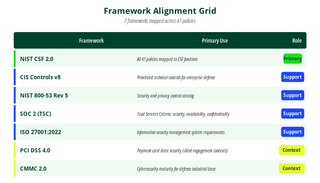
The program is designed with primary alignment to NIST CSF 2.0. Every policy's PURPOSE section maps to one (1) or more CSF functions. In addition, we draw from six (6) other frameworks where applicable:
NIST CSF Coverage
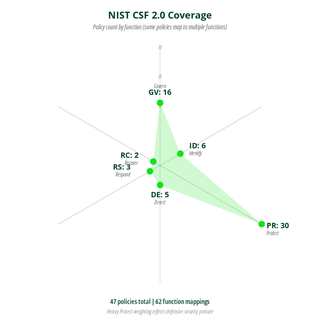
The heavy Protect weighting is intentional. That's where the bulk of operational security controls live: access control, encryption, endpoint protection, patch management, and data handling. Some policies map to multiple functions, so the total count across functions (62) exceeds the 47 policy count.
The lighter Detect/Respond/Recover counts don't mean we're weak there. It means fewer policies are needed to cover those functions. You don't need 12 policies about incident response, you need one good policy (200.6), a detailed procedure (200.19), and a breach notification policy (300.10), resulting in three (3) documents, clear ownership, and no overlap.
The AI Angle: How This Was Actually Feasible
Here's the part I want to be honest about, because I've seen too many "we used AI and it was magical" posts that skip the details.
This project would have taken months of manual work. We have 47 policies, each needing structural conformance, consistent language, NIST CSF mapping, cross-reference validation, and formatting cleanup. For one (1) person, that's a wall.
I used Claude Code extensively, and it's what made this project realistic for a single person to drive. Here's specifically what AI did:
- Structural conformance: All 47 documents were audited against the eight (8) section standard and flagged deviations. Some policies had 6 sections while some had 12, and AI identified every structural gap.
- NIST CSF mapping: Each policy's purpose and requirements were reviewed against CSF function definitions, and the PURPOSE section language that maps to the correct function(s) was drafted.
- Cross-reference validation: When Policy A references "Section 3.4 of Policy B," AI confirmed that section actually exists and says what Policy A indicates.
- Consistency audits: AI identified places where one policy said "must" and another said "should" for the same requirement, terminology drift, and definitions that varied between documents.
- Writing cleanup: Punctuation was made consistent and boilerplate inconsistencies were fixed.
- PDF template CSS: The WeasyPrint-compatible CSS was iterated for headers, footers, running page elements, table styling, and print layout.
Here's what AI did not do:
- Write policy from scratch: Every policy had existing content, either from our prior Word docs or from requirements I specified. AI restructured and normalized, it did not invent policy positions.
- Make compliance decisions: Which frameworks to align to, how to map specific requirements, and what constitutes a violation are all human judgment calls.
- Approve anything: I reviewed every line of every policy. When AI suggested a change, I accepted, modified, or rejected it, and the Git history shows this clearly.
The workflow was iterative. I'd point Claude Code at a batch of policies with a specific instruction ("audit these for section numbering consistency" or "flag every cross-reference and verify the target exists"), review the output, make corrections, and move on. What would have been a week of manual diff-checking became an afternoon.
I want to be clear about the tradeoff: AI is fast and tireless at pattern matching across large document sets, but it's also confidently wrong sometimes. The review step isn't optional, it's the whole point. AI proposes, human disposes. The Git history is the proof.
The Audit Program
The policy repository backs a documented internal audit program (200.21) that includes:
- Annual policy review (Q1): Every policy reviewed for accuracy and relevance during January through March
- Internal penetration testing: We test our own infrastructure because we'd be hypocrites not to
- Third-party penetration testing and social engineering: Independent annual assessment from an outside firm
- Business risk assessments: Documented in a central risk register per the Risk Assessment Policy (200.15)
- Tabletop exercises: Incident response and business continuity readiness drills
- Program maturity assessment: Evaluated against NIST CSF
- Semi-annual metrics reporting: Patches, vulnerabilities, incidents, exceptions, training completion, and vendor assessments
All of this is traceable. When an auditor asks, "How often do you review policies?" the answer is "Q1, and here's the merge request history proving it." When they ask, "Who approved this change?" the answer is in the merge request approval record, not someone's recollection.
What Actually Changed
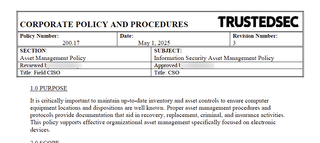
Here's the before-and-after comparison:
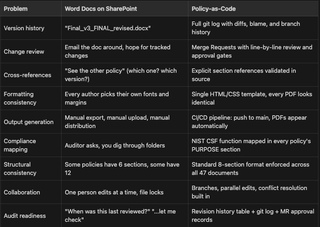
Some of the wins are subtle. For example: because every policy is plaintext in a Git repo, I can grep across the entire corpus in seconds. "Which policies reference encryption?" is a one-liner, not an afternoon of opening Word docs.
The CI/CD pipeline means formatting is never a discussion. Nobody argues about fonts, margins, or header styles. The template owns all of that. Authors write content, the system handles presentation.
The merge request workflow means we get the same review discipline for policy changes that engineering teams get for code changes. Diffs are line by line, comments are threaded, approvals are recorded, and nothing gets merged to main without sign-off from the designated reviewer and approver.
Old policy
New Policy
What's Next
This isn't "done" in the sense that you ship a feature and move on. Policy programs are living things. Here's what's in motion:
- Continuous improvement: Every incident, every audit finding, and every regulatory change feeds back into the policy corpus. The merge request workflow makes this lightweight instead of a dreaded task.
- Program maturity tracking: We are measuring ourselves against NIST CSF on an ongoing basis, not just during annual reviews. The CSF function mapping in every policy makes this measurable rather than subjective.
- Expanding automation: We're looking at automated validation (schema checks on YAML front matter, section numbering lint, cross-reference integrity checks) as pre-merge CI steps. If the pipeline can catch a broken cross-reference before a human reviewer has to, that's a win.
The Takeaway
If you're a security leader still managing policies in Word documents, I get it. Migration feels like a huge project, and you've got actual security work to do. But the compound cost of the current approach (the annual review cycle, the version confusion, the formatting fights, and the audit scramble) is real, and it grows every year.
Markdown + Git + CI/CD is not a new idea. Engineers have been doing this with documentation for years. What's new is that AI tooling makes the migration feasible for a security team that doesn't have months to burn. The structural cleanup, the consistency auditing, and the cross-reference validation are where AI earns its keep.
Martin Bos is the Chief Security Officer at TrustedSec. He spends his time building security programs, breaking things professionally, and apparently writing blog posts about policy management.