Modern Web Application Content Discovery

Table of contents
When testing web applications, discovering what functionality is available is key to finding vulnerabilities. Ideally you want to find as many application pages as possible. You can do this by using web‑crawling or spidering tools to uncover indexed pages, as well as employing forced‑browsing techniques. When doing forced browsing you are looking for pages that are not indexed on the site but still available. Forced-browsing is more useful when the applications user interface (UI) is limited, but even on applications with a large UI, forced-browsing can return webpages that would otherwise not be known.
Recently, I got this question:
"I found a URL that is returning a default homepage, but it has no links or navigation. How do I find out if the application has functionality?”
So, I figured I would write up a quick guide on how I find content in modern web applications.
FORCED BROWSING
To start we can try to guess page names that are present in an application. A common way to browse for un-indexed pages is to run though a list of common page names. For example, we can grab a HTTP request with a proxy like Burp Suite and send the request to intruder which makes repeated requests with different page names.
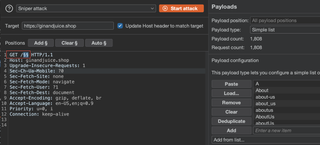
Then, we can review the results to see what response codes are returned by the application.
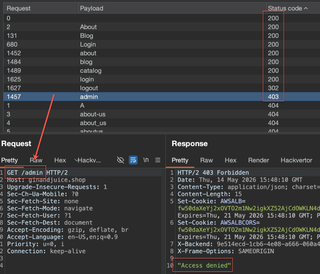
If a page exists, the application could return a 200 response code or sometimes a redirect code like a 302. Forced browsing typically sends a lot of requests, and the results depends on how good of a wordlist you use. Seclists is still a pretty good baseline to get common lists:
https://github.com/danielmiessler/SecLists/tree/master/Discovery/Web-Content
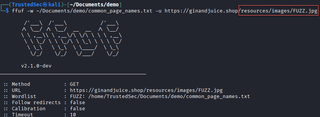
But a lot of tools, such as Burp Suite, have common lists built in as well. Burp Suite does restrict how fast requests can be sent in the community version, so using command line tools such as FFuF is also common and in some cases can return results faster.
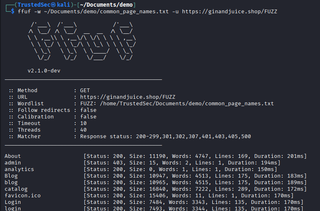
It is important to note that by default FFuF sends 40 requests at a time where Burp Suite only sends 10 requests at a time. The -t parameter in FFuF can set the number of requests send each iteration. To ensure you don't overwhelm a site, or get blocked by rate limits, you may want to decrease the threads being used.
Typically, if a page returns a response code that is not a 404 (Not found) that page might be part of a valid URL path and we can then start re-searching any paths that seem to get a valid response code like a 200. If we find a valid page, we can then navigate to the page in our browser and review what functionality is available.
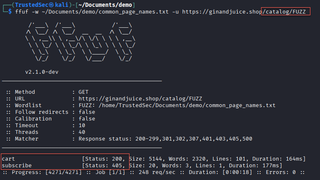
It should be noted that depending on the website, the application may require pages to contain an extension such as .html, or .php. So, when looking for a URL path like /blog different sites will return different response codes for example.com/blog and example.com/blog.html
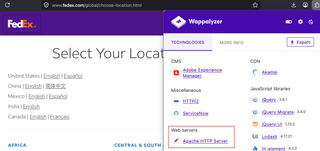
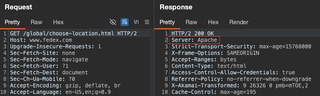
To make forced browsing a little more targeted, we can review application response headers or common fingerprinting tools like Wappalyzer to identify what server or software is being used in the application.
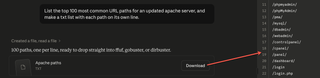
Then, we can ask an AI model to create a list of common URL paths, or common file paths that you can use with FFuF or Burp Suite.
WEB CRAWLERS
It's worth mentioning there may not be many un-indexed pages on a site. In those cases, web crawling would be better suited for enumeration. You can use Burp Suite’s Content Discovery function by right clicking a target and selecting Engagement Tools/DiscoverContent. This will submit a bunch of requests to find pages. When it finds pages, it will also pull content from the discovered pages.
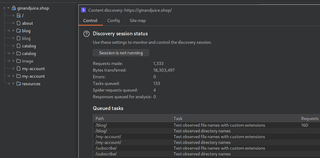
Note that you can configure this discovery to use your own wordlists, but at its core, web crawlers will look for any page references, like URL paths in the site's navigation, or pull the source from script or image tags.
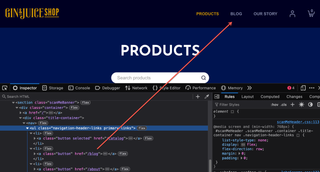
Content discovery in Burp Suite is a Pro only feature, so if you are using the community version, you can also use other command line tools like BBOT (https://github.com/blacklanternsecurity/bbot) to craw/spider a site as well:
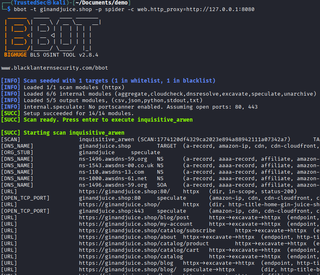
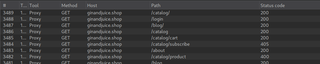
Here’s a tip for when you are using command line tools: If you pass the tool though a proxy or enable verbose logging usually by adding a -v command, you can view what requests are being sent by the tool. This can identify what requests are being made to not only know what the tool is doing, but more easily troubleshoot if you are getting unexpected scan results.
OSINT GOOGLE
Both brute-forcing and web crawling send a lot of requests and can have a low rate of return. Typically, a common wordlist will only return a small number of valid endpoints. To help discover more pages, we can also use a few OSINT resources such as Google and GitHub.
A quick way to find possible URL paths for a target application is to search a domain in google with the prefix, site:
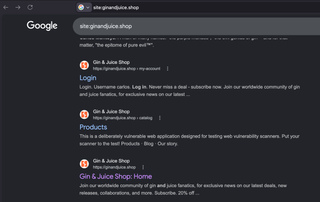
This will return any content indexed by Google for that domain. Sometimes, sites can have thousands of pages indexed and the same directory can be repeated over and over.
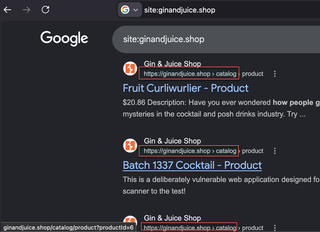
For example, if a majority of the results start with /blog or /catalog, we can use additional filters to omit those results such as:
-site:example.com/blog or -inurl:/blog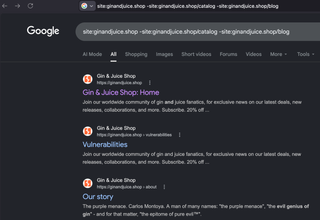
Using -inurl:/blog can sometimes omit results, but I have found that adding -site: with the URL you want to omit is more reliable. A nice breakdown of these filters can be found here: https://support.google.com/websearch/thread/285402637/advanced-google-search-techniques-to-master?hl=en
For less common sites, such as a development version of a site, Google likely won't have any pages indexed, or only the homepage will be indexed.
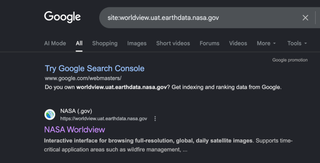
However, if you search for the production version of the site by adding a wildcard as the subdomain, you may find the production version of the site has pages that are indexed in Google. Same as before, using inurl: or adding relevant subdomains in quotes can help limit results.
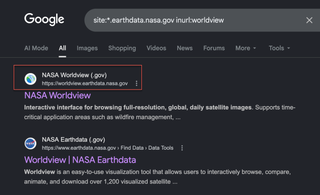
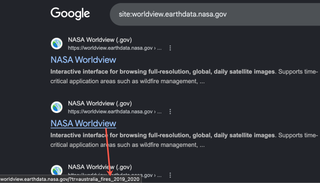
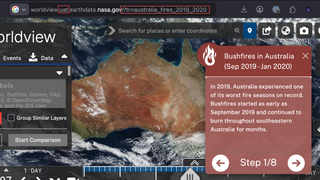
Once you return results for the production URL, you can then append any paths or parameters identified in the results to the development site.
OSINT GITHUB
GitHub can also contain code files which have URL paths for a target domain. To search code files on GitHub, you do need an account, but you can easily self-register. To search for URL paths or parameters for a domain, you can simply add the domain in quotes to the search bar, then click the filter by code on the left-hand options. I like to also add a forward slash or a question mark at the end of the domain so that my results only include domains with a path or parameters.
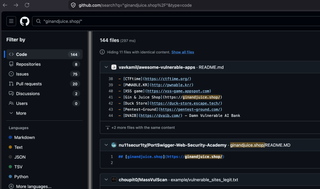
GitHub also has limited regex or filters that you can use to try to only return domains that contain a URL path:
/https?:\/\/ginandjuice\.shop\/[^\s"']+/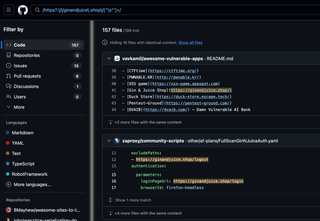
Unfortunately, omitting directories from the path like we did in Google is hit or miss. So, if you have a lot of search results that contain a known directory you want to omit, I recommend using the GitHub API.
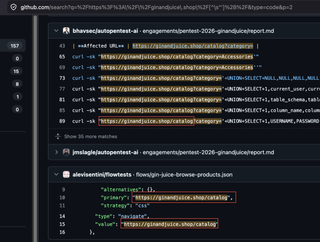
Here is a quick python script you can use to return URL paths for a domain with the GitHub API.
import re, requests, argparse

def search(domain, token, exclude=[], max_pages=5):
    pattern = re.compile(rf'https?://{re.escape(domain)}/[^\s"\']+')
    headers = {"Authorization": f"Bearer {token}", "Accept": "application/vnd.github.text-match+json", "X-GitHub-Api-Version": "2022-11-28"}
    seen = set()
    for page in range(1, max_pages + 1):
        items = requests.get("https://api.github.com/search/code", headers=headers, params={"q": domain, "per_page": 100, "page": page}).json().get("items", [])
        if not items: break
        for item in items:
            for match in item.get("text_matches", []):
                for url in pattern.findall(match.get("fragment", "")):
                    path = url.split(domain)[1]
                    if url not in seen and not any(path.startswith(e) for e in exclude) and "</" not in url:
                        seen.add(url)
                        print(url)

if __name__ == "__main__":
    p = argparse.ArgumentParser()
    p.add_argument("-t"); p.add_argument("-u"); p.add_argument("-e", nargs="*", default=[])
    a = p.parse_args()
    search(a.u, a.t, a.e)
To run the script, you can use:
python github.py -t {github_token} -u {URL} -e /catalog /registerTo get a token, you can login to GitHub then go to https://github.com/settings/tokens and click "Generate new token (classic)" from the "Generate new token" dropdown.
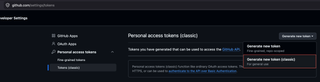
The script allows you to set any directories you want to omit with -e and can return a list of possible URL paths.
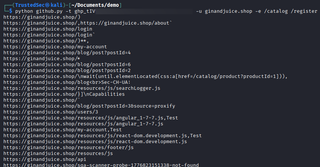
It is important to note that the directories returned from the script are just paths that are present in public code repositories. They may be a list of fake paths that someone added to a list and when navigated to return 404 responses, but sometimes there are a few endpoint that are valid and not indexed in Google that can lead to a section of the application that would have otherwise been undiscovered.
WRAP-UP
The methodology that I have had the most success with is to manually browse the application UI as that is an easy way to find webpages. While I do that, I may run a basic web crawler to find any indexed pages that might have been hidden in the UI.
Then, I'll look for any headers or use a fingerprinting tool to help identify what server or coding language is in use and use AI to generate a list of common file paths or file locations I can use with Burp Suite or FFuF. Typically, I keep generated lists short, under 5000 lines.
Then, I'll use the Google filters to find any indexed file paths, and search GitHub, using the API script to omit results if results are large.
If none of that yields results, I'll use a wordlist or two from Seclists to perform forced-browsing and do recursive searches on anything that comes back with a valid response code, making sure to keep in mind if the target application requires file extensions or not.
In the end, you may find a path that allows sensitive data or administrative functionality that would have otherwise been missed if only one discovery method was used.
PREVENTION
To help prevent enumeration on your own applications, make sure you are using web application firewalls (WAFs). Which can prevent a large number of requests from being processed by a user which can limit how many requests can be sent when doing forced-browsing.
Additionally, review what data is publicly available in Google and GitHub for your applications. Configuring a robots.txt file at your web root can help prevent bots (that play by the rules) from accessing parts or all your website, which prevents your pages from being indexed. But that doesn't prevent pages that have already been indexed. You can also request data be removed using the guides below, but ultimately if a password is exposed or a sensitive path was found to be available without authentication, it is up to you to rotate those passwords and secure those endpoints.
Google Removal
https://support.google.com/websearch/answer/11080680
GitHub Removal