MCP in Burp Suite: From Enumeration to Targeted Exploitation

Table of contents
MCP-ASD Burp extension has been submitted to the BApp Store and is awaiting approval.
MCP OVERVIEW
MCP (Model Context Protocol) servers are becoming more common thanks to their ease of integration with AI systems such as Large Language Models (LLMs) that are becoming pervasive in corporate applications. They provide a standardized 'glue' protocol for providing access to data and tools for LLMs. An MCP server functions as a universal translator, enabling an LLM to augment its training data to perform real-time tasks and retrieve current information from the corporate environment.
This is relatively new tech (Anthropic introduced it at the end of 2024), so deployments of these servers are still ramping up.
We do a lot of LLM testing here at TrustedSec, with many of our clients assessing the security of their application LLMs or Copilot deployments. This means we’re regularly testing MCP integrations indirectly by working through the LLMs themselves and trying to control those external tool calls.
A client recently asked us about directly assessing the MCP server itself. Their concern was that due to the architecture of their systems, the MCP server needed to be exposed publicly. This is not an uncommon scenario for the types of integrations our clients are looking to achieve.
MCP TESTING
MCP protocol typically uses Server-Sent Events (SSE) or WebSockets, which can be difficult for application pentesters to work with in Burp Suite, the most common tool for manual pentesting. To address this, I created the MCP Attack Surface Detector tool to provide a helpful workflow in Burp Suite to facilitate easier enumeration and manual pentesting of MCP servers.
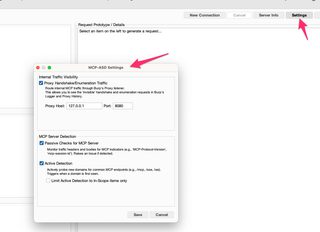
Discovery and enumeration of the MCP server is the first major feature of MCP-ASD. Once the Burp extension is installed, there are optional settings for passive and active detections of MCP servers. Passive detection is based on common headers and endpoints. Optional active detection has Burp probe common endpoints to detect if a domain seen in Burp Suite is exposing an MCP server. The active detection is disabled by default but can be enabled in the settings. It’s a very light active detection with only a few GET requests triggered to common endpoints.
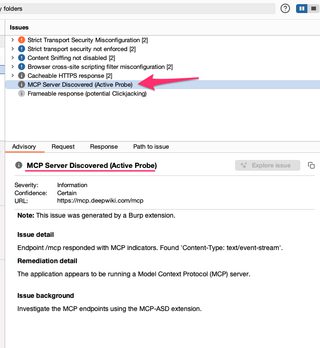
If MCP-ASD detects an MCP server, it will add an informational finding.
Once you’ve identified an MCP server, you can attempt to connect to it.
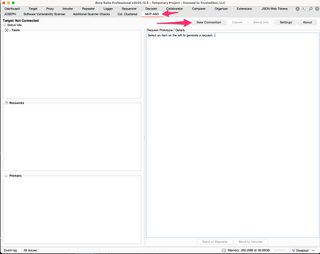
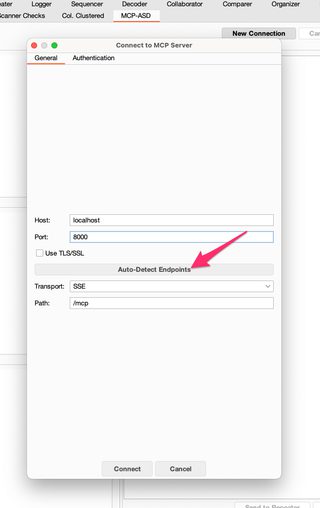
Based on my testing of publicly exposed MCP servers, they’re most commonly using SSE endpoints, although many also expose WebSockets. MCP-ASD supports both. The auto-detection probes what endpoints are available and auto-configures the connection endpoints, but you can manually set this as well. I typically prefer the SSE endpoints over WebSockets, which more often require authentication to interact with.
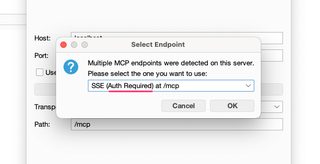
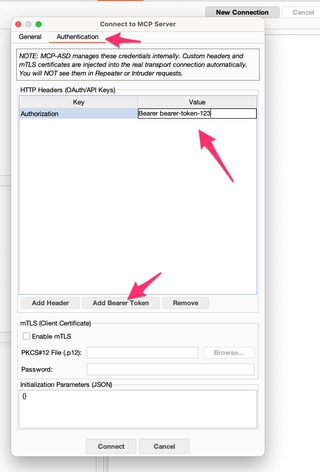
Many MCP servers require authentication, and the connection UI allows you to enter tokens, headers, auth parameters, mTLS client certs, etc., as needed.
Once you have your connection configured and have connected to the server, MCP-ASD will enumerate the primitives and server information. The primitives of MCP are Resources, which are read-only pieces of information; Tools, executable functions that allow an LLM to perform actions; and lastly, Prompts, which are predefined templates for the LLM on how to interact with data or perform actions. These are populated into the MCP-ASD user interface.
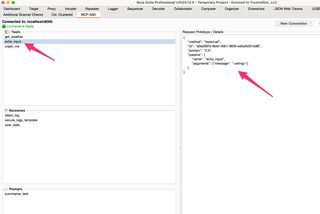
Selecting a primitive on the left will generate a prototype request on the right. This request can be sent to Repeater or Intruder to use as you normally would.
Now for the magic bits.
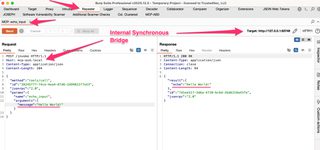
MCP-ASD stands up an internal synchronous bridge that allows Repeater and Intruder to work as if you were simply making a request and receiving the response like a normal web application API endpoint. That is not how SSE and WebSockets work, but we can create the illusion that it is to make manual pentesting easier. The internal bridge acts a proxy within BurpProxy, routing requests from Repeater/Intruder correctly to the right MCP server endpoint and continuously monitoring the SSE stream or WebSocket for the correct response.
This allows MCP-ASD to automatically handle management of request/response GUIDs, injecting authentication, and rewriting requests to target the internal bridge proxy instead of the MCP server itself. All this is merged together for ease of use in Burp Suite.
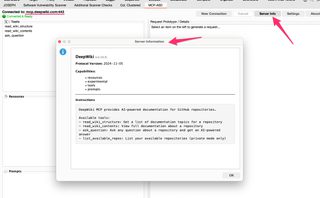
MCP servers can also advertise information about themselves, which can be retrieved using the Server Info button.
WHAT'S NEXT
The Burp Suite BApp Store submission process is a many-months wait for reviews unfortunately, but this has been submitted. For now, you can install the extension by building it yourself from source code or installing the release .jar file. I’ll update the blog when the extension is formally added to the BApp Store, which will make installation easier.
Release:
https://github.com/hoodoer/MCP-ASD/releases/tag/v1.0
Repository:
https://github.com/hoodoer/MCP-ASD
Please let me know if you find any bugs or have any feature requests.