LnkMeMaybe - A Review of CVE-2026-25185

A Windows shortcut (.lnk) seems very simple on the surface. It is a file that points somewhere and tells the system to open or execute a resource. A shortcut is relatively easy to overlook and can be spoofed to look like something it’s not. It wasn’t until I was tasked to expand our capabilities for interacting with a .lnk that I realized just how many options were exposed by the structure of a .lnk. I set out to build a cross-platform library that could manipulate every structure of a Windows shortcut and walked away with the first CVE to my name (CVE-2026-25185). Through this post we’ll walk through what all goes into a Windows shortcut, the tooling I developed, the resulting CVE, and potential future areas of research.
What Makes a .lnk?
The structure of a Windows shortcut is outlined can be found here.
There are existing libraries that read and format a .lnk file, but as is often the case, the best way to learn about something is to dig into it and build against it. For that reason, I set out to build my own cross-platform C# library that would enable reading, modifying, and creating Windows shortcuts. We’ll walk through those fields below, and I’ll point out interesting findings as we go.
ShellLinkHeader
This header contains the signature of the .lnk, some auxiliary information about the .lnk file, and flags that dictate how the .lnk is structured and interpreted.
Name | Notes |
|---|---|
HeaderSize | Static value of 0x4C |
LinkCLSID | Static GUID of 00021401-0000-0000- C000-000000000046 |
LinkFlags | Various flags dictating other fields present in a .lnk (1) |
FileAttributes | Various attributes of the target file |
CreationTime | Creation time of target file |
AccessTime | Access time of target file |
WriteTime | Write time of target file |
FileSize | Lower 32bits of target file size |
Icon Index | Index to pull icon from referenced resource (2) |
ShowCommand | Flag indicating expected window state of launched application |
HotKey | Indicates key and modifies to trigger this .lnk if on desktop (3) |
Reserved1 | Unused, and I didn’t reverse engineer to find out otherwise |
Reserved2 | Unused, and I didn’t reverse engineer to find out otherwise |
Reserved3 | Unused, and I didn’t reverse engineer to find out otherwise |
(1) Outside of specifying what other fields in the .lnk are present, there are a few specific flags of interest, namely:
a. RunAsUser -> lnk will prompt for elevation when run.
b. RunWithShimLayer -> will attempt to apply the shim defined in ShimDataBlock.
c. PreferEnvironmentPath -> Setting can lead to unexpected behavior when a TargetIDList is present.
(2) This index is only used when stringdata.iconLocation is populated.
(3) The Properties window within Windows won’t let you set a hotkey without a modifier key. Despite that restriction in the properties UI, a hotkey without a modifier key will function as expected if the .lnk is created in a way that bypassed that UI restriction.
LinkTargetIDList
For all intents and purposes, this field may as well be undocumented. We have a size and a variable list of 'shell data source-defined data that specifies an item.' There are components of the Windows shell that will interpret this list of items and understand this .lnk to point to a specific resource based on what’s contained in this list. For the library being released at the end of this document, only local file resources are supported.
When this part of the .lnk is present and correctly populated, it will be what the .lnk resolves to, regardless of what other fields are populated in the .lnk. If this field is not present or points at a nonexistent item, then other attributes of the .lnk take over and attempt to resolve the current location of the item that used to be pointed to by this .lnk.
LinkInfo
If a .lnk is not present at the referenced location, the data populated in this structure is one of the ways that the shell will attempt to resolve the new .lnk location. If a new location is found, the LinkTargetIDList is updated with the new location.
Name | Notes |
|---|---|
LinkInfoSize | Size of this structure |
LinkInfoHeaderSize | 0x1C or 0x24 (optional Unicode fields present) |
LinkInfoFlags | Specifies which optional internal structures are present |
VolumeIDOffset | Offset from start of struct to VolumeID |
LocalBasePathOffset | Offset from start of struct to LocalBasePath |
CommonNetworkRelativeLinkOffset | Offset to CommonNetworkRelativeLink from start of struct |
CommonPathSuffixOffset | Offset to CommonPathSuffix from start of struct |
LocalBasePathOffsetUnicode | Offset to Unicode version of the LocalBasePath |
CommonPathSuffixUnicode | Offset to Unicode version of CommonPathSuffix |
VolumeID | Variable Length Structure |
LocalBasePath | String |
CommonNetworkRelativeLink | Variable Length Structure |
CommonPathSuffix | String |
LocalBasePathUnicode | String |
CommonPathSuffixUnicode | String |
While I did some research on the fields and structures within this table, I could not produce any meaningful results. Largely, this table does seem to be for resolving the .lnk when LinkTargetIDList points to an invalid item. It’s possible one could cause some sort of confusion attack using this section, but I will leave that for future research.
StringData
This is such a deceptive name for a table that can control the entire .lnk resolution flow.
Let’s go through each field, as all of them are important.
NAME_STRING: This controls the text that will be shown to the user when hovering on this .lnk.
RELATIVE_PATH: This field can control the resolution of the .lnk if the LinkTargetIDList is invalid. Three specific scenarios have been investigated.
- Missing TargetIDList, populated RELATIVE_PATH: .lnk does not function
- Valid TargetIDList, populated RELATIVE_PATH: .lnk executes TargetIDList
- Invalid TargetIDList, populated RELATIVE_PATH: .lnk executes RELATIVE_PATH and TargetIDList is rewritten
WORKING_DIR: This is the working directory the .lnk target will run from after the .lnk resolves and starts the target. If the .lnk needs to be rewritten for any reason (invalid TargetIDList for instance), this field may be overwritten.
COMMAND_LINE_ARGUMENTS: Up to 65,535 characters are available to give to the program as command line arguments. What I find interesting is you can include newlines, and something like powershell.exe -Command handles said newlines just fine. Makes it easy to run a whole formatted script.
ICON_LOCATION: This points to a resource that contains the icon you want to use for this shortcut. Normally this will be a .exe or .dll file.
ExtraData
This section consists of zero or more extra data blocks followed by a terminal block. It was designed to be extended in the future if needed, with each block denoting a size and having a special signature to identify what the block is.
We’ll go through each block below; I’ll highlight anything specifically special about any given block.
CONSOLE_PROPS: This contains various properties that could be applied to the console if you’re running an application under conhost.exe. In this new brave world of Windows terminal, this section appears to be ignored.
CONSOLE_FE_PROPS: This controls the code page for console applications. I didn’t experiment with this section.
DARWIN_PROPS: This serves as legacy support for install-on-demand. See this blog for more information. My favorite line of that article is by the famous Raymond Chen.
“What can you do with that descriptor? I have no idea, but you did ask for it.”
Seems like an area for future research.
ENVIRONMENT_PROPS: This sure would sound like environment variables that might get applied after the executable is loaded. That, however, is not the case; this is yet another string that can point to the file that is to be executed/opened.
ICON_ENVIRONMENT_PROPS: This alternative field points to a file path that could house the icon. I’ve not seen it be effectively used for that purpose, as setting it does not result in an icon being displayed.
KNOWN_FOLDER_PROPS: This block specifies the offset in bytes of a known folder GUID within the TargetIDList. I did not experiment with this block.
PROPERTY_STORE_PROPS: This can be used to store extra data properties which applications might want to reference within the .lnk. I’ve experimented with using this section for data smuggling, with varying degrees of success.
SHIM_PROPS: This section can be used to apply a compatibility shim to the started application. There are some interesting implications here, but I was not able to find a meaningful abuse.
SPECIAL_FOLDER_PROPS: While the same general purpose as KNOWN_FOLDER_PROPS, this is for special folders instead of known folders.
TRACKER_PROPS: In this block are some GUIDs and the NETBIOS name of the machine that created this .lnk when created through standard Windows utilities.
VISTA_AND_ABOVE_IDLIST_PROPS: This is a slightly different structure compared to TargetIDList. The only time I’ve observed it being used is in shortcuts that target a network-based resource, such as a file on an SMB share.
Learning .lnk Through C# Projects
To better understand and experiment with .lnk files, I created a few projects in C# (available at https://github.com/trustedsec/LnkMeMaybe).
- Lnk -> A library that implemented all Windows shortcut structures
- LnkUi -> A research-oriented UI to review and quickly modify Windows shortcuts
- LnkMeMaybe -> A CLI tool to weaponize any specific Windows shortcuts
Specifically, .NET 8 was targeted and the code was written such that it should be able to run on Windows, Mac, and Linux. And, through manually creating those tools, I gained an understanding of the various components of a .lnk file. There are, in my opinion, a couple interesting investigations paths related to .lnk files.
- Code paths that fire when an .lnk is previewed/viewed
- Code paths that fire on activation of an .lnk file
The first is far more interesting than the second, as those paths could lead to broad network effects simply by placing an .lnk on a corporate file share.
Tracing .lnk Preview Code Paths
To investigate the code that fires when a .lnk is viewed, we need to obtain a trace of that activity. Luckily, with tools such as procmon (https://learn.microsoft.com/en-us/sysinternals/downloads/procmon), getting this trace is easy.
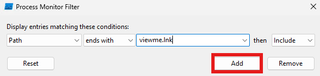
First, I’ll configure procmon on a system and configure a filter to look for viewme.lnk.
Second, I’ll open a file share where I intend to write a .lnk from a second system.
Third, from an unrelated system, I’ll drop a .lnk named viewme.lnk into the share opened on the first system.
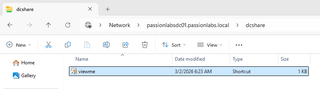
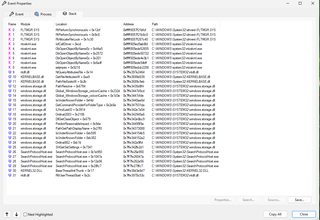
Finally, I’ll review the stack trace of the system opening the .lnk file, which should inform where disassembly should begin.
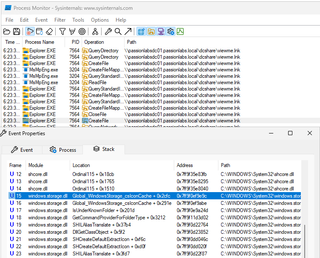
The first CreateFile call was locating and loading the shell handler. The second CreateFile call is the handler initializing. The disassembly for the offset shown above lands us within CShellLink::_LoadFromStream.
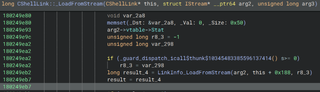
Looking at cross-references to _LoadFromStream, this appears to get called through most code paths that would sound like they are initializing this object.
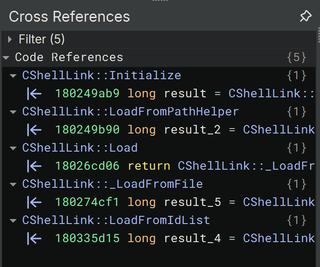
Any code within this path that could have some potential effect is going to be highly valuable to us. This code was hit simply by viewing a folder with the associated .lnk in it. End-user interaction with the .lnk itself is not required.
From there, I spent a fair bit of time reversing this class. Skipping to the part of interest, we find ourselves at this block within _LoadFromStream:
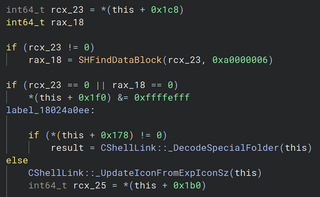
In this case, the code is attempting to see if the .lnk has an ExtraData block that contains the signature 0xa0000006. That signature corresponds with DARWIN_PROPS. If the .lnk has a Darwin data block, the object completely ignores it and calls _UpdateIconFromExpIconSz. It’s possible I’m missing something though, because I really have no idea why it checks for a Darwin data block prior to that update call.
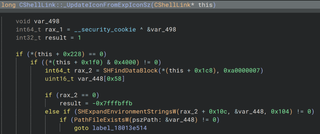
Inside the next block the object has some checks, which I’ve found to not matter beyond having a valid .lnk file built. After that, this object checks for a data block with signature 0xa0000007. This corresponds to ICON_ENVIRONMENT_PROPS. The code indexes into this data block 268 bytes, which points right at the TargetUnicode field. If this field is populated, any environment variables are expanded in it and the result is passed to PathFileExistsW. This is our vulnerability trigger.
In short, if you have a .lnk with a populated Darwin ExtraData block, and a populated icon environment data block, the system will attempt to open the path pointed to by the icon environment data block. This causes the system to authenticate out to the target, allowing for relay and various credential attacks.
Gaining Computer Credentials
Given this path is executed when this object loads the .lnk, what else might use this specific object when working with .lnk files? So far, I’ve found two other systems that leverage this object when working with shortcuts: Microsoft’s indexing service and Windows Defender.
A full demo video of credentials being captured can be found at the bottom of the blog.
Tool Release
This blog largely covered the structure of an .lnk and one specific vulnerability that resulted from this research. Along with this blog post, we’re releasing the .lnk library, the UI to examine and modify .lnk files, and a CLI tool for generating bespoke .lnk files at https://github.com/trustedsec/LnkMeMaybe. The .lnk library itself isn’t unique or special, but I believe the UI and CLI tool are meaningful contributions that may be valuable for others performing research on .lnk files. The CLI tool is being released with subcommands that can generate a .lnk capable of triggering CVE-2026-25185 and a few examples that generate fairly standard .lnk files. This should give any future developers or internal shops a starting point if they wish to adopt this tooling. If you enjoy the CLI syntax and coding flow, it’s adopted from another TrustedSec framework, Titanis (https://github.com/trustedsec/Titanis).
Closing
Windows .lnk files continue to be a rich research area, largely due to their complexity and age. There are other issues I’ve found using this tooling that would not count as security vulnerabilities under Microsoft’s current guidelines. With that said, I hope this enables researchers to continue to expose flaws in the vast codebase making up .lnk files and hopefully reduces the attack surface they provide over time.
Reporting timeline:
Date | Outcome |
|---|---|
December 10, 2025 | Initial report |
December 10, 2025 | Assigned MSRC case number |
January 20, 2026 | Issue confirmed, development of fix starts |
February 09, 2026 | Impact classified as Spoofing, Severity Important; bounty awarded |
February 10, 2026 | Enters pre-release for March 10, 2026 security update |
March 10, 2026 | Patch released |