- Blog
- Limiting Domain Controller Attack Surface: Why Less Services, Less Software, Less Agents = Less Exposure
Limiting Domain Controller Attack Surface: Why Less Services, Less Software, Less Agents = Less Exposure
Table of contents
Before we dive in, let’s get all the TrustedSec Certified Absolutes out of the way:
- All software presents some level of inherent risk.
- Only required software that cannot live on other systems should be installed on Domain Controllers (DCs).
- DCs should have a separate, detailed approval process for software/services/agents.
Each organization’s needs and risk appetite will be different, but it is important to highlight that having less 'stuff' on DCs can lower the security risk to these critical systems by minimizing their attack surface.
At TrustedSec, we have assessed numerous Active Directory (AD) forests when performing our Active Directory Security Assessment. Too often we discover questionable software running on DCs or the reluctance to acknowledge that the Patch Management team is effectively Tier 0 with their elevated rights through the patching agent. Hence, this blog is intended to be a guide for making the best-informed decisions through awareness of potential issues and ensuring organizations are asking the right questions.
There is no debate that securing DCs, and therefore AD, is of the utmost importance. These Windows servers host AD Domain Services (AD DS) and control who can authenticate to and access resources within an organization. While there are best-practice configurations for items like User Rights Assignments and Security Options, I wanted to highlight and emphasize how software allowed to run on a DC can be just as important (or detrimental!) to the security of AD.
These installations often introduce additional exposure that may get overlooked during deployment and are typically forgotten about for the full life cycle of the DC. For example, a single agent running on all DCs can perform its own Denial of Service (DoS) against AD; it’s happened before and will happen again.
Note: While this blog is directed at DCs, it is also applicable to other Tier 0 systems (Entra Connect, AD Certificate Services (AD CS), etc.) to a somewhat lesser degree.
Common types of agents/software on DCs include:
- Anti-Virus (AV)
- Endpoint Detection and Response (EDR) / Extended Detection and Response (XDR) / Managed Detection and Response (MDR)
- Identity Security Agents (Microsoft Defender for Identity (MDI), etc.)
- Inventory
- Logging
- Management
- Monitoring
- Patching
- Vulnerability
Approval Process
Let’s start with the assumption (always dangerous) that there is already a process for approving software installations on systems. This policy must include a separate approval procedure specifically targeted at DCs and other Tier 0 systems. To state the obvious, these systems matter more, and all additions should be thoroughly vetted. It is also imperative that the additional risk (it’s there!) is documented to include any mitigating controls.
The following basic questions should be asked during the approval, in some form:
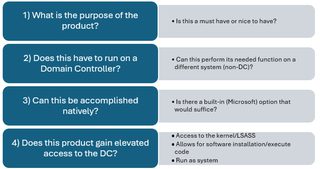
Use the answer key below as a decision-making guide:
- Question 1: If it is only a NICE TO HAVE, consider not having it.
- Question2: If the answer is NO, do not put it on a DC, plain and simple. Less stuff = less exposure.
- Question 3: If the answer is NATIVELY, consider using the native option.
- Question 4: If the answer is YES, our frenemy 'Risk Acceptance' enters the equation.
TrustedSec Tip: DCs should NOT be deployed from a standard server template/image if it includes additional software components.
Risk/Risk Acceptance
To make intelligent and informed decisions throughout the approval process, an understanding of risk acceptance is required. For the purposes here, and to keep things simple, let’s define risk acceptance as the function gained outweighs the increased exposure. (Remember, with additional 'stuff' there is always increased risk/exposure.)
But what are all the factors at play? This is where many organizations tend to fall short in their approval process. They look at the software vendor and say, “I trust this vendor, therefore I trust the software,” or “This agent provides functionality for X,” without ever looking at the additional exposure that comes with the installation.
While these are valid indicators of trustworthiness and functionality, stopping there would be woefully short of a true risk acceptance determination. However, before veering into a risk acceptance diatribe, let’s bring this back to DCs. Consider the following points below when making decisions regarding your DCs.
Who has Control?
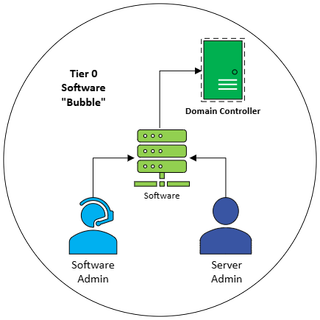
If the software, services, or agents have elevated rights (see Rights Required for the Software below) to DCs…Congrats!:
- The software system is now considered Tier 0.
- The administrators of the software are Tier 0.
- The administrators of that system - you guessed it - are Tier 0.
In the nightmare scenario below, which is all too common, we now add Workstation Admins to the list of Tier 0 accounts.
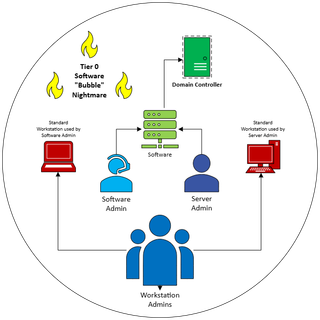
TrustedSec Tip: Don’t forget to set up separate Tier 0-specific systems (including separate administrative accounts) for managing your critical assets. Otherwise, your Tier 0 Software 'Bubble' turns into a 'Bubble Nightmare'.

How is the Software Maintained?
- Note that updating may require a manual process.
- Consider NOT being on the latest/greatest release (n-1) unless it presents a security risk to not install it (there’s that risk word again).
Rights Required for the Software
Each of these items involve additional risk:
- Service runs as SYSTEM
- Service runs with AD admin account privileges
- Code is installed/run
- Kernel driver is involved
- LSASS is interacted with ('hooked')
The Recovery Process
If a software program is no longer performing as expected, it could potentially bring down DCs—breaking all functionality within the environment (assuming all DCs have the software).
TrustedSec Tip: Scan and review software/services/agents on all DCs annually. Ensure the product is still required and is running a recent version.
- AV (Microsoft Defender is included on Windows Operating Systems.)
- Backup (Windows Server Backup is excellent and free.)
- Event Log Collection (Don’t forget Windows Event Forwarding is an option.)
- Identity Security (e.g., MDI)
- Vulnerability Scanning
TrustedSec Tip: Notice that patch management is not included in this list? TrustedSec recommends using WSUS for all Tier 0 systems to simplify the update process without needing a dedicated Tier 0 patch management deployment. (This recommendation may change based on Microsoft deprecating WSUS, but it is still a viable option for Windows Server 2025. See the article titled Windows Server Update Services (WSUS) deprecation for more information.)
Summary
It is critical to ensure that software installed on DCs is limited to the bare necessities. Anything more than the absolute minimum may tilt the function-versus-exposure equation in the favor of a potential attacker. DCs should only be viewed as a commodity—they should be easily replaced if there are issues and therefore should never contain anything 'special' that needs additional servicing.
Because there will always be an increase in risk with any software installation, restricting the software on DCs to only what is required is the best way to reduce the chance of impact to confidentiality, integrity, and availability (the C.I.A. triad). This leads into a defense-in-depth approach coupled with a tried-and-true recovery process. But those are topics for another day and maybe another blog, or two.
Contact Us if…
☐ You can’t list all of the software installed on your DCs without first logging in
☐ Your Patch Management team has Domain Admin rights
☐ One or more agents installed on your DC has the ability to execute code
☐ Different DCs have different software configurations
☐ You haven’t had a full Active Directory Security Assessment in over a year
☐ You are worried about the 100s of other configurations impacting AD security
☐ You have any other concerns or questions
**This blog has been updated from it's original posting, published on the Trimarc website on October 8, 2024.