LDAP Channel Binding and LDAP Signing

Table of contents
With Microsoft “enforcing” Lightweight Directory Access Protocol (LDAP) Signing by default in Server 2025, it once again seems like a good time to revisit our old friends LDAP Channel Binding and LDAP Signing. It’s likely more important to rehash since we, the TrustedSec Remediation Team, continue to see most AD environments we assess without these necessary security configurations enabled. What’s worse is that many organizations haven’t even started auditing for these events! If only Microsoft would have enforced both settings back in 2020 as originally planned. Then I wouldn’t be on the third revision of this article in five years 😊
TLDR
- Server 2025 domain controllers (DCs) have LDAP Signing enabled by default thanks to a new policy setting called LDAP server signing requirements Enforcement that comes set as “Not Configured” and translates to “Require Signing”. No changes have been made to the default behavior of LDAP Channel Binding.
- Auditing is your best friend and only way to ensure that configuring these settings to the recommended values will not break your environment. A 30-day period of audit activity should be sufficient to determine if these settings will cause any grief once enforced.
- For LDAP Signing, monitor for Event ID 2889 on DCs AFTER enabling LDAP diagnostics in the Registry on each DC -
Reg Add HKLM\SYSTEM\CurrentControlSet\Services\NTDS\Diagnostics /v "16 LDAP Interface Events" /t REG_DWORD /d 2 - For LDAP Channel Binding, monitor for Event IDs 3074 and 3075 AFTER setting the DC GPO configuration Domain controller: LDAP server channel binding token requirements to “When Supported”
- For LDAP Signing, monitor for Event ID 2889 on DCs AFTER enabling LDAP diagnostics in the Registry on each DC -
- If you are running Server 2025 DCs, configure the old policy setting to “None” and the new policy to “Enabled” once you are ready to enforce LDAP Signing.
- Domain controller: LDAP server signing requirements = None
- Domain controller: LDAP server signing requirements Enforcement = Enabled
- Should you enable LDAP Signing when using Secure LDAP (LDAPS)? Absolutely. TrustedSec strongly encourages both configurations. Even though LDAPS also provides authentication integrity, a defense-in-depth strategy is a must for any organization. Plus, LDAP Signing is better at relay protection.
What’s New?
As mentioned previously, Microsoft is changing the default behavior of LDAP Signing on Server 2025 DCs via a new policy setting called LDAP server signing requirements Enforcement. When deploying DCs with this latest operating system, LDAP Signing’s default behavior will be “Require Signing” unless you set its value to “Disabled” via Group Policy. Microsoft has made this change because LDAP is insecure and is often used by threat actors to exploit credentials in Active Directory (AD) environments.
No changes have been made to the default behavior of LDAP Channel Binding. This means that it is completely disabled unless otherwise configured in GPO. Please, please, at least set this to “When Supported” to start capturing binding events.
What’s New-ish?
Microsoft released, in its August 08, 2023 update cycle, the patch KB4520412. This update is designed to provide administrators with two (2) additional Event IDs to monitor in case of a channel binding failure. Note that this update is only available for Server 2022 and Server 2019 DCs.
Previously, Microsoft required the installation of ADMX files to configure the generation of these new Event IDs. As of January 2024, that is no longer necessary.
Event ID | Description |
|---|---|
3074 | The following client performed an LDAP bind over SSL/TLS and would have failed the channel binding token validation if the directory server was configured to enforce validation of Channel Binding Tokens. |
3075 | The following client performed an LDAP bind over SSL/TLS and did not provide Channel Binding Information. When this directory server is configured to enforce validation of Channel Binding Tokens, this bind operation will be rejected. |
Essentially, these events trigger a “what if” for systems that are unable to comply with LDAP Channel Binding enforcement. As with the other Channel Binding events, logging must first be enabled and the Channel Binding GPO configuration set to “When Supported.”
What’s Old?
The initial fuss around Microsoft “forcing” customers into LDAP Channel Binding and LDAP Signing (January 2020, March 2020, second half of 2020, TBD) overshadowed the crucial questions organizations should be addressing: the What, How, Where, and Why associated with secure LDAP communication. After speaking with security professionals attempting to implement these very settings, and based on the results of TrustedSec’s Active Directory Security Assessment, it has become clear that the right answers are proving difficult to come by; we continue to see very low adoption of these highly recommended configurations.
What Are LDAP Channel Binding and LDAP Signing?
It is important to recognize that while these two (2) settings are often mentioned in the same breath, they are two (2) distinct configurations and should be treated as such. But before breaking these settings down further, it would be beneficial to give a brief overview of LDAP. At its core, LDAP is a communication protocol commonly used by directory services like AD to talk back and forth with applications regarding identity and access. The easiest way to think about this is with authentication. AD stores user credentials needed by programs when validating identity. In order for a program to retrieve said credentials, it can reach out to AD over LDAP, and AD will respond in kind with the same protocol.
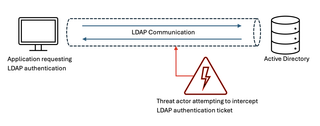
Knowing that these types of communication occur over LDAP, it’s quite easy to see why it needs to be configured as securely as possible (what attacker wouldn’t want a valid authentication ticket?).
LDAP Channel Binding
LDAP Channel Binding was brought to our attention by Microsoft with the tagline “To make LDAP authentication over SSL/TLS more secure.” Basically, LDAP Channel Binding is the act of tying the TLS tunnel and the application layer (leveraged by LDAPS) together to create a unique identifier, or channel binding token, for that specific LDAP session. This channel binding token can only be used within that TLS tunnel as a means to prevent relay attacks and is also why channel binding is only effective when used with LDAPS, as standard LDAP (port 389) does not operate over SSL/TLS. Does this mean you should only enforce channel binding if you are leveraging LDAPS, no, get it setup for when you move over to LDAPS. And you should definitely move over to LDAPS.
Channel binding requires three (3) part implementation, although most organizations can likely jump straight to Part 3, as the necessary updates should already be installed:
- Part 1: Installing the necessary update on your Windows system (CVE-2017-8563), which should already be in place, as this was released in 2017
- Part 2: Installing the August 2023 update KB4520412 (Servers 2019 and 2022 only)
- Part 3: Configuring the appropriate GPO setting on DCs (this no longer needs to be deployed via Registry with the March 2020 Microsoft updates); the GPO options include:
- Option A - Domain controller: LDAP server channel binding token requirements = “Never” (default)
- Option B - Domain controller: LDAP server channel binding token requirements = “When Supported”
- Option C - Domain controller: LDAP server channel binding token requirements = “Always”
The end goal for LDAP Channel Binding should be Option C, “Always”, but for auditing/testing purposes, Option B, “When Supported”, needs to be selected to start generating failure logs with Event IDs 3039, 3074, and 3075. Setting the GPO to “Always” will also permit Event ID generation but will not allow the authentication validation to occur; i.e., if there are systems that do not comply, they will no longer successfully communicate with AD.
LDAP Signing
LDAP Signing has been around since Server 2003, with additional auditing capabilities added in Server 2008. LDAP Signing, when enforced, requires clients to sign LDAP requests with its (the client’s) digital signature. By default, AD does not require LDAP communication to be signed, which makes it vulnerable to hacking. When LDAP Signing is enforced, domain controllers will not allow any authentication requests without a valid signature. LDAP Signing ensures that the request received by the server was sent by the client that the LDAP message is purported to be from. Additionally, signing certifies that the LDAP messages are not modified or tampered with.
LDAP Signing is implemented in two (2) parts:
- Part 1: Configuring Windows clients through GPO; the GPO options include:
- Network security: LDAP client signing requirements = “None”
- Network security: LDAP client signing requirements = “Negotiate signing” (Windows 10+ default)
- Network security: LDAP client signing requirements = “Require signing”
- Part 2: Configuring DCs through GPO; the GPO options include:
- Domain controller: LDAP server signing requirements = “None” (default)
- Domain controller: LDAP server signing requirements = “Require signing”*If running 2025 DCs, set Domain controller: LDAP server signing requirements = “None” and use the new policy instead - Domain controller: LDAP server signing requirements Enforcement = “Enabled”
The end goal with LDAP Signing is to “Require signing” on both Windows clients and DCs. As with LDAP Channel Binding, a robust audit plan needs to be implemented first to ensure all systems will comply. Note that signing is only supported on Windows XP SP3 and higher—meaning, if you are running anything prior, do not set your domain controllers to require signing (better yet, move off of XP and older already).
How Are These Vulnerabilities Being Exploited?
The major attack vectors these configurations seek to mitigate are person-in-the-middle and replay-style attacks. Look no further than Microsoft's own executive summary of CVE-2017-8563, which describes the exploit resolved with LDAP Channel Binding:
"An elevation of privilege vulnerability exists in Microsoft Windows when a man-in-the-middle attacker is able to successfully forward an authentication request to a Windows LDAP server, such as a system running Active Directory Domain Services (AD DS) or Active Directory Lightweight Directory Services (AD LDS), which has been configured to require signing or sealing on incoming connections.
The update addresses this vulnerability by incorporating support for Extended Protection for Authentication security feature, which allows the LDAP server to detect and block such forwarded authentication requests once enabled."
The big takeaway here is that AD is vulnerable to targeted attacks against LDAP communication. As illustrated earlier, an attacker would place themselves between the system/application performing an authentication request and AD in an attempt to intercept, modify, and forward the request to obtain a valid authentication ticket. This assailant could also potentially capture a ticket that has already been validated and reuse it in the environment. Keep in mind that these security exploits all occur under the guise of a normal, legitimate user, which makes them all the more disconcerting.
Dirk-jan Mollema has some excellent articles that dive into these types of attacks:
- https://dirkjanm.io/worst-of-both-worlds-ntlm-relaying-and-kerberos-delegation/
- https://dirkjanm.io/exploiting-CVE-2019-1040-relay-vulnerabilities-for-rce-and-domain-admin/
Where to Get Started?
Anytime changes of this magnitude are recommended in an environment, it can cause angst (rightly so) and misinformation. After all, many different types of applications, storage devices, network equipment, and operating systems rely on AD for authentication. The nice part about these recommendations is that they do not need to be implemented blindly; auditing is your friend!
With the March 2020 updates and now the August 2023 patch, Microsoft has provided the capabilities necessary for testing/auditing LDAP Channel Binding (as previously mentioned, LDAP Signing events have been around since Server 2008). This is great news for the admins and engineers who must answer that all-important question at the next change control board meeting: “What affect will these configurations have?”.
Arriving at the correct resolution is straightforward; these steps assume all necessary updates have been applied AND the use of supported operating systems.
- Enable LDAP events diagnostic logging to 2 or higher on all DCs using the command
Reg Add HKEY_LOCAL_MACHINE\SYSTEM\CurrentControlSet\Services\NTDS\Diagnostics /v "16 LDAP Interface Events" /t REG_DWORD /d 2 - Configure the channel binding Group Policy setting to “When Supported” to log binding failure events on DCs. Nothing needs to be done for LDAP Signing failures, as these events are already captured.
- Configure your SIEM to alert Directory Service Event IDs 3074 and 3075 for channel binding and 2889 for signing requests that will not conform to the new requirements. These events include a source IP address that can be used to track down the “offending” operating system/application/equipment.
- With the “offenders” identified, research will need to be performed to see if they can be configured to comply.
- Once all systems correctly leverage channel binding and signing (no more Event IDs 3074, 3075, or 2889), enforcement should be set on the GPOs. Note: it is strongly recommended that these settings be enforced one (1) at a time.
A. LDAP Channel Binding enforcement: Domain controller: LDAP server channel binding token requirements = “Always”
B. LDAP Signing enforcement (Windows clients): Network security: LDAP client signing requirements = “Require signing”
C. LDAP Signing enforcement (DCs): Domain controller: LDAP server signing requirements = “Require signing” OR Domain controller: LDAP server signing requirements Enforcement = “Enabled” (if 2025 DCs) - Show up at the change control board meeting with all the right answers and without having to break anything to get them. Stand for applause from your colleagues.
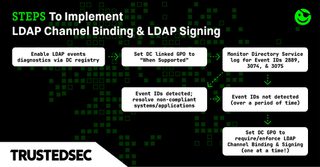
It is important to note that Windows systems and Microsoft applications will not have any issues with these settings as long as the necessary updates have been applied and the Group Policy settings are configured correctly. LDAP Channel Binding is rare outside of the Windows family, but audit to be sure. LDAP Signing, on the other hand, is common and therefore should be thoroughly audited. Simply put, audit your environment. This will also allow you to see if changes made to the “offending” systems are in fact working before implementing the Group Policy settings that will require these configurations.
Why Should We Deploy These Settings?
Hopefully, at this point in the article, the “Why Should We Deploy These Settings?” question has been thoroughly answered. LDAP is inherently susceptible to attacks, and having these settings configured to Microsoft’s recommendation is one (1)—or, in this case, two (2)—ways to better harden your AD environment. Just because Microsoft has decided not to force these changes on customers does not mean that LDAP Channel Binding and LDAP Signing should be ignored. If done correctly, and with proper forethought, these settings are an easy win for the security of any AD forest.
Contact Us If…
☐ You are worried about the impact of these settings in your environment
☐ You are not currently auditing for signing and binding events
☐ You have these settings disabled in your environment
☐ You don’t know the current configuration
☐ You haven’t had a full AD Security Assessment in over a year
☐ You are worried about the hundreds of other configurations impacting AD security
☐ You have any other concerns or questions
References and Additional Information
- https://portal.msrc.microsoft.com/en-us/security-guidance/advisory/CVE-2017-8563
- https://techcommunity.microsoft.com/t5/core-infrastructure-and-security/ldap-channel-binding-and-ldap-signing-requirements-march-2020/ba-p/921536
- https://support.microsoft.com/en-us/help/4520412/2020-ldap-channel-binding-and-ldap-signing-requirements-for-windows
- https://cve.mitre.org/cgi-bin/cvename.cgi?name=CVE-2017-8563
- https://support.microsoft.com/en-us/help/4034879/how-to-add-the-ldapenforcechannelbinding-registry-entry
- https://oxfordcomputergroup.com/resources/ldap-channel-binding-signing-requirements/
- https://access.redhat.com/articles/4661861
**This blog has been updated from it's original posting, published on the Trimarc website on October 17, 2023.