Large Workflows with Local LLMs

Table of contents
Over the last few months, I have been digging into local LLMs and Frontier models. Frontier models have huge context windows, which gives them an advantage because it can keep the entire project in its context, but with smaller-scale tests, local LLMs can be extremely capable as well. In this post, I’ll be going over some pain points of using local LLMs and how I approached working around them.
Picking a Local Model
The first thing we should talk about is how to pick a good local model to use. During my testing, I broke these down into categories:
- Summarization Tasks
- Tasks where speed is more important and full info is provided for it to just summarize
- Programming Tasks
- Tasks where accuracy is the most important, and full context is not provided; an example would be having an LLM insert a function into a previously existing code base in a specific subset of files
- Reverse Engineering Tasks
- Tasks like using Ghidra to pull apart malware samples and clean up the disassembly
- Research Tasks
- Tasks that can provide multiple MCP servers to try to identify related topics that may not normally be categorized together
All of these tasks can be done with different sized models, but some of them benefit HEAVILY from larger models. For example, a 20b to 35b model will do infinitely better than a 4b to 9b model on programming tasks, but a 4b to 9b model will run significantly faster than a 20b to 35b model on summarization tasks without a significant decrease in output. The size of model that you choose will depend on what you are trying to do, so experimentation with different models is recommended.
Context Size Issues
No matter what models you choose, some workflows end up needing more context than others. The problem is that most models I’ve encountered have an upper limit at 256K context. If you tried to use GhidraMCP with larger binaries and a local model through something like OpenCode, you may have noticed that after a while, the naming for some functions starts being wrong, and sometimes, some models may go into a loop trying tools that error out. When that happens, the context size may increase and need to be compacted through various methods, and it may just keep looping indefinitely, increasing the size of the context until you exit out. In these tasks, Frontier models seem to be an answer. Another option is to just use local models on smaller samples with a 256K context setup. There is also the concept of “context rot,” (5) when increasing the size of context doesn’t necessarily increase the performance of a model and, in some cases, degrades it based on size. Due to this, it’s worth testing how accurate your chosen model performs.
LLMs Going Off the Rails
Another major issue I’ve encountered is that, when using tools like Claude Code and OpenCode, even when in “plan mode,” it seems the LLM is what determines if it can run specific tools. When the LLM decides to follow instructions, that works fine, but if you are going to be running long-term workflows, completely disabling specific tools would be ideal. For instance, if the workflow you are running only needs GhidraMCP’s functions and writing a file to disk, then it would be nice to ACTUALLY block all tool calls in the harness to do stuff like shell, read file, list files, web request, etc., instead of just trusting the LLM to listen to instructions and do it for you.
An Attempt to Address These
While thinking about these issues, I decided that having a basic Python library that we can provide to OpenCode, and a local model, to generate full harnesses that will divide long-running tasks into smaller bite-sized chunks, could be the solution. While designing this based off of the previous issues, I gave myself a few requirements:
- Avoid all dependencies outside of Python’s standard library.
- Interface with OpenAI-compatible endpoints.
- Support /mcp (Streamable HTTP) endpoints and /sse (HTTP with SSE) endpoints.
- Be able to provide custom tools in the harness script.
- Be able to block specific tool calls from being accessed in specific sections.
- Be set up in such a way that local models can generate harness scripts automatically.
The first test case I focused on for this initial attempt was simply using GhidraMCP and a local model to annotate every function in an extremely large binary and provide a basic summary and analysis of possible issues. The second was to build a generic C and C++ analysis script that can run over larger projects, summarize each file, and output to a folder, and a shared script that can summarize both sets of outputs in a report.
Encountered Issues
To start, I wanted to leverage local models only to generate the basic building blocks of what would end up being the Python library. I started in plan mode with OpenCode and qwen3-coder-next, provided instructions, answered all the questions, and reviewed the plan. After reviewing the results and confirming everything in the plan looked good, I tasked the agent to implement it. In this case, I chose qwen3-coder-next, simply because in past testing, it seemed to be consistent at generating Python and basic C code. When done, implementing all the basic scaffolding was close to what I wanted, which sped up development significantly. There were a few pain points, though—the biggest one was that the SSE (Server-Sent Events) MCP (Model Context Protocol) seemed to be extremely difficult for it to figure out, so I had to work on that myself to get it set up and working right. Although, once it was set up, I was able to use GhidraMCP and a testing MCP server to provide markdown documentation without issues, which I considered pretty good success.
Once the basic library was functioning, the next step was making sure that the tools were only exposed if we allowed it. This is where another issue popped up. As it turns out, sometimes different LLMs like to guess tool names, even if no tools are provided. When building the scaffolding, the LLM thought that just not providing the tool names to the LLM was enough. Even when stating that it was ONLY allowed to call specific tools, it was still attempting to guess other tool names. To address this, I went in and, before running the tool function, validated that the harness was allowed to run the tool before calling it. This way, each section of the harness script could be allowed only the specific tools they should use, and this entire library doesn’t have any mechanism to run shell commands—just MCP tool calls and built-in tools.
The next problem encountered was during my testing phase. I decided a perfect test was to run it over a binary with 700+ functions in it, but I couldn’t write that harness because the goal is to have a local model run it. So, I provided OpenCode and qwen3-coder-next the README that was generated for this library, a few examples, the instructions of what I wanted it to do, and where the LLM and MCP endpoints were, and let it try to divide up the tasks. The big issue here was that the auto-generated system prompt wasn’t as explicit as I would have liked, and the first three (3) iterations ended up looping on tool calls forever. I decided that a safety check for this would be to be able to set a timeout for tool calls. If tool calls loop so many times that the timeout is hit, then stop trying and continue on to the next item. After a few more tweaks to the system prompt, I was able to get it to stop looping as often but thought the tool timeout would be a safe setting.
In my follow-on test, I picked out a random binary I had lying around and tried to run it over one with over 10,000 functions, and another issue popped up that would happen every so often. The LLM would time out in prompt processing if a tool call was made that happened to return a TON of data. This is bad, because we have a limited context, so I modified the system prompt to avoid calling specific tools I knew would provide too much data, and that mostly fixed it. I also added a timeout to the library so that if it hangs for longer than a specified amount of time, at least we can bail and try again later.
With the first test script working, I tried to generate an additional example by having OpenCode and a local model to generate the C and C++ scanner script. The purpose of this test was, when testing local models directly in OpenCode, to scan moderately sized projects— the amount of tool calls and source code being read in used up a ton of context. I thought that we could break these projects up into files. Provided that the model has enough context to handle the largest file in the project, it should be perfectly fine. I went into “plan mode,” and it immediately spun up a sub-agent that just generated the script without prompting for any questions, and then it tried to reimplement the script from the main agent. The plus side was that, since I pointed it at the previous script, the analysis output was identical. I decided to run it over a small project, and to my surprise, it generated output, and the spot-checked issues were real bugs. Some examples were NULL-dereferences and a stack overflow sample. A few of those can be seen later in the screenshots. The system prompt wasn’t ideal—it didn’t provide examples of what sort of bugs to identify, and it lacks context of what was checked from other files before calling—but it did identify valid issues without running into context issues. I then scaled it up and ran it over a larger project and it ran without issue. I again counted this as a win.
Project Details
To use this library, there are a few basic components needed. I tried to keep it as simple as possible so that any local model could handle generating the code. The main class is ‘ChatSession’, which takes the following arguments:
- system_prompt
- This is a custom system prompt for the task you want the script to do.
- tool_list
- This is a list of custom tools you want to make available to the LLM. An example of how to register tools is in “example_getcwd.py”.
- mcp_servers
- This is a dictionary of MCP server names and locations to expose to the LLM.
- llm_endpoint_url
- This is the OpenAI compatible endpoint.
- model_name
- This is the model that you want it to use.
- timeout
- This is a timeout value for the LLM responses. By default, it is set to 60 seconds.
- max_runtime
- This is the maximum dedicated time you want to provide a prompt. For example, if you think the LLM may try to loop on tool calls, you can specify that you want it to run at most five (5) minutes before giving up and moving on.
All of these are optional, but the model_name should be specified at a minimum if you are running LMStudio server on localhost. Once initialized, you simply call the ‘run_prompt’ function with the user prompt and wait for a response. The response will have an “error” key or “content” key. For more complex tasks like directly calling an MCP server’s tools from Python, you can call ‘registry.execute_tool(“tool_name_here”, {“arg1”: “value1”})’, which will then call the tool and get the content from the server. A full, simple example is provided in “example_ts_llmlib.py”.
Example Scripts Usage
By default, all the scripts are pointing at 127.0.0.1 for all LLM and MCP endpoints. There are two (2) models hardcoded, and these can be updated to point at your preferred systems before installation by updating in the example files:
- qwen3.5-35b-a3b
- qwen3.5-9b
These were chosen just so that a Mac with 64 gigs of ram can run everything locally; the only model that uses qwen3.5-9b is example_ts_llmlib.py. You can also override the endpoints from localhost to whatever system you want by using the TS_LLM_MODEL/TS_LLM_ENDPOINT variables.
ts_llmlib-ghidra-analyze
Ghidra analyze is the example script that will use GhidraMCP to annotate all functions and, depending on the flags provided, analyzes for bugs with a super-simple system prompt. It’s being released in this state to show how it could be done. If anyone wants to extend the system or user prompts to get better results, please open a pull request. An example of how to run it is provided below:
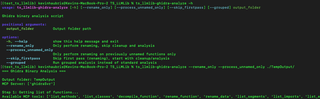
Following the list of functions, the script will then begin to process them all as follows:
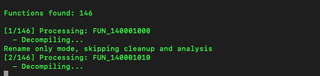
To skip the renaming step, provided you already annotated all functions in the repo, you can run the following:

This will run full cleanup and grouped analysis to dump out a commented and cleaned-up C file for each function, along with a JSON file of analysis and an overview summary of the binary.
To dump the vulnerabilities found, you can run the following command:
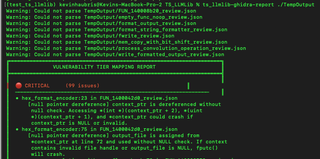
This will also produce a summary:
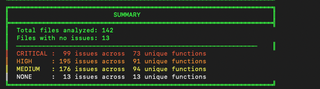
The final part is the group-analysis step. This takes the summaries of individual function groups (up to 10 functions each) and then generate an overview of the binary’s functionality. An example of that is in the screenshot below.
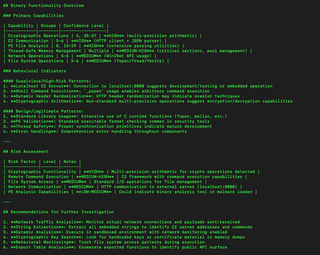
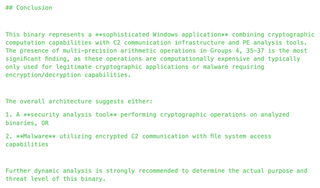
In this case, it was just run over a basic practice malware sample, and the conclusion section ended up as this:
This ended up using the following number of tokens for the summarization of all those groups, which in my testing cases was the part that used the most tokens for context.

ts_llmlib-cpp-analyze
This is similar, but instead of processing every function, it processes each file in a directory structure that ends with ‘.c’ or ‘.cpp’. The output folder will be the same structure as ‘ts_llmlib-ghidra-analyze’, so running the same ‘ts_llmlib-ghidra-report’ will generate the same overview report as above.
ts_llmlib-redclippy
This is the only example that has an added dependency, and that is pyside6. It is a simple qt script that is set up as an example of how to run the conversation without blocking the UI.
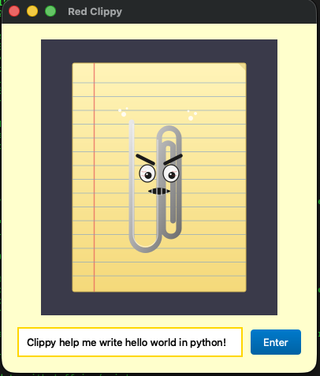
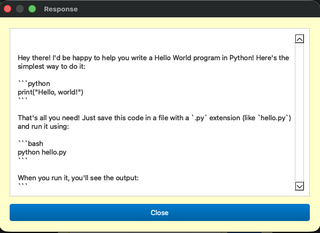
After a second or so, this will pop up the response:
Takeaways
Although not ideal given the limitations of current local models, this provides a decent way to divide up tasks and allow larger workflows to be run with locally when needed. With enough tweaking and updates to the system prompts and logic, hopefully these scripts can be repeatable standalone workflows that can be run as needed without Frontier models.
Future Work
- Provide immediate surrounding context to function calls in C/C++ directly
- Provide examples of vulnerabilities in the analysis system prompts of what to look for
- Provide examples of additional large workflows that Frontier models are used for currently