Kerberos with Titanis

Table of contents
In this article, I’ll walk you through the basics of Kerberos, how to use Titanis for the different parts, and how to mitigate some problems.
Titanis Setup
I use Titanis tools throughout this article to demonstrate various concepts. If you want to follow along, download the latest Titanis toolset. I’ll be using the Kerb and Ldap tools. The Kerb tool enables you to make requests to a KDC, among other things. Most tools within Titanis directly support Kerberos authentication scenarios (e.g., passwords, PKINIT), so there is rarely any need to manually request a Kerberos ticket with Kerb.
Whenever a Titanis tool runs, it checks for environment variables with a name matching TITANIS_DEFAULT_<param> and uses those as the default value. Setting these environment variables means you won’t have to type the parameters over and over, saving you time and reducing the risk of error. Titanis tools print an informational message whenever importing an environment variable and using it as a parameter, so there is a full accounting of what parameters the command uses. Note that the parameter -TicketCache is special in that it also checks $KRB5CCNAME, since this variable is known and used by other tools.
Throughout this article, I’ll be using four (4) different identities. Each of them has a corresponding profile:
milchick.profile (Password-based logon)
unset "${!TITANIS_DEFAULT_*}"
export KRB5CCNAME=~/milchick.ccache
export TITANIS_DEFAULT_KDC=LUMON-DC1
export TITANIS_DEFAULT_WORKSTATION=COBEL-WKS
export TITANIS_DEFAULT_USERNAME=milchick@LUMON
export TITANIS_DEFAULT_PASSWORD=Br3@kr00m\!
milchick-pkinit.profile (PKINIT-based logon)
unset ${!TITANIS_DEFAULT_*}
export TITANIS_DEFAULT_KDC=LUMON-DC1
export KRB5CCNAME=~/milchick-pkinit.ccache
export TITANIS_DEFAULT_WORKSTATION=milchick-wks
export TITANIS_DEFAULT_USERNAME=milchick@LUMON
export TITANIS_DEFAULT_USERCERT=milchick.pfx
export TITANIS_DEFAULT_USERKEYPASSWORD=password
allentown.profile (Computer account with password logon)
unset ${!TITANIS_DEFAULT_*}
export TITANIS_DEFAULT_KDC=LUMON-DC1
export KRB5CCNAME=~/allentown.ccache
export TITANIS_DEFAULT_WORKSTATION=allentown
export TITANIS_DEFAULT_USERNAME=allentown@LUMON
export TITANIS_DEFAULT_PASSWORD=password
allentown-s4u-admin.profile (Administrator using S4U2proxy through allentown)
unset ${!TITANIS_DEFAULT_*}
export TITANIS_DEFAULT_KDC=LUMON-DC1
export KRB5CCNAME=~/allentown-s4u-admin.ccache
export TITANIS_DEFAULT_WORKSTATION=allentown
export TITANIS_DEFAULT_USERNAME=allentown@LUMON
export TITANIS_DEFAULT_PASSWORD=password
export TITANIS_DEFAULT_S4USERNAME=Administrator
export TITANIS_DEFAULT_S4PROXYSERVICE=host/allentown
Kerberos Primer
First, let’s get some terminology out of the way. Kerberos is a network authentication protocol, allowing a client to authenticate to a service. Clients and services are both identified by a principal name, which itself consists of a name type (NT) and one (1) or more parts. Clients and services both share one (1) or more secret keys with the key distribution center, but never with each other. A key distribution center (KDC) is a server that maintains a database of clients and services (along with their keys) to facilitate authentication within a realm. A realm is a collection of clients and services that operate under the same security authority. The KDC serves two (2) roles: as an authentication server (AS) and a ticket-granting server (TGS). In Active Directory, the domain controller (DC) acts as a KDC, serving both as the AS and TGS, hosted by the lsass.exe process.
Here’s a typical Kerberos sequence:
- The user (client) logs into a workstation by presenting credentials, usually a password.
- AS Exchange: The client requests a ticket-granting ticket (TGT) from the AS. The AS may require preauthentication, requiring the client to demonstrate knowledge of the client key before providing a ticket.
- TGS Exchange: When the client wishes to access a network service, it requests a service ticket from the ticket-granting server (TGS) for the network service.
- AP Exchange: The client authenticates to the network service using the service ticket. The AP exchange is embedded in the application protocol (AP) used by the network service (e.g. SMB, RPC).
Each of the exchanges is protected by encryption. The AS exchange requires knowledge of the client key, usually derived from a password. Each ticket includes a session key to be used in the next step. The TGT contains a session key to use for the TGS exchange. A service ticket obtained through the TGS exchange contains a session key to be used for the AP exchange with the target service. The TGS and AP exchanges may also use sub-session keys.
Why the two (2) step process? There are a couple of reasons—first, the AS exchange is the only step that requires the client key. After receiving a TGT, the client doesn’t need to keep their key floating around memory somewhere. Second, the client may wish to access a service in a different realm, serviced by another KDC. The KDC in the service realm won’t know the client key, but it can accept a TGT issued by the client’s home KDC if a trust relationship exists between the realms.
What’s in a Name?
As mentioned above, both the client and service are identified by a principal name. RFC 4120 § 6.2 discusses principal names and name types and how they should be used.
Active Directory defines a user principal name (UPN) as a name of the form user@domain, similar in appearance to an email address. From a Kerberos perspective, a UPN consists of one (1) part.
Active Directory attaches different lookup behavior to different name types. Windows encodes the client name as NT-PRINCIPAL (5) for most password-based logons and NT-ENTERPRISE (10) for UPN-style and PKI-based logins (PKINIT). [MS-KILE] also specifies how names are resolved using Active Directory. [MS-KILE] § 3.3.5.6.1 specifies how to resolve client names. For NT-PRINCIPAL:
- Search for an account where sAMAccountName matches the client name.
- If no account is found, append $ and try again.
- If no account is found, search the userPrincipalName attribute for cname@realm.
- If no account is found, search the altSecurityIdentities attribute. Only count as a match if the found account doesn’t require preauthentication.
Rule 1 is the most straightforward. The sAMAccountName attribute is the logon name of the account, so this rule simply checks for an account object with a matching account name. Rule 2 makes sense for computer accounts, since computer account names usually end with $. This doesn’t have to be the case, though.
Rule 3 requires a bit of an explanation. Most Windows users are familiar with the <domain>\<user name> syntax for specifying which domain to log into. When a user enters this name, Windows splits the name into the domain and user parts, uses the domain part to know which DC to contact, and sends the username part to authenticate. Alternatively, the user may log on with a UPN of the form <user name>@<domain>. This syntax also allows the user to specify the logon domain. However, when the request is sent to the DC, the whole UPN is sent as NT-ENTERPRISE, not just the username part. The DC searches for an account that matches the entire UPN. Note that while the ADUC user interface requires you to enter the UPN using the user@domain style, the Attribute Editor doesn’t. However, the Windows logon screen only sends a logon request as NT-ENTERPRISE if the user enters the name as a UPN.
Rule 4 requires that the account doesn’t use preauthentication. The altSecurityIdentities attribute accepts multiple values. To match, the values must be prefixed with Kerberos:.
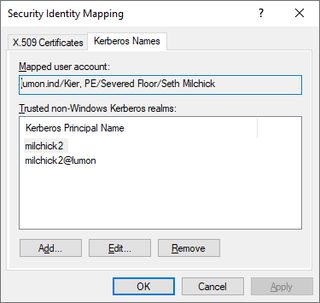
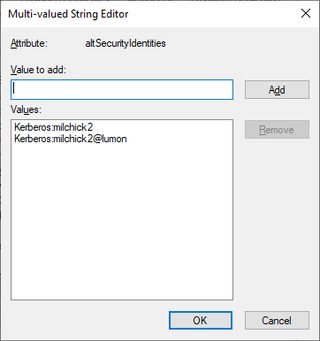
Let’s have some fun. I created a user account for the Siena file with a sAMAccountName of Siena$ and a UPN of siena@notlumon. I can log into this account with a username of:
- Siena$ (Rule 1)—Since Siena$ is found, the server accepts the logon.
- Siena (Rule 2)—Since no account named Siena exists, the server adds $ and matches Siena$. It doesn’t matter that this is a user account and not a computer account.
- LUMON\siena@notlumon (Rule 3) —The client recognizes the name as user siena@notlumon within the LUMON domain, and the username matches the userPrincipleName of the account object.
- Othername (Rule 4)—This is similar to the above, but the name matches on altSecurityIdentities.
- Siena$@lumon - ???
The last one gets a little weird. Windows tries to authenticate as siena$@lumon, but this UPN doesn’t exist. Although “lumon” and “lumon.ind” logically refer to the same domain, remember that the UPN is compared in its entirety. In this case, the DC rejects the logon attempt with KDC_ERR_C_PRINCIPAL_UNKNOWN (6). Windows takes another crack at it, this time cracking the UPN into its individual parts, and authenticates as Siena$ within the LUMON realm. Note that this behavior is implemented on the Windows client, not the DC.
So each user account can effectively have several logon names: one without $, one with $, and the UPN. If you are willing to forego preauthentication, you can use altSecurityIdentities, which accepts an arbitrary number of values. In all cases, once the user is logged on, Windows reports the user name as the value of sAMAccountName.
Service Principal Names
[MS-KILE] defines a service principal name (SPN) as a principal name with name type NT-SRV-INST (2) and consisting of two (2) or three (3) parts, separated by slashes: a service class, the host, and an optional service name. Titanis refers to everything after the service class as the service instance. The host part is usually either the NetBIOS host name or fully-qualified domain name (FQDN) of the host and sometimes also includes the port. Here are some examples:
- HOST/LUMON-DC1
- cifs/LUMON-FS1.lumon.ind
- ldap/LUMON-DC1.lumon.ind/DomainDnsZones.lumon.ind
SPNs have different lookup rules than client names, detailed in [MS-KILE] § 3.3.5.1.1. For NT-SRV-INST names, the multiple parts are joined together with a slash as a separator (resembling the example names) and used to search objects with a matching value in the servicePrincipalName attribute. This same section also specifies lookup rules for other name types, such as NT-PRINCIPAL. This means you can send a request for a ticket using the account name, without needing to know the SPNs for the account.
Note that services generally don’t register SPNs with an IP address, so clients usually need to determine the host name for an IP address (e.g., through a reverse DNS lookup), unless an administrator has specifically registered an SPN with the IP address.
What’s in a Ticket?
So, what does a ticket look like? A ticket is an ASN.1 DER-encoded structure defined in RFC 4120 § 5.3. It is divided into an outer unencrypted section and an inner encrypted section. The outer section includes the name of the realm the ticket is issued in and the target service. The encrypted section is more interesting. It has:
- Client name optional address
- Client realm
- Ticket flags
- Start and end times
- Session key
- Authorization data
The encrypted section is usually encrypted with the service’s key so the client cannot read or modify it. Active Directory provides the authorization data in the form of a privilege attribute certificate. The privilege attribute certificate (PAC), specified by [MS-PAC], is used in Windows environments to convey user account information and group memberships. The PAC may also contain assertions (in the form of group memberships) about the initial authentication. If the client preauthenticates with PKINIT, the authorization data includes the NTLM hash for the client account ([MS-PAC] § 2.6). When the client uses the ticket to authenticate to a service, Windows uses the information in the ticket to construct a logon token.
Encryption Profiles
Kerberos specifies the use of encryption as a series of encryption profiles. An encryption profile specifies:
- An encryption type, or EType value, identifying the encryption profile
- How to derive a protocol key from a password and optional salt value
- How to use this key to compute a checksum over a message (for integrity)
- How to use this key to encrypt and decrypt data (for confidentiality and integrity)
When a client logs on with a password, an encryption profile converts the password to a protocol key. The protocol key is then used, either directly or indirectly, for the integrity and confidentiality functions. Encryption profiles generally use a hash function for integrity and a symmetric encryption algorithm for confidentiality. Note that #3 ensures both confidentiality and integrity. In practice, encryption profiles hash a message while encrypting it so the remote party knows if a message is successfully decrypted. Foreshadowing.
Titanis supports the following encryption profiles. The number in parentheses is the EType.
- Aes256-cts-hmac-sha1-96 (18) [RFC 3962]
- Aes128-cts-hmac-sha1-96 (17) [RFC 3962]
- Des-cbc-md5 (3) [RFC 3961]
- RC4-HMAC (23) [RFC 4757]
- RC4-HMAC-EXP (24) [RFC 4757]
The name indicates the encryption algorithm, mode, and hash function. CTS is a chaining mode similar to CBC that preserves the length of the original message and doesn’t require padding.
Titanis offers the Kerb s2k command to convert a password to a protocol key for one (1) or more encryption profiles.
milchick@COBEL-WKS:~$ Kerb s2k Br3@kr00m\! LUMON.INDseth -EncType Rc4Hmac, Aes256CtsHmacSha1_96
 INFO: Kerb Version 0.9.11201106.Q

EType                 Key
--------------------  ----------------------------------------------------------------
             Rc4Hmac  327e931f48594f4bbd9f10fef8b2841c
Aes256CtsHmacSha1_96  26d2823ca837dd162f9a41bf45d4e2c4c77bee0266d283c77a0b7f89c28a253e
The first argument is the password, followed by the salt. The salt is not secret and is meant to be different for each client. [MS-KILE] § 3.1.1.2 specifies how this salt value is computed in Active Directory:
- For user accounts: <uppercase domain FQDN> | <lowercase username>
- For computer accounts: <uppercase domain FQDN> | “host” | <lowercase computer name without $> | “.” | <lowercase domain FQDN>
Here are some examples:
- User account milchick: LUMON.INDmilchick
- Computer account ALLENTOWN$: LUMON.INDhostallentown.lumon.ind
A couple of things to note:
- The username is the <user> component of the UPN, which may differ from the sAMAccountName.
- The salt is computed at the time the password is set and does not change until the password is changed.
- The formula depends on whether the account is a user or a computer.
This means that while you can guess the salt and be correct most of the time, you can’t be certain. Fortunately, the KDC provides a way to ask for the salt for a given account.
Authentication Server (AS) Exchange
It is now time to request our first ticket, in the form of a TGT. The first step in the Kerberos process is the AS exchange. The initial AS request (AS-REQ) includes the name of the client being authenticated, the service to authenticate to, and a list of encryption profiles supported by the client. A TGT is really just a service ticket for the TGS, which is itself a network service named krbtgt/<realm>. In Active Directory, <realm> is the name of the domain, specified as the DNS domain name.
If all goes well, the KDC replies with an AS reply (AS-REP). An AS-REP includes the salt used to generate the client encryption key, a ticket that is encrypted with the service’s key, and a section encrypted with the client key that contains the same session key as the ticket.
At this point, the client hasn’t proven anything to the KDC, but it can’t use the returned ticket without decrypting the corresponding session key, which is itself encrypted with the client key. An attacker may attempt to decrypt either the client section or the service ticket through brute force. This type of attack is generally referred to as kerberoasting and can reveal either the client key or service key, depending on which section is targeted.
To avoid this, the AS generally requires the client to prove knowledge of the client key through preauthentication. If this is the case, the KDC replies with error KDC_ERR_PREAUTH_REQUIRED (25) along with a list of supported preauthentication methods, supported encryption profiles, and salts for each (if there is one). For password-based logon, the KDC usually accepts an encrypted timestamp. This is exactly what it sounds like. The client checks the current UTC time, encrypts it, and sends it back. The KDC checks that it was encrypted with the correct key and compares the time to its own clock, allowing for some variance.
In response to an error requiring preauthentication, the client sends another AS-REQ, this time with the proper preauthentication. If successful, the KDC replies with a ticket. If not, the KDC replies with another error.
To check the preauthentication information for an account, use Kerb getasinfo:
milchick@COBEL-WKS:~$ Kerb getasinfo
 INFO: Importing default for 'UserName': milchick@LUMON
 INFO: Importing default for 'Kdc': LUMON-DC1
 INFO: Kerb Version 0.9.11201106.Q

 INFO: KDC time: 2026-02-09T15:33:29.2622230
EType                 Salt (text)    Salt (hex)
--------------------  -------------  --------------------------
Aes256CtsHmacSha1_96  LUMON.INDseth  4c554d4f4e2e494e4473657468
             Rc4Hmac
The command tells us a few things:
- The KDC serves the LUMON realm (specified by -UserName)
- The system time reported by the KDC
- “milchick” is a valid user within LUMON
- The user account requires preauthentication (this command only works for accounts that require preauthentication; if the account does not require preauthentication, you’ll get an error saying as much)
- The list of encryption profiles supported by the KDC for this user
- The salt value for each; Rc4Hmac doesn’t use a salt to calculate the key, so no salt is provided
Look at the salt value. This doesn’t match the expected value of LUMON.INDmilchick. It’s a good idea to check this before manually calculating a key.
It’s time to get a ticket. To request a TGT with Titanis, use the Kerb asreq command as follows:
milchick@COBEL-WKS:~$ Kerb asreq -vv
 INFO: Importing default for 'TicketCache': /home/devuser/milchick.ccache
 INFO: Importing default for 'Kdc': LUMON-DC1
 INFO: Importing default for 'Workstation': milchick-wks
 INFO: Importing default for 'UserName': milchick@LUMON
 INFO: Importing default for 'Password': Br3@kr00m!
 INFO: Kerb Version 0.9.11201106.Q

 DIAG: Requesting ticket for target=<null>
[Kerberos] DIAG: Requesting TGT for realm LUMON for user milchick (nonce=-1828977489)
[Kerberos] DIAG: KDC supports PA-DATA type ETypeInfo2 (19)
[Kerberos] DIAG: KDC supports PA-DATA type EncTimestamp (2)
[Kerberos] DIAG: KDC supports PA-DATA type PkASReq (16)
[Kerberos] DIAG: KDC supports EType Aes256CtsHmacSha1_96 salt=LUMON.INDseth
[Kerberos] DIAG: KDC supports EType Rc4Hmac salt=<none>
[Kerberos] DIAG: Encrypting timestamp with Aes256CtsHmacSha1_96 key 26d2823ca837dd162f9a41bf45d4e2c4c77bee0266d283c77a0b7f89c28a253e (salt=4c554d4f4e2e494e4473657468.
[Kerberos] DIAG: KDC supports EType Aes256CtsHmacSha1_96 salt=LUMON.INDseth
 VERBOSE: ASREP key: etype=Aes256CtsHmacSha1_96 bytes=26d2823ca837dd162f9a41bf45d4e2c4c77bee0266d283c77a0b7f89c28a253e
[Kerberos] DIAG: Received TGT for realm LUMON.IND: Aes256CtsHmacSha1_96 session key a887fc7283776aed69838e294e03e2694dc4d163e5a2e6ef5d7d149a7f019f5b
 WARN: The ticket realm 'LUMON.IND' does not match the requested realm 'LUMON'.  This may be the result of canonicalization.
WARN: The ticket realm 'LUMON.IND' does not match the requested realm 'LUMON'.  This may be the result of canonicalization.
Client name  Client realm  TargetSpn         End time             Options
-----------  ------------  ----------------  -------------------  ---------------------------------------------------------------
milchick     LUMON.IND     krbtgt/LUMON.IND  02/14/2026 04:27:14  Canonicalize, Preauthenticated, Initial, Renewable, Forwardable

 VERBOSE: 1 record(s) written
Let’s break this down:
- The client sends an AS-REQ to the KDC located at LUMON-DC1, asking for a TGT for the client named “milchick” within realm LUMON.
- The KDC replies with an error indicating that preauthentication is required and that the server accepts an encrypted timestamp using encryption profiles Rc4Hmac and Aes256CtsHmacSha1_96.
- The client sends another AS-REQ with an encrypted timestamp using Aes256CtsHmacSha1_96.
- The KDC replies with a TGT for [email protected].
- Kerb writes the received ticket to the file named milchick.ccache.
There are a few things to note:
- Although Kerb sent a request with the domain’s NetBIOS name, the KDC canonicalized this to the FQDN.
- The KDC supports Rc4Hmac and Aes256CtsHmacSha1_96 for preauthentication on this particular account.
- The salt value sent by the KDC is LUMON.INDseth, not the expected LUMON.INDmilchick. This indicates that this account may have been renamed since the last password change.
- Kerb sent a timestamp encrypted with AES 256 as preauthentication.
- The ticket includes both the Initial and Preauthenticated flags, indicating that the ticketholder has knowledge of the client secret. Some services, such as the Change Password service, require a ticket with the Initial flag set.
Kerb asreq allows you to specify the key directly in the form of an NTLM hash or AES key. Since the KDC accepts Rc4Hmac, let’s try requesting a ticket with the NTLM hash:
milchick@COBEL-WKS:~$ unset TITANIS_DEFAULT_PASSWORD
milchick@COBEL-WKS:~$ Kerb asreq -NtlmHash B406A01772D0AD225D7B1C67DD81496F -OutputFileName milchick-ntlm.ccache
 INFO: Importing default for 'TicketCache': /home/devuser/milchick.ccache
 INFO: Importing default for 'Kdc': LUMON-DC1
 INFO: Importing default for 'Workstation': milchick-wks
 INFO: Importing default for 'UserName': milchick@LUMON
 INFO: Kerb Version 0.9.11201106.Q

 WARN: The ticket realm 'LUMON.IND' does not match the requested realm 'LUMON'.  This may be the result of canonicalization.
Client name  Client realm  TargetSpn         End time             Options
-----------  ------------  ----------------  -------------------  ---------------------------------------------------------------
milchick     LUMON.IND     krbtgt/LUMON.IND  02/14/2026 04:29:11  Canonicalize, Preauthenticated, Initial, Renewable, Forwardable
You can also get a ticket with the AES256 or AES128 key using -AesKey.
PKINIT
You may have noticed the PkASReq (16) preauthentication type in the command output above. This indicates the KDC is configured for PKINIT (not the client specifically, just the KDC in general). This is a preauthentication method that allows the client to request a ticket using public key cryptography rather than a password. Titanis supports this using up to three (3) parameters: -UserCert, -UserKey, and -UserKeyPassword.
- If the certificate and key are in the same file (e.g., a .PFX or .PEM file), specify the file name with
-UserCert. - If the certificate and key are in separate files, specify them with
-UserCertand-UserKey, respectively. - In either case, if the key is encrypted, specify the password for decryption with
-UserCertKey. Here’s an example:
milchick@COBEL-WKS:~$ source milchick-pkinit.profile
milchick@COBEL-WKS:~$ Kerb asreq -vv
 INFO: Importing default for 'TicketCache': /home/devuser/milchick-pkinit.ccache
 INFO: Importing default for 'Kdc': LUMON-DC1
 INFO: Importing default for 'Workstation': milchick-wks
 INFO: Importing default for 'UserName': milchick@LUMON
 INFO: Importing default for 'UserCert': milchick.pfx
 INFO: Importing default for 'UserKeyPassword': password
 DIAG: Opening certificate file /home/devuser/milchick.pfx
 VERBOSE: Selected certificate CN=Seth Milchick, OU=Severed Floor, OU="Kier, PE", DC=lumon, DC=ind
 WARN: The certificate specifies a user name '[email protected]' that differs from the user name provided on the command line.  Using the user name from the command line.
 INFO: Kerb Version 0.9.11201106.Q

 DIAG: Requesting ticket for target=<null>
[Kerberos] DIAG: Requesting TGT for realm LUMON for user milchick@LUMON (nonce=-2029158211)
[Kerberos] DIAG: KDC supports PA-DATA type ETypeInfo2 (19)
[Kerberos] DIAG: KDC supports PA-DATA type EncTimestamp (2)
[Kerberos] DIAG: KDC supports PA-DATA type PkASReq (16)
[Kerberos] DIAG: KDC supports PA-DATA type AsFreshness (150)
[Kerberos] DIAG: KDC supports EType Aes256CtsHmacSha1_96 salt=LUMON.INDseth
[Kerberos] DIAG: KDC supports EType Rc4Hmac salt=<none>
 VERBOSE: ASREP key: etype=Aes256CtsHmacSha1_96 bytes=e7c12a8c779e18ffa9a3eb2d40df11a60db9cbef84b10cee5b552d3c3459fb40
[Kerberos] DIAG: Received TGT for realm LUMON.IND: Aes256CtsHmacSha1_96 session key a9287525a00dd08f2f11d36e15d543177b803dbee76978b58aa611374d73374b
 WARN: The ticket realm 'LUMON.IND' does not match the requested realm 'LUMON'.  This may be the result of canonicalization.
Client name  Client realm  TargetSpn         End time             Options
-----------  ------------  ----------------  -------------------  ---------------------------------------------------------------
milchick     LUMON.IND     krbtgt/LUMON.IND  02/14/2026 04:29:59  Canonicalize, Preauthenticated, Initial, Renewable, Forwardable
Kerb asreq prints a warning that -UserName doesn’t match the name on the certificate. In this case, it’s because the environment is configured with milchick@LUMON, using the short form of the domain name. In the case of a conflict such as this, Titanis uses the value provided with -UserName, allowing the operator to override the value in the certificate.
When the KDC issues a ticket for a PKINIT request, it includes the NTLM hash in the PAC. Unfortunately, the PAC is in the part of the ticket encrypted with the service key. We’ll see how to handle this later in this article.
Requesting Non-TGT Tickets
While AS-REQ is usually used to request TGTs, it isn’t limited to this. To request tickets for another service, use the -Target parameter:
milchick@COBEL-WKS:~$ Kerb asreq -Target host/allentown
 INFO: Importing default for 'TicketCache': /home/devuser/milchick-pkinit.ccache
 INFO: Importing default for 'Kdc': LUMON-DC1
 INFO: Importing default for 'Workstation': milchick-wks
 INFO: Importing default for 'UserName': milchick@LUMON
 INFO: Importing default for 'UserCert': milchick.pfx
 INFO: Importing default for 'UserKeyPassword': password
 WARN: The certificate specifies a user name '[email protected]' that differs from the user name provided on the command line.  Using the user name from the command line.
 INFO: Kerb Version 0.9.11201106.Q

 WARN: The ticket realm 'LUMON.IND' does not match the requested realm 'LUMON'.  This may be the result of canonicalization.
Client name  Client realm  TargetSpn   End time             Options
-----------  ------------  ----------  -------------------  ---------------------------------------------------------------
milchick     LUMON.IND     ALLENTOWN$  02/14/2026 04:30:35  Canonicalize, Preauthenticated, Initial, Renewable, Forwardable
Notice the target SPN of the ticket doesn’t match the SPN; it’s the name of the matching account. What if you don’t know the SPN mapping for an account? Just use the name of the account:
milchick@COBEL-WKS:~$ Kerb asreq -Target allentown, milchick
 INFO: Importing default for 'TicketCache': /home/devuser/milchick-pkinit.ccache
 INFO: Importing default for 'Kdc': LUMON-DC1
 INFO: Importing default for 'Workstation': milchick-wks
 INFO: Importing default for 'UserName': milchick@LUMON
 INFO: Importing default for 'UserCert': milchick.pfx
 INFO: Importing default for 'UserKeyPassword': password
 WARN: The certificate specifies a user name '[email protected]' that differs from the user name provided on the command line.  Using the user name from the command line.
 INFO: Kerb Version 0.9.11201106.Q

 WARN: The ticket realm 'LUMON.IND' does not match the requested realm 'LUMON'.  This may be the result of canonicalization.
 WARN: The ticket realm 'LUMON.IND' does not match the requested realm 'LUMON'.  This may be the result of canonicalization.
Client name  Client realm  TargetSpn   End time             Options
-----------  ------------  ----------  -------------------  ---------------------------------------------------------------
milchick     LUMON.IND     ALLENTOWN$  02/14/2026 04:36:19  Canonicalize, Preauthenticated, Initial, Renewable, Forwardable
milchick     LUMON.IND     milchick    02/14/2026 04:36:19  Canonicalize, Preauthenticated, Initial, Renewable, Forwardable
For this to work, an account must have an SPN mapping. The actual mapping doesn’t matter; you don’t have to know what it is, but the account must have one. If it doesn’t, you get KDC_ERR_S_PRINCIPAL_UNKNOWN. Again, notice that the target SPN doesn’t quite match the requested name. It has a trailing $. This is because allentown is a computer account, and computer account names end with a $. Due to the lookup rules above, the client doesn’t have to specify this; the DC automatically adds it. This step happens for all accounts, not just computer accounts. So although the trailing $ usually means it’s a computer account, this isn’t conclusive.
Something to note about KDC_ERR_S_PRINCIPAL_UNKNOWN—if the principal doesn’t exist at all, the DC returns this error with no additional detail. However, if the account exists but doesn’t have an SPN, the DC returns an extra structure, indicating to the client that this principal exists and the client should use U2U authentication. I haven’t found where this particular structure is documented, but Titanis detects this situation and translates it to STATUS_USER2USER_REQUIRED. U2U authentication is covered later.
DC Perspective
Let’s look at the AS exchange from the perspective of a DC. When the DC receives an AS-REQ, it first checks whether it is even prepared to service a request. If not, you get error KDC_ERR_SVC_UNAVAILABLE (29) / STATUS_INVALID_DOMAIN_STATE (0xC00000DD). This can happen if the DC is still starting up. Otherwise, it resolves the client name in the request, evaluates policy, and resolves the target service. If any of these steps fail, the KDC replies with an appropriate error. If the client account requires preauthentication, the KDC includes information on supported preauthentication methods along with the error so that the client can construct another request with the necessary preauthentication data.
The DC builds a ticket for the client to send to the target service (usually krbtgt for as AS-REQ). This includes the name of the client, ticket flags, a session key, and usually authorization data in the form of a privilege attribute certificate. This all gets encrypted with the service key. The same session key and ticket information are separately encrypted with the client secret so that the client can read them.
Since the KDC has a database with all clients and services in its realm, it has the necessary key material to validate the preauthentication data, encrypt the ticket with the service key, and encrypt the session key with the client key. In the AS-REQ, the client included a list of supported encryption profiles, so the KDC chooses an encryption profile from this list to create a session key and encrypt the client part of the response. This says nothing of the encryption capabilities of the service. The KDC must keep track of the encryption types supported by a service in its database. Active Directory uses the msDS-SupportedEncryptionTypes attribute for this purpose, containing a bitfield where each bit indicates support for a specific encryption profile. That’s what the documentation says, although it doesn’t appear to be the case in practice. According to [MS-KILE] § 3.4.3.1, when an application server initializes within a Windows domain, it must update this attribute on its service account to reflect the encryption profiles that it supports.
If the KDC receives a request for a TGT (that is, the SPN starts with “krbtgt”), it follows special logic. If it’s for a local TGT, the KDC uses the account named “krbtgt” with a SID ending in -502. If the request is for a TGT in a different domain, the KDC searches for an interdomain trust account with the name of the target domain.
Ticket Issuance Policy
Kerberos is an authentication protocol, and although a ticket may contain authorization data, Kerberos itself is not an authorization protocol. Just because a user can get a ticket to a resource doesn’t mean that user is authorized to access the resource. In general, the KDC job is to authenticate a user, not bother with authorization data. Active Directory introduced authentication silos to limit which accounts may be issued tickets to which services. If a user requests a ticket for a service not permitted, the KDC responds with STATUS_AUTHENTICATION_FIREWALL_FAILED (0xC0000413).
What Could Go Wrong?
If the KDC encounters a problem while processing the request, it replies with an error. At a minimum, this contains a Kerberos error code indicating the type of problem. Sometimes, the KDC includes an NTSTATUS code providing additional information. Here is a list of some of the problems the KDC may encounter.
Kerberos error | Kerberos error number | NTSTATUS | NTSTATUS value | Explanation |
|---|---|---|---|---|
KDC_ERR_SVC_UNAVAILABLE | 29 | STATUS_INVALID_DOMAIN_STATE | 0xC00000DD | Domain services unavailable, most likely because the KDC is starting. |
KDC_ERR_WRONG_REALM | 68 | The client realm in the request is not serviced by this KDC. | ||
KDC_ERR_C_PRINCIPAL_UNKNOWN | 6 | The client name doesn't map to an account in the domain. | ||
KDC_ERR_CLIENT_REVOKED | 18 | STATUS_ACCOUNT_LOCKED_OUT | 0xC0000234 | The account is locked out. |
KDC_ERR_CLIENT_REVOKED | 18 | STATUS_ACCOUNT_EXPIRED | 0xC0000193 | The account is expired. This is not the same as password expiration. |
KDC_ERR_CLIENT_REVOKED | 18 | STATUS_ACCOUNT_DISABLED | 0xC0000072 | The account is disabled. |
KDC_ERR_ETYPE_NOSUPP | 14 | None of the offered encryption types can be used, either because of policy or account settings. | ||
KDC_ERR_POLICY | 12 | STATUS_SMARTCARD_LOGON_REQUIRED | 0xC00002FA | The account requires smart card logon. |
KDC_ERR_POLICY | 12 | STATUS_INVALID_WORKSTATION | 0xC0000070 | The account is restricted to logons from specific workstations.** |
KDC_ERR_POLICY | 12 | STATUS_INVALID_LOGON_HOURS | 0xC000006F | The logon request is outside the user's allowed logon hours. |
KDC_ERR_PREAUTH_FAILED | 24 | Usually caused by using the wrong password or salt. | ||
KDC_ERR_KEY_EXPIRED | 23 | STATUS_PASSWORD_EXPIRED | 0xC0000071 | The account's password has expired.* |
KDC_ERR_KEY_EXPIRED | 23 | The account requires the user to change the password.* (in response to PKINIT) | ||
KDC_ERR_KEY_EXPIRED | 23 | STATUS_PASSWORD_MUST_CHANGE | 0xC0000224 | The account requires the user to change the password.* (in response to password-based logon) |
KDC_ERR_S_PRINCIPAL_UNKNOWN | 7 | The target SPN in the request doesn't map to an account in the domain. | ||
KDC_ERR_POLICY | 12 | STATUS_AUTHENTICATION_FIREWALL_FAILED | 0xC0000413 | Authentication policy (probably wrong auth silo) |
* The KDC does not return this error if the request is for the special SPN kadmin/changepw. This allows the user to authenticate in order to change their own password.
** This policy is only checked if the request includes a workstation name. If it doesn’t, this policy check is skipped. In Titanis, use -Workstation to specify the workstation.
The error conditions in this table are listed in the order in which they are evaluated, based on testing. For example, if an account is locked out, disabled, and the request contains the wrong password, the KDC replies with STATUS_ACCOUNT_LOCKED_OUT. Without credentials, you can:
- Enumerate known client names
- Verify the realm name
- Check the server time
- Check whether an account is locked out, expired, disabled, requires a smart card, is within logon hours, or allows logon from a particular workstation
- Supports a particular encryption profile
After those conditions are checked, the KDC verifies the preauthentication information. This means you can’t check for password expiration or SPN mappings without presenting valid credentials.
Working with Tickets
To work with tickets in Titanis, use the Kerb select command. This command:
- Reads tickets from one (1) or more files
- Applies filtering
- Prints the matching tickets to the screen
- Optionally writes the matching tickets to another file
With it, you can:
- Inspect tickets in a file
- Combine ticket files
- Convert between .ccache and .kirbi fiormats
- Combine multiple ticket files into a single file
- Split a file with multiple tickets into multiple files
- Remove expired tickets
- Decrypt tickets
- Export ticket hashes for kerberoasting
- Export tickets to CSV, JSON, or a couple of other formats for use in other applications
Printing Tickets
To show tickets in the ticket cache:
milchick@COBEL-WKS:~$ Kerb select
 INFO: Importing default for 'TicketCache': /home/devuser/milchick-pkinit.ccache
 INFO: Kerb Version 0.9.11201106.Q

SeqNbr  Client name  Client realm  TargetSpn         End time             Options                                                          Comment
------  -----------  ------------  ----------------  -------------------  ---------------------------------------------------------------  -------
     1  milchick     LUMON.IND     krbtgt/LUMON.IND  02/14/2026 04:29:59  Canonicalize, Preauthenticated, Initial, Renewable, Forwardable
     2  milchick     LUMON.IND     ALLENTOWN$        02/14/2026 04:30:35  Canonicalize, Preauthenticated, Initial, Renewable, Forwardable
     3  milchick     LUMON.IND     ALLENTOWN$        02/14/2026 04:37:39  Canonicalize, Preauthenticated, Initial, Renewable, Forwardable
     4  milchick     LUMON.IND     milchick          02/14/2026 04:37:39  Canonicalize, Preauthenticated, Initial, Renewable, Forwardable
By default, Kerb select only prints basic fields. To print all available fields:
milchick@COBEL-WKS:~$ Kerb select -OutputStyle List -OutputFields \*
 INFO: Importing default for 'TicketCache': /home/devuser/milchick-pkinit.ccache
 INFO: Kerb Version 0.9.11201106.Q

SourceFileName: /home/devuser/milchick-pkinit.ccache
SeqNbr: 1
Client name: milchick
Client realm: LUMON.IND
Ticket realm: LUMON.IND
TargetSpn: krbtgt/LUMON.IND
ServiceClass: krbtgt
ServiceInstance: LUMON.IND
Service realm: LUMON.IND
Options: Canonicalize, Preauthenticated, Initial, Renewable, Forwardable
End time: 02/14/2026 04:29:59
Start time: 02/13/2026 18:29:59
Renew till: 02/14/2026 06:29:59
AsrepKeyText: 96e489ec7d5f4a7fdaeb1e24a3bba367dececad4c79cfb8359e6768a54da602a
SupportedEncryptionTypes: DesCbcCrc, DesCbcMd5, Rc4Hmac, Aes128CtsHmacSha1_96, Aes256CtsHmacSha1_96
Session etype: Aes256CtsHmacSha1_96
Session key: 3059b375f9cdc370180715aec3972a55bb3bbd274a7cd4cc9adfbefdb1b1ad3f
Ticket etype: Aes256CtsHmacSha1_96
TgsrepHashcatMethod: 19700
TicketHash: $krb5tgs$18$milchick$LUMON.IND$*krbtgt/LUMON.IND*$21cd18f587e6ac5dce
…
To view available fields, check the help text with Kerb select -h. The available fields are listed under -OutputFields:
      -OutputFields                      <String[]>     Fields to display in output

                                                        Possible values:
                                                          SourceFileName
                                                          SeqNbr
                                                          Comment
                                                          ClientName
                                                          ClientRealm
                                                          TicketRealm
                                                          TargetSpn
                                                          ServiceClass
                                                          ServiceInstance
                                                          ServiceRealm
                                                          KdcOptions
                                                          EndTime
                                                          StartTime
                                                          RenewTill
                                                          AsrepKeyText
                                                          TicketKeyText
                                                          SupportedEncryptionTypes
                                                          SessionEType
                                                          SessionKeyText
                                                          TicketEType
                                                          TgsrepHashcatMethod
                                                          TicketHash
                                                          IsCurrent
                                                          SecurityGroups
                                                          NtlmHashText
If no source file(s) are specified, Kerb select uses the ticket cache. To read tickets from a specific file, specify one (1) or more filenames:
milchick@COBEL-WKS:~$ Kerb select milchick*.ccache
 INFO: Importing default for 'TicketCache': /home/devuser/milchick-pkinit.ccache
 INFO: Kerb Version 0.9.11201106.Q

SeqNbr  Client name  Client realm  TargetSpn         End time             Options                                                          Comment
------  -----------  ------------  ----------------  -------------------  ---------------------------------------------------------------  -------
     1  milchick     LUMON.IND     krbtgt/LUMON.IND  02/14/2026 04:29:11  Canonicalize, Preauthenticated, Initial, Renewable, Forwardable
     2  milchick     LUMON.IND     krbtgt/LUMON.IND  02/14/2026 04:29:59  Canonicalize, Preauthenticated, Initial, Renewable, Forwardable
     3  milchick     LUMON.IND     ALLENTOWN$        02/14/2026 04:30:35  Canonicalize, Preauthenticated, Initial, Renewable, Forwardable
     4  milchick     LUMON.IND     ALLENTOWN$        02/14/2026 04:37:39  Canonicalize, Preauthenticated, Initial, Renewable, Forwardable
     5  milchick     LUMON.IND     milchick          02/14/2026 04:37:39  Canonicalize, Preauthenticated, Initial, Renewable, Forwardable
     6  milchick     LUMON.IND     krbtgt/LUMON.IND  02/14/2026 04:27:14  Canonicalize, Preauthenticated, Initial, Renewable, Forwardable
     7  milchick     LUMON.IND     krbtgt/LUMON.IND  02/14/2026 04:29:11  Canonicalize, Preauthenticated, Initial, Renewable, Forwardable
Combining and Converting Ticket Files
To combine or convert files, use the above syntax to specify the files to combine or convert, and then specify the output file with -Into:
milchick@COBEL-WKS:~$ Kerb select milchick\*.ccache -Into all.kirbi -Overwrite -v
 INFO: Importing default for 'TicketCache': /home/devuser/milchick-pkinit.ccache
 INFO: Kerb Version 0.9.11201106.Q

 VERBOSE: Reading file /home/devuser/milchick-ntlm.ccache
 VERBOSE: Reading file /home/devuser/milchick-pkinit.ccache
 VERBOSE: Reading file /home/devuser/milchick.ccache
 INFO: Writing tickets to /home/devuser/all.kirbi
SeqNbr  Client name  Client realm  TargetSpn         End time             Options                                                          Comment
------  -----------  ------------  ----------------  -------------------  ---------------------------------------------------------------  -------
     1  milchick     LUMON.IND     krbtgt/LUMON.IND  02/14/2026 04:29:11  Canonicalize, Preauthenticated, Initial, Renewable, Forwardable
     2  milchick     LUMON.IND     krbtgt/LUMON.IND  02/14/2026 04:29:59  Canonicalize, Preauthenticated, Initial, Renewable, Forwardable
     3  milchick     LUMON.IND     ALLENTOWN$        02/14/2026 04:30:35  Canonicalize, Preauthenticated, Initial, Renewable, Forwardable
     4  milchick     LUMON.IND     ALLENTOWN$        02/14/2026 04:37:39  Canonicalize, Preauthenticated, Initial, Renewable, Forwardable
     5  milchick     LUMON.IND     milchick          02/14/2026 04:37:39  Canonicalize, Preauthenticated, Initial, Renewable, Forwardable
     6  milchick     LUMON.IND     krbtgt/LUMON.IND  02/14/2026 04:27:14  Canonicalize, Preauthenticated, Initial, Renewable, Forwardable
     7  milchick     LUMON.IND     krbtgt/LUMON.IND  02/14/2026 04:29:11  Canonicalize, Preauthenticated, Initial, Renewable, Forwardable

 VERBOSE: 7 record(s) written
If the extension of the output file is .ccache, the file is written in the .ccache format. Otherwise, the file is written as with the .kirbi format.
When loading a file, Titanis doesn’t care about the extension but inspects the file contents to determine the format. When loading multiple ticket files, there is no requirement for them to be in the same format.
Filtering and Splitting Ticket Files
Kerb select offers several filters to limit output. These are all documented under the “Ticket Filter” category in the documentation.
Parameter | Description | Example |
|---|---|---|
-Current | Only tickets with a start time before now and an end time after now | -Current -Current:no |
-MatchingClientName | Client name matches a regular expression | -MatchingClientName “mil.*” |
-MatchingSpn | SPN matches a regular expression | -MatchingSpn “krbtgt/.*” |
-MatchingTicketEType | Tickets encryption with a specific encryption profile | -MatchingTicketEType Aes128CtsHmacSha1_96, Aes256CtsHmacSha1_96 |
-MatchingSessionEType | Tickets with a session key using a specific encryption profile | -MatchingSessionEType Aes128CtsHmacSha1_96, Aes256CtsHmacSha1_96 |
-InvertMatch | Only display tickets not matching all filters | -InvertMatch |
-SeqNbr | Select tickets by sequence # | -SeqNbr -3, 5, 6-8, 10- |
Each ticket has a sequence number. This is not saved with the ticket and is assigned sequentially as the tickets are loaded. To filter tickets based on sequence number, specify the individual numbers or ranges with -SeqNbr.
Kerb select -SeqNbr *-3, 5, 6-8, 10-*
This command selects all tickets from the beginning, up to and including ticket numbers 3, 5, 6-8, 10, and everything after it. If you specify a ticket that doesn’t exist, no error occurs.
This doesn’t affect the original file(s). To write the filtered tickets to a file, specify an output file with -Into. You can use this to effectively split a file with multiple tickets into multiple files.
Export for Kerberoasting
Although Titanis doesn’t perform kerberoasting, it does provide the hash string and hashcat method number. To export this information as a CSV:
Kerb select -OutputStyle Csv -OutputFields ClientName, TgsrepHashcatMethod, TicketHash -MatchingTicketEType Rc4Hmac > tickets.csv
Decrypting Tickets – The Hard Way
To decrypt tickets, specify the ticket key with -TicketKey. It just so happens that I know the password for Allentown$ is “password.” Let’s walk through the steps to compute the key.
- Determine the ticket encryption type.
- Get the salt for the account.
- Compute the encryption key for this encryption profile.
- Pass the key to
Kerb select.
milchick@COBEL-WKS:~$ Kerb select -OutputFields TargetSpn, TicketEType # Determine the ticket encryption type
 INFO: Importing default for 'TicketCache': /home/devuser/milchick-pkinit.ccache
 INFO: Kerb Version 0.9.11201106.Q

TargetSpn         Ticket etype
----------------  --------------------
krbtgt/LUMON.IND  Aes256CtsHmacSha1_96
ALLENTOWN$        Aes256CtsHmacSha1_96
ALLENTOWN$        Aes256CtsHmacSha1_96
milchick          Aes256CtsHmacSha1_96

milchick@COBEL-WKS:~$ Kerb getasinfo allentown@LUMON # Get the salt for this account
 INFO: Importing default for 'Kdc': LUMON-DC1
 INFO: Kerb Version 0.9.11201106.Q

 INFO: KDC time: 2026-02-13T18:47:33.3930680
EType                 Salt (text)                       Salt (hex)
--------------------  --------------------------------  ----------------------------------------------------------------
Aes256CtsHmacSha1_96  LUMON.INDhostallentown.lumon.ind  4c554d4f4e2e494e44686f7374616c6c656e746f776e2e6c756d6f6e2e696e64
             Rc4Hmac

milchick@COBEL-WKS:~$ Kerb s2k password LUMON.INDhostallentown.lumon.ind # Compute the encryption key for this encryption profile
 INFO: Kerb Version 0.9.11201106.Q

EType                 Key
--------------------  ----------------------------------------------------------------
Aes256CtsHmacSha1_96  41d93c5f36f2e78d18150b5ca24f1802fbc6b14e8996281c6ae4442ade8e9eef
Aes128CtsHmacSha1_96  fd04dbd2968a5aedd62b3a66d48c3aca
             Rc4Hmac  8a9d093f14f8701df17732b2bb182c74
           DesCbcMd5  707a5d8cfd7f5210

milchick@COBEL-WKS:~$ Kerb select -SeqNbr 2 -TicketKey 41d93c5f36f2e78d18150b5ca24f1802fbc6b14e8996281c6ae4442ade8e9eef -OutputFields SeqNbr, TargetSpn, TicketKeyText -PrintAuthData -vv # Decrypt the ticket
INFO: Importing default for 'TicketCache': /home/devuser/milchick-pkinit.ccache
 INFO: Kerb Version 0.9.11201106.Q

 VERBOSE: Reading file /home/devuser/milchick-pkinit.ccache
 INFO: Ticket #2:
 INFO:   NTLM hash: b406a01772d0ad225d7b1c67dd81496f
 INFO:   Full name: Seth Milchick
 INFO:   Account flags: NormalAccount
 INFO:   Logon flags: HasExtraSids, HasResourceGroupIds
 INFO:   Logon count: 4139
 INFO:   Logon domain SID: S-1-5-21-1752138614-393460150-3098146133
 INFO:   User ID: 1103
 INFO:   User SID: S-1-5-21-1752138614-393460150-3098146133-1103
 INFO:   Bad password count: 0
 INFO:   Password last set: 02/06/2026 20:15:02
 INFO:   Password expires: 03/08/2026 20:15:02
 INFO:   Security groups: (8)
 INFO:     S-1-5-21-1752138614-393460150-3098146133-512 (DomainAdmins) : Mandatory, EnabledByDefault, Enabled
 INFO:     S-1-5-21-1752138614-393460150-3098146133-513 (DomainUsers) : Mandatory, EnabledByDefault, Enabled
 INFO:     S-1-5-21-1752138614-393460150-3098146133-518 (SchemaAdministrators) : Mandatory, EnabledByDefault, Enabled
 INFO:     S-1-5-21-1752138614-393460150-3098146133-519 (EnterpriseAdmins) : Mandatory, EnabledByDefault, Enabled
 INFO:     S-1-5-21-1752138614-393460150-3098146133-3129 : Mandatory, EnabledByDefault, Enabled, Resource
 INFO:     S-1-5-21-1752138614-393460150-3098146133-572 (DeniedRodcPasswordReplicationGroup) : Mandatory, EnabledByDefault, Enabled, Resource
 INFO:     S-1-18-1 (AuthenticationAuthorityAssertedIdentity) : Mandatory, EnabledByDefault, Enabled
 INFO:     S-1-18-3 (FreshPublicKeyIdentity) : Mandatory, EnabledByDefault, Enabled
SeqNbr  TargetSpn   TicketKeyText
------  ----------  ----------------------------------------------------------------
     2  ALLENTOWN$  41d93c5f36f2e78d18150b5ca24f1802fbc6b14e8996281c6ae4442ade8e9eef
The PAC also contains the security groups. The last two (2) groups stand out from the others. The KDC adds S-1-18-1 to indicate that the KDC itself authenticated the client. S-1-18-3 indicates that the client authentication included the PKINIT Freshness extension. These groups may be used in DACLs or SACLS to control or audit access to resources based on how a client was authenticated.
Decrypting Tickets – The Easy Way
To decrypt tickets the easy way, specify one (1) or more password guesses using -ServicePassword.
milchick@COBEL-WKS:~$ Kerb select -ServicePassword password, Br3@kr00m\! -OutputFields SeqNbr, TargetSpn, TicketKeyText -PrintAuthData -vv
 INFO: Importing default for 'TicketCache': /home/devuser/milchick-pkinit.ccache
 INFO: Kerb Version 0.9.11201106.Q

 VERBOSE: Reading file /home/devuser/milchick-pkinit.ccache
 DIAG: Attempting to decrypt with password 'password' and salt 'LUMON.INDhostlumon.lumon.ind'.
 DIAG: Attempting to decrypt with password 'password' and salt 'LUMON.INDlumon'.
 DIAG: Attempting to decrypt with password 'Br3@kr00m!' and salt 'LUMON.INDhostlumon.lumon.ind'.
 DIAG: Attempting to decrypt with password 'Br3@kr00m!' and salt 'LUMON.INDlumon'.
 DIAG: Attempting to decrypt with password 'password' and salt 'LUMON.INDhostallentown.lumon.ind'.
 VERBOSE: Decrypted ticket #2 using password 'password' and salt 'LUMON.INDhostallentown.lumon.ind'.
 DIAG: Attempting to decrypt with password 'password' and salt 'LUMON.INDhostallentown.lumon.ind'.
 VERBOSE: Decrypted ticket #3 using password 'password' and salt 'LUMON.INDhostallentown.lumon.ind'.
 DIAG: Attempting to decrypt with password 'password' and salt 'LUMON.INDhostmilchick.lumon.ind'.
 DIAG: Attempting to decrypt with password 'password' and salt 'LUMON.INDmilchick'.
 INFO: Ticket #2:
 INFO:   NTLM hash: b406a01772d0ad225d7b1c67dd81496f
 INFO:   Full name: Seth Milchick
…
It guesses the salt based on the target SPN in the ticket, attempting the pattern for both user and computer accounts. However, remember that milchick had a different salt.
milchick@COBEL-WKS:~$ Kerb select -ServicePassword Br3@kr00m\! -ServiceSalt LUMON.INDseth -OutputFields SeqNbr, TargetSpn, TicketKeyText -PrintAuthData -vv
 INFO: Importing default for 'TicketCache': /home/devuser/milchick-pkinit.ccache
 INFO: Kerb Version 0.9.11201106.Q

 VERBOSE: Reading file /home/devuser/milchick-pkinit.ccache
 DIAG: Attempting to decrypt with password 'Br3@kr00m!' and salt 'LUMON.INDseth'.
 DIAG: Attempting to decrypt with password 'Br3@kr00m!' and salt 'LUMON.INDseth'.
 DIAG: Attempting to decrypt with password 'Br3@kr00m!' and salt 'LUMON.INDseth'.
 DIAG: Attempting to decrypt with password 'Br3@kr00m!' and salt 'LUMON.INDseth'.
 VERBOSE: Decrypted ticket #4 using password 'Br3@kr00m!' and salt 'LUMON.INDseth'.
 INFO: Ticket #4:
 INFO:   NTLM hash: b406a01772d0ad225d7b1c67dd81496f
 INFO:   Full name: Seth Milchick
…
Success! Note that you can specify multiple passwords and salts. Also note that the command didn’t modify the source file, since the command line didn’t include -Into. Repeat the above commands with -Into $KRB5CCNAME -Overwriteto save the ticket key with the ticket.
Kerb select -TicketKey 41d93c5f36f2e78d18150b5ca24f1802fbc6b14e8996281c6ae4442ade8e9eef -vv -Into $KRB5CCNAME -Overwrite
Kerb select -ServicePassword Br3@kr00m\! -ServiceSalt LUMON.INDseth -Into $KRB5CCNAME -Overwrite
Print Authorization Data
To print authorization data for tickets that are decrypted, use -PrintAuthData:
Kerb select -PrintAuthData
This will print the authorization data for all tickets that are decrypted.
Ticket-Granting Service (TGS) Exchange
After acquiring a TGT, the next step is to request a ticket for a particular service from the TGS. The main difference between the AS exchange and the TGS exchange is that the AS exchange requires credentials (in the form of a password or certificate), whereas the TGS instead requires a TGT. You can request a service ticket with the Kerb tgsreq command:
milchick@COBEL-WKS:~$ Kerb tgsreq -vv -Target cifs/lumon-FS1
 INFO: Importing default for 'TicketCache': /home/devuser/milchick-pkinit.ccache
 INFO: Importing default for 'Kdc': LUMON-DC1
 INFO: Importing default for 'Workstation': milchick-wks
 INFO: Kerb Version 0.9.11201106.Q

 VERBOSE: Reading TGT from /home/devuser/milchick-pkinit.ccache
 VERBOSE: Using ticket for [email protected] => krbtgt/LUMON.IND expiring 02/14/2026 04:29:59
[Kerberos] DIAG: Requesting ticket for cifs/lumon-fs1 within LUMON.IND for user [email protected] (KDC options = RenewableOK, Canonicalize, Renewable, Forwardable)
[Kerberos] DIAG: Received ticket for cifs/lumon-fs1 within LUMON.IND for user [email protected]: Aes256CtsHmacSha1_96 session key 26886d2150eeefbec712b5f69e846f3ffb9dcd57757e1bcfa43448851e6ec317 with options Canonicalize, OkAsDelegate, Preauthenticated, Renewable, Forwardable
Client name  Client realm  TargetSpn       End time             Options
-----------  ------------  --------------  -------------------  --------------------------------------------------------------------
milchick     LUMON.IND     cifs/lumon-FS1  02/14/2026 04:29:59  Canonicalize, OkAsDelegate, Preauthenticated, Renewable, Forwardable

 VERBOSE: 1 record(s) written
The returned ticket has the TargetSpn that Kerb asked for. Note that the ticket does not have the Initial option set as the TGT did, since the client did not prove knowledge of the client secret. As with Kerb asreq, the target(s) may be specified as the account logon name without knowing the SPN:
Kerb tgsreq -vv -Target lumon-FS1
As with Kerb asreq, computer accounts don’t require the trailing $. Unlike before, the TargetSpn of the ticket is not normalized and matches the request exactly, including the mixed case.
Inter-Realm Requests
What if the target service is running on a computer in a different domain? The client KDC doesn’t know the service’s secret and therefore cannot issue a ticket for it. This is where interdomain trusts come into play. When the KDC receives a request for a service principal in a different realm, it replies with a TGT for a realm closer to the realm hosting the service. The client must then request a service ticket from the KDC in the other realm. Kerb tgsreq handles this for you:
milchick@COBEL-WKS:~$ Kerb tgsreq -vv -Target host/B5X-DC1/BRANCH5X
 INFO: Importing default for 'TicketCache': /home/devuser/milchick-pkinit.ccache
 INFO: Importing default for 'Kdc': 10.66.0.11
 INFO: Importing default for 'Workstation': milchick-wks
 INFO: Kerb Version 0.9.11201106.Q

 VERBOSE: Reading TGT from /home/devuser/milchick-pkinit.ccache
 VERBOSE: Using ticket for [email protected] => krbtgt/LUMON.IND expiring 02/14/2026 04:29:59
[Kerberos] DIAG: Requesting ticket for host/B5X-DC1/BRANCH5X within LUMON.IND for user [email protected] (KDC options = RenewableOK, Canonicalize, Renewable, Forwardable)
[Kerberos] DIAG: Received ticket for krbtgt/BRANCH5X.LUMON.IND within LUMON.IND for user [email protected]: Aes256CtsHmacSha1_96 session key b949bff4622b858f8f9e9ce2c9411a72fbe4dfd1bd84b642fed288b760a235db with options Canonicalize, OkAsDelegate, Preauthenticated, Renewable, Forwardable
[Kerberos] DIAG: Received referral for host/B5X-DC1/BRANCH5X to realm BRANCH5X.LUMON.IND
[Kerberos] DIAG: Requesting ticket for host/B5X-DC1/BRANCH5X within BRANCH5X.LUMON.IND for user [email protected] (KDC options = RenewableOK, Canonicalize, Renewable, Forwardable)
[PlatformNameResolver] DIAG: System DNS resolved BRANCH5X.LUMON.IND as [ 10.66.0.5 ]
[PlatformNameResolver] VERBOSE: Resolved BRANCH5X.LUMON.IND with [ 10.66.0.5 ]
[Kerberos] DIAG: Received ticket for host/B5X-DC1/BRANCH5X within BRANCH5X.LUMON.IND for user [email protected]: Aes256CtsHmacSha1_96 session key ee8defbe3adf18441a0048f3df1052efee1138e7e3ee42d73e4e300ec2d15e2b with options Canonicalize, OkAsDelegate, Preauthenticated, Renewable, Forwardable
Client name  Client realm  TargetSpn              End time             Options
-----------  ------------  ---------------------  -------------------  --------------------------------------------------------------------
milchick     LUMON.IND     host/B5X-DC1/BRANCH5X  02/14/2026 04:29:59  Canonicalize, OkAsDelegate, Preauthenticated, Renewable, Forwardable

 VERBOSE: 1 record(s) written
Note that the target SPN has a third part specifying the target realm. The KDC interprets this as the realm containing the service. In fact, the KDC doesn’t even verify the first two (2) parts. You could send a TGS request for “bad/host/BRANCH5X” and the KDC would happily send you a referral to BRANCH5X. The TGS-REQ to the BRANCH5X KDC would fail, though. You can also request an interdomain ticket using the FQDN of the target host as the second part. In this case, the SPN must be valid or the KDC won’t send you a referral.
Let’s get back to the example that actually worked. The command output indicates that it received a referral to realm BRANCH5X.LUMON.IND and sent another TGS-REQ to the KDC in this realm. Let’s take a closer look at our ticket cache:
milchick@COBEL-WKS:~$ Kerb select -MatchingSpn .\*BRANCH5X.\* -OutputFields ClientName, ClientRealm, TicketRealm, ServiceRealm, TargetSpn
 INFO: Importing default for 'TicketCache': /home/devuser/milchick-pkinit.ccache
 INFO: Kerb Version 0.9.11201106.Q

Client name  Client realm  Ticket realm        Service realm       TargetSpn
-----------  ------------  ------------------  ------------------  -------------------------
milchick     LUMON.IND     LUMON.IND           LUMON.IND           krbtgt/BRANCH5X.LUMON.IND
milchick     LUMON.IND     BRANCH5X.LUMON.IND  BRANCH5X.LUMON.IND  host/B5X-DC1/BRANCH5X
Notice that there are two (2) tickets. The first one is a TGT for BRANCH5X.LUMON.IND, but the ticket realm is still LUMON.IND. The ticket realm reflects the realm of the KDC that issued the ticket, and the realm listed under TargetSpn indicates the realm of the KDC the ticket may be sent to. Remember that a TGT is really just a special service ticket targeting the krbtgt service and, as such, uses the shared secret of the krbtgt account. For an interdomain request, the KDC in the client’s realm doesn’t know the secret key of the krbtgt service running in a different realm. To facilitate inter-realm requests, Active Directory uses interdomain trust accounts. An interdomain trust account stores the secret key that the KDC uses to authenticate with another domain. The KDC encrypts the interdomain TGT with this key. When the KDC in the other domain receives a TGT with a different ticket realm, it looks up the secret key for the interdomain trust account for that domain. Also notice this TGT doesn’t have the Initial flag set, because it was obtained from the TGS, not the AS.
User-to-User (U2U)
Up to this point, the tickets are all encrypted with the service key. That’s about to change. With user-to-user (U2U), the KDC accepts two (2) TGTs: the client TGT (to authenticate) and another user’s TGT. Instead of encrypting the requested service ticket with the service key, the KDC encrypts the ticket with the session key in the second TGT. This is designed for situations where the client needs to authenticate to a service, but the service doesn’t have access to its own secret. Instead, the service sends its TGT to the client, and the client sends this to the KDC in a TGS request. This is relatively safe, since without the session key, the client can’t use the service’s TGT for anything. In a U2U request, the client name of the additional TGT must match the target SPN of the TGS request. Otherwise, the KDC replies with KRB_AP_ERR_BADMATCH (36). If the client has at least one (1) SPN mapped, you can specify the client TGT as the additional TGT.
Kerb tgsreq accepts the additional TGT with the -U2u parameter:
milchick@COBEL-WKS:~$ Kerb tgsreq -U2U $KRB5CCNAME -Target milchick -OutputFileName u2u.ccache
 INFO: Importing default for 'TicketCache': /home/devuser/milchick-pkinit.ccache
 INFO: Importing default for 'Kdc': LUMON-DC1
 INFO: Importing default for 'Workstation': milchick-wks
 INFO: Kerb Version 0.9.11201106.Q

 INFO: Ticket authorization data:
 INFO:   NTLM hash: b406a01772d0ad225d7b1c67dd81496f
 INFO:   Full name: Seth Milchick
 INFO:   Account flags: NormalAccount
…
Since the ticket is encrypted with the session key in the TGT, Kerb can decrypt the encrypted part and extract the authorization data. Since milchick’s ticket was obtained with PKINIT, the PAC contains the NTLM hash.
Service-For-User (S4U) and Resource-Based Constrained Delegation (RBCD)
Up to this point, all of the tickets have been based ultimately on credentials. That’s about to change. Service-for-user (S4U) is an extension to Kerberos that allows a service to request a ticket for a given client without providing credentials for that client. This comes in two (2) different flavors:
- S4U-to-self (S4U2self) – Request a client ticket for its own SPN
- S4U-to-proxy (S4U2proxy) – Request a client ticket to a different SPN
To find accounts configured for S4U2proxy:
milchick@COBEL-WKS:~$ Ldap query LUMON-DC1 "(&(msDS-AllowedToDelegateTo=*)(userAccountControl|=TrustedForS4U2self))" -OutputFields samAccountName, servicePrincipalName, msDS-AllowedToDelegateTo
 INFO: Importing default for 'UserName': milchick@LUMON
 INFO: Importing default for 'Workstation': milchick-wks
 INFO: Importing default for 'TicketCache': /home/devuser/milchick-pkinit.ccache
 INFO: Importing default for 'Kdc': LUMON-DC1
 INFO: Importing default for 'UserCert': milchick.pfx
 INFO: Importing default for 'UserKeyPassword': password
 WARN: The certificate specifies a user name '[email protected]' that differs from the user name provided on the command line.  Using the user name from the command line.
 INFO: Ldap Version 0.9.11201106.Q

sAMAccountName  servicePrincipalName      msDS-AllowedToDelegateTo
--------------  ------------------------  -----------------------------------------------------------------------------------
ALLENTOWN$      ldap/allentown.lumon.ind  www/LUMON-DC1.lumon.ind/lumon.ind
ALLENTOWN$      LDAP/lumon.ind            www/LUMON-DC1.lumon.ind
ALLENTOWN$      HOST/ALLENTOWN            www/LUMON-DC1
ALLENTOWN$      cifs/ALLENTOWN            www/LUMON-DC1.lumon.ind/LUMON
Looks like Allentown is a winner. To get a ticket with S4U2self:
# Import allentown credentials
milchick@COBEL-WKS:~$ source allentown.profile # Use allentown profile
milchick@COBEL-WKS:~$ Kerb asreq # Get allentown TGT
 INFO: Importing default for 'TicketCache': /home/devuser/allentown.ccache
 INFO: Importing default for 'Kdc': LUMON-DC1
 INFO: Importing default for 'Workstation': allentown
 INFO: Importing default for 'UserName': allentown@LUMON
 INFO: Importing default for 'Password': password
 INFO: Kerb Version 0.9.11201106.Q

 WARN: The ticket realm 'LUMON.IND' does not match the requested realm 'LUMON'.  This may be the result of canonicalization.
Client name  Client realm  TargetSpn         End time             Options
-----------  ------------  ----------------  -------------------  ---------------------------------------------------------------
ALLENTOWN$   LUMON.IND     krbtgt/LUMON.IND  02/14/2026 05:16:55  Canonicalize, Preauthenticated, Initial, Renewable, Forwardable

milchick@COBEL-WKS:~$ Kerb tgsreq -S4UserName cobel -S4ProxyService host/allentown -Target host/LUMON-FS1
 INFO: Importing default for 'TicketCache': /home/devuser/allentown.ccache
 INFO: Importing default for 'Kdc': LUMON-DC1
 INFO: Importing default for 'Workstation': allentown
 INFO: Kerb Version 0.9.11201106.Q

Client name  Client realm  TargetSpn       End time             Options
-----------  ------------  --------------  -------------------  --------------------------------------------------------------------
cobel        LUMON.IND     host/LUMON-FS1  02/14/2026 05:16:55  Canonicalize, OkAsDelegate, Preauthenticated, Renewable, Forwardable
Now let’s take a look at our ticket cache:
milchick@COBEL-WKS:~$ Kerb select
 INFO: Importing default for 'TicketCache': /home/devuser/allentown.ccache
 INFO: Kerb Version 0.9.11201106.Q

SeqNbr  Client name  Client realm  TargetSpn         End time             Options                                                               Comment
------  -----------  ------------  ----------------  -------------------  --------------------------------------------------------------------  -------
     1  ALLENTOWN$   LUMON.IND     krbtgt/LUMON.IND  02/14/2026 05:16:55       Canonicalize, Preauthenticated, Initial, Renewable, Forwardable
     2  cobel        LUMON.IND     host/allentown    02/14/2026 05:16:55                Canonicalize, Preauthenticated, Renewable, Forwardable
     3  cobel        LUMON.IND     host/LUMON-FS1    02/14/2026 05:16:55  Canonicalize, OkAsDelegate, Preauthenticated, Renewable, Forwardable
In addition to the TGT, there are now two (2) tickets for client cobel. Ticket #2 is the S4U2self ticket, and ticket #3 is the S4U2proxy ticket. Since Ticket #2 targets Allentown, let’s decrypt it and take a look at the authorization data:
milchick@COBEL-WKS:~$ Kerb select -Seqnbr 2 -ServicePassword password -PrintAuthData
 INFO: Importing default for 'TicketCache': /home/devuser/allentown.ccache
 INFO: Kerb Version 0.9.11201106.Q

 INFO: Ticket #2:
 INFO:   Full name: Harmony Cobel
 INFO:   Account flags: NormalAccount, DontExpirePassword
 INFO:   Logon flags: HasExtraSids
 INFO:   Logon count: 0
 INFO:   Logon domain SID: S-1-5-21-1752138614-393460150-3098146133
 INFO:   User ID: 1112
 INFO:   User SID: S-1-5-21-1752138614-393460150-3098146133-1112
 INFO:   Bad password count: 0
 INFO:   Password last set: 02/27/2025 16:34:19
 INFO:   Security groups: (2)
 INFO:     S-1-5-21-1752138614-393460150-3098146133-513 (DomainUsers) : Mandatory, EnabledByDefault, Enabled
 INFO:     S-1-18-2 (ServiceAssertedIdentity) : Mandatory, EnabledByDefault, Enabled
SeqNbr  Client name  Client realm  TargetSpn       End time             Options                                                 Comment
------  -----------  ------------  --------------  -------------------  ------------------------------------------------------  -------
     2  cobel        LUMON.IND     host/allentown  02/14/2026 05:16:55  Canonicalize, Preauthenticated, Renewable, Forwardable
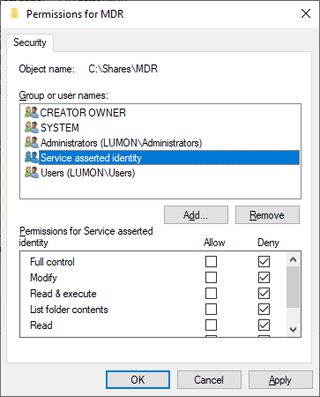
Notice that instead of S-1-18-1, this ticket has S-1-18-2. This is a signal to any downstream service that this ticket was acquired through S4U. Administrators can use this in security descriptors just like any other group. Due to the mysterious and important work of MDR, the MDR share doesn’t allow access for S4U tickets.
The AP Exchange
Now that the client has a ticket, it can connect to the service and use the ticket to authenticate. The client sends an AP request (AP-REQ), embedded in the application protocol, containing the service ticket and an authenticator. The exact manner of this embedding is up to the application protocol. When the client sends the ticket to the service, the service attempts to decrypt the ticket using its secret key. If the decryption succeeds, then the ticket must have been encrypted with the service’s secret from a KDC entrusted with this shared secret.
So, what’s to stop an eavesdropper from snatching a ticket and reusing it? Remember that the ticket has a session key within its encrypted part, which is encrypted with the service key. The client also has a copy of this key, encrypted with a key known by the client. The AP exchange includes an authenticator. The authenticator is encrypted with the session key included in the ticket and includes other information specific to the connection, such as the channel binding. In order to forge the authenticator, an attacker would need to generate a session key and encrypt that session key with the service’s key.
Most services have a well-known SPN consisting of the service class and host name. SMB on LUMON-FS1 requires the ticket cifs/LUMON-FS1. If a service doesn’t have a well-known service class, you can probably get away with using host/LUMON-FS1 or RestrictedKrbHost/LUMON-FS1. By default, Windows services don’t care about the SPN on the ticket. When a service receives an AP-REQ, it attempts to decrypt the ticket with its secret key. If the decryption works, the keys match, so it must be the correct ticket. This means the client can send a ticket with any SPN mapped to that particular service account. For example, to authenticate to LUMON-FS1, you could use host/LUMON-FS1, since both SPNs are mapped to the account for LUMON-FS1.
Titanis commands allow you to override the SPN if you really want to. Provide one (1) or more SPN mappings using the -SpnOverride parameter:
milchick@COBEL-WKS:~$ Smb2Client ls //lumon-fs1/mdr -SpnOverride \*/lumon-fs1=host/lumon-fs1 -vv
 INFO: Importing default for 'UserName': milchick@LUMON
 INFO: Importing default for 'Workstation': milchick-wks
 INFO: Importing default for 'TicketCache': /home/devuser/milchick-pkinit.ccache
 INFO: Importing default for 'Kdc': LUMON-DC1
 INFO: Importing default for 'UserCert': milchick.pfx
 INFO: Importing default for 'UserKeyPassword': password
 DIAG: Opening certificate file /home/devuser/milchick.pfx
 VERBOSE: Selected certificate CN=Seth Milchick, OU=Severed Floor, OU="Kier, PE", DC=lumon, DC=ind
 WARN: The certificate specifies a user name '[email protected]' that differs from the user name provided on the command line.  Using the user name from the command line.
 INFO: Smb2Client Version 0.9.11201106.Q

 VERBOSE: Traversing \\lumon-fs1\mdr; found 0 files in 1 directories
[Titanis.Smb2.Smb2Client] DIAG: Connected to \\lumon-fs1 at Unspecified/lumon-fs1:445
        Client GUID  : 50481509-0160-4ba8-a8da-2eee023e289f
        Capabilities : Dfs, Leasing, LargeMtu, MultiChannel, PersistentHandles, DirectoryLeasing, Encryption
        Security mode: SigningEnabled
[PlatformNameResolver] DIAG: System DNS resolved lumon-fs1 as [ 10.66.0.13 ]
[PlatformNameResolver] VERBOSE: Resolved lumon-fs1 with [ 10.66.0.13 ]
[Titanis.Smb2.Smb2Client] DIAG: Connected to \\lumon-fs1 at Unspecified/lumon-fs1:445
        Dialect         : Smb3_1_1
        Server GUID     : 3a750988-26ba-489d-8ec2-3ae403ea56ab
        Server time UTC : 02/13/2026 19:41:47
        Capabilities    : Dfs, Leasing, LargeMtu, MultiChannel, DirectoryLeasing
        Cipher          : Aes256Gcm
        Signing alg     : AesGmac
        Signing required: SigningEnabled, SigningRequired
 VERBOSE: Overriding SPN: cifs/lumon-fs1 => host/lumon-fs1
 DIAG: Loading ticket cache from /home/devuser/milchick-pkinit.ccache.
[Kerberos] DIAG: Sending AP-REQ to host/lumon-fs1 for user [email protected] with session key Aes256CtsHmacSha1_96 9db740ec88efe21e88b0118bb9d05f0e3cd518ff3a79f86cde79c66bdabea6cc (sendSeqNbr=-936131878)(gssFlags=MutualAuthentication, ReplayDetection, SequenceDetection, Integrity)
Titanis.Winterop.NtstatusException: The operation failed with: STATUS_ACCESS_DENIED (0xC0000022).
This instructs the Titanis command that when a ticket is required for any service class on LUMON-FS1, it should first change the service class to host before requesting a ticket. The ticket is presented to the server as-is, with the mismatched SPN. Although the ticket is encrypted with the same secret key, the server notices that the SPN on the ticket doesn’t match the service, so it is rejected. Changing the = to ~= causes Titanis to use a ticket with the mapped name, but to present the ticket to the service with the original name. For example:
Smb2Client ls //lumon-fs1/mdr -SpnOverride \*/LUMON-FS1~=host/LUMON-FS1
This instructs Titanis that when a ticket is required for any service class on LUMON-FS1, it should check for (or request) a ticket using host/LUMON-FS1, but when sending the AP-REQ to the service, it should present the ticket with the original SPN (in this case, cifs/LUMON-FS1).
This functionality may come in handy when accessing servers with an alias or by IP address. Normally, a service account has SPNs with its host name but not its IP address, so requesting a ticket from the KDC with the IP address fails. You can use the -SpnOverride functionality to request a ticket with the host name:
Smb2Client ls //10.66.0.13/mdr -SpnOverride \*/\*~=\*/LUMON-FS1 -OutputFields FileName
This instructs Titanis that any SPN should be mapped to the same service on LUMON-FS1. In this case, Titanis would ordinarily request a ticket for cifs/10.66.0.13 (which would fail because of the IP address), but instead, it overrides the SPN and requests a ticket with cifs/LUMON-FS1. However, when authenticating to the service, Titanis sends a ticket with the original SPN of cifs/10.66.0.13.
Active Directory offers two (2) policies for this:
- For SMB: Computer Configuration > Policies > Windows Settings > Security Settings > Local Policies > Security Options > Microsoft network server: Server SPN target name validation level
- Note: Although this policy mentions SPN, it only appears to verify the service class part. As long as the SPN starts with cifs/ and the key matches, the server doesn’t appear to care about the rest. Also note that this policy is not Kerberos-specific; it also applies to NTLM.
- For RPC: Computer Configuration > Policies > Administrative Templates > System > Kerberos > Require strict target SPN match on remote procedure calls
U2U
Most services on a Windows host run in the context of the computer account and have access to the corresponding secret key. Some service processes may run under the context of a user and not have access to this key. This is frequently the case with DCOM activation. Kerberos doesn’t provide a means to communicate when a service is using a different SPN; this must be implemented by the service protocol. DCOM provides a mechanism to communicate the SPN of the target service, which may be a user name.
- The client requests a ticket from the KDC.
- The DC replies with error KDC_ERR_S_PRINCIPAL_UNKNOWN with a special structure indicating that U2U should be used.
- The client sends a TGT-REQ to the server, requesting its TGT.
- The server responds with a TGT-REP to the client with the requested TGT.
- The client requests a U2U ticket from the KDC.
- The client sends the U2U to the service.
- The server validates the ticket and authenticator as normal.
Note that the SPN is still validated according to configured policy.
Cheatsheet
Here are some example command lines for Kerberos-related tasks using Ldap and Kerb from Titanis.
Accounts not requiring preauthentication
Ldap query $DC '(&(userAccountControl&=NoPreauthRequired)(!(userAccountControl|=Disabled,LockedOut)))' -OutputFields sAMAccountName, userAccountControl
Find interdomain trust accounts
Ldap query $DC "(sAMAccountType=TrustAccount)" -OutputFields sAMAccountName, sAMAccountType, userAccountControl
Find SPN mappings
Ldap query $DC “(servicePrincipalName=*)” -OutputFields sAMAccountName, sAMAccountType, servicePrincipalName
Find accounts that can use S4U2proxy
Ldap query $DC "(&(userAccountControl|=TrustedForS4U)(msDS-AllowedToDelegateTo=*))" -OutputFields sAMAccountName, sAMAccountType, userAccountControl, msDS-AllowedToDelegateTo
Active Directory Attributes
LDAP Attribute | Location in ADUC UI | Description |
|---|---|---|
sAMAccountName | Properties > Account > User logon name (pre-Windows 2000) | Account name |
userPrincipalName | Properties > Account > User logon name | Alternate account name |
altSecurityIdentities | Action > Name Mappings | Yet more alternate logon names |
servicePrincipalName | Attribute Editor |
|
userAccountControl | Properties > Account | Controls various account behavior |
msDS-SupportedEncryptionTypes | Attribute Editor | Supported encryption profiles |
userAccountControl | Properties > Account | Various flags affecting the behavior of the account |
msDS-AllowedToDelegateTo | Properties > Delegation | SPNs the account can delegate to, either through Kerberos or S4U2proxy, depending on userAccountControl (only visible if servicePrincipalName has a value) |
Abbreviations and Acronyms
Abbreviation | Description |
|---|---|
ADUC | Active Directory Users and Computers |
AP | Application Protocol |
AP-REP | Application Protocol Reply |
AP-REQ | Application Protocol Request |
AS | Authentication Server |
AS-REP | Authentication Server Reply |
AS-REQ | Authentication Server Request |
CBC | Cipher Block Chaining |
CTS | Cipher Text Stealing |
DC | Domain Controller |
FQDN | Fully Qualified Domain Name |
KDC | Key Distribution Center |
MDR | Macrodata Refinement |
NT | Name Type |
PAC | Privilege Attribute Certificate |
PKINIT | Public Key Cryptography for Initial Authentication |
RBCD | Resource-Based Constrained Delegation |
S4U | Service for User |
SPN | Service Principal Name |
TGS | Ticket-Granting Server |
TGS-REP | Ticket-Granting Service Reply |
TGS-REQ | Ticket-Granting Service Request |
TGT | Ticket-Granting Ticket |
TGT-REQ | Ticket-Granting Ticket Request |
TGT-REP | Ticket-Granting Ticket Reply |
U2U | User-to-User |
UPN | User Principal Name |
References
- RFC 4120 – Kerberos Network Authentication Service - https://datatracker.ietf.org/doc/html/rfc4120
- [MS-KILE] – Kerberos Protocol Extensions - https://winprotocoldoc.z19.web.core.windows.net/MS-KILE/%5bMS-KILE%5d.pdf
- [MS-SFU] – Kerberos Protocol Extensions: Service for User and Constrained Delegation Protocol - https://winprotocoldoc.z19.web.core.windows.net/MS-SFU/[MS-SFU].pdf
- [MS-PKCA] – Public Key Cryptography for Initial Authentication (PKINIT) in Kerberos Protocol - https://winprotocoldoc.z19.web.core.windows.net/MS-PKCA/[MS-PKCA].pdf
- [MS-PAC] – Privilege Attribute Certificate Data Structure - http://winprotocoldoc.z19.web.core.windows.net/MS-PAC/[MS-PAC].pdf
- [MS-ADTS] – Active Directory Technical Specification - http://winprotocoldoc.z19.web.core.windows.net/MS-ADTS/[MS-ADTS].pdf
- [RFC 4556] – Public Key Cryptography for Initial Authentication in Kerberos (PKINIT) - https://datatracker.ietf.org/doc/html/rfc4556
- [SPNNAMES] - Name Formats for Unique SPNs - https://learn.microsoft.com/en-us/windows/win32/ad/name-formats-for-unique-spns
- [RFC 3961] – Encryption and Checksum Specifications for Kerberos 5- https://datatracker.ietf.org/doc/html/rfc3961
- [RFC 3962] – Advanced Encryption Standard (AES) Encryption for Kerberos 5 - https://datatracker.ietf.org/doc/html/rfc3962
- [RFC 4757] – The RC4-HMAC Kerberos Encryption Types Used by Microsoft Windows - https://datatracker.ietf.org/doc/html/rfc4757
- [RFC 8070] – Public Key Cryptography for Initial Authentication in Kerberos (PKINIT) Freshness Extension- https://datatracker.ietf.org/doc/html/rfc8070
- User Security Attributes - https://learn.microsoft.com/en-us/windows/win32/ad/security-properties
- [U2U-swift] - User to User Kerberos Authentication using GSS-API - https://datatracker.ietf.org/doc/html/draft-swift-win2k-krb-user2user-03