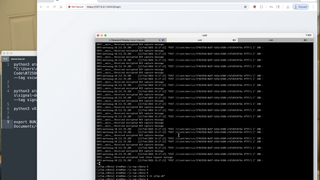
JS-Tap v3: Endpoint Post-Exploitation With JavaScript Implants

Table of contents
When I first wrote JS-Tap, the goal was to provide red teamers with a generic JavaScript payload that works without prior knowledge of a web application and without an authenticated user running it. Instrument the client side, collect loot, attack the application with stolen creds.
That original payload, what I now call the DOM beacon, still works just fine, but in the past year, I wanted to expand the reach of JS-Tap. JavaScript, sadly, has escaped the web application DOM and is now used extensively in desktop applications and software. Browser extensions are JavaScript. Electron desktop apps (Slack, Signal, VS Code, Discord, lots of the corporate tooling you'll find on a workstation) are JavaScript. The new wave of CLI tools built on Node and Bun, including the AI coding assistants everyone is suddenly running, are JavaScript.
Here’s the part that makes all of this worse—all of these application environments run JavaScript with less sandboxing than the browser DOM where the original JS-Tap payload lives. The same monkeypatching tricks JS-Tap has always used to intercept network calls and scrape data work in these environments, too—except now, there's no Same-Origin Policy in the way, and in many cases, there's full access to the underlying operating system.
So, JS-Tap v3 grows beyond the browser to post-exploitation of the endpoint. It introduces three (3) new beacon types, all reporting back to the same JS-Tap C2, integrated for your engagement data collection needs.
The New Beacons
BEX Beacon (Browser Extension)
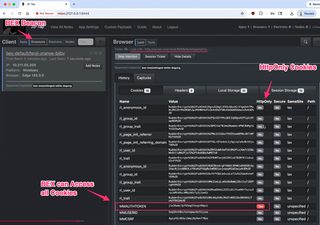
The BEX beacon is JS-Tap as a browser extension, for Chrome, Chromium, Edge, and Firefox across Windows, Linux, and Mac. The DOM beacon lives inside a single page, and the BEX beacon sits at the browser level and sees all.
Because it runs with extension privileges rather than page privileges, it sidesteps a lot of what limits the DOM beacon. It captures cookies across all domains, including httpOnly cookies, which the DOM beacon simply can't touch. It grabs localStorage, sessionStorage, and request headers and tracks browsing across every tab. Note that there are very important scoping settings about what domains the BEX beacon is allowed to work on, compiled in and critical for use in an engagement. Make sure you have that scoping conversation with your client before you use this in an assessment.
The BEX beacon also works as a dropper. From the JS-Tap portal, you can task it to inject a full DOM beacon into a specific domain being used in that browser. A DOM beacon spawned this way gets pixel-perfect screenshots through the extension's captureVisibleTab API instead of relying on the html2canvas library baked into the DOM beacon.
The BEX beacon also allows proxying of network traffic through the beacon.
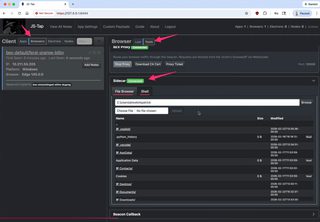
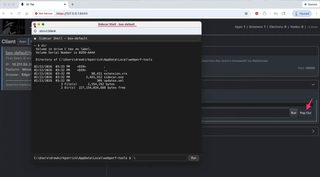
Pair the BEX beacon with the optional new Sidecar, a small Go binary installed alongside the extension and used via the browser's native messaging feature, and you get OS-level file browsing and command execution from a browser extension. There is an OPSEC tradeoff here. Native messaging is the least stealthy of the OS-access options in JS-Tap v3 beacons, since it requires a registered native host and a separate binary on disk, and the Atom and V8 beacons get host access in cleaner ways. For situations where the browser extension is your foothold, it is very powerful if you’re in a position to install Sidecar alongside the BEX extension.
Atom Beacon (Electron App Implant)
The Atom beacon is an implant for Electron desktop applications. You patch it into the target app's ASAR archive with the included atomize.py, and on next launch, it connects back to the JS-Tap C2.
The main process agent runs in Electron's Node.js runtime, so it gets native OS access (file system, command execution) with no separate Sidecar binary needed. If the Electron app has set security fuses that block node functionality or sandboxing, the patcher resets the fuses. Note that you have to have write access to the app.asar file to be able to modify the Electron app.
The usual JS-Tap functionality follows: screenshots, keylogs, and network intercepts. The proxy feature is also supported.
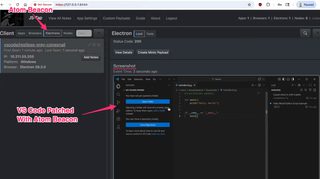
While the Atom beacon is generic, there are commonly used Electron apps that we can implement custom JS-Tap functionality for, and these are implemented in runtime-delivered plugins specific to the application. JS-Tap v3 ships with the following Electron app plugins:
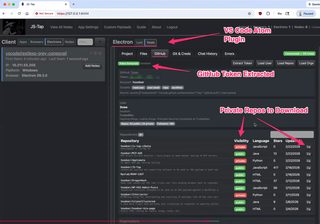
- VS Code Infiltrator - Targets the VS Code Electron app and reaches into the editor environment to copy and edit files and “borrow” GitHub tokens for accessing private repos
- 1Password Vault Raider - Targets the 1Password desktop app and goes after vault contents through the running unlocked application, capturing the unencrypted copy of the password vault
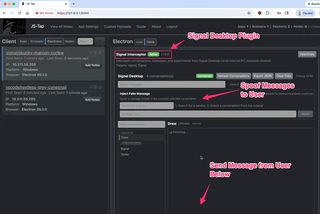
- Signal Interceptor - Targets Signal Desktop; Signal's whole value proposition is end-to-end encryption, but an implant living inside the desktop client can access all messages, send messages from the user to others, or spoof messages to them
- Mattermost Masher - Targets the Mattermost desktop client; same functionality as the Signal plugin, just ported to Mattermost
- Slack Wrecker - The Slack equivalent; same functionality as Signal and Mattermost plugins
Adding new plugins is not terribly time-consuming. I accept pull requests. 🙂
V8 Beacon (Node.js/Bun CLI Implant)
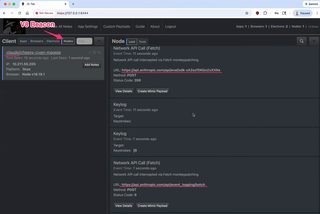
The V8 beacon targets Node.js and Bun command-line applications, and unlike the Atom beacon, there's no app patching at all.
You drop the beacon's .js file on disk and set an environment variable—NODE_OPTIONS for Node or BUN_OPTIONS for Bun. The runtime pulls in the malicious JavaScript before the target app's own code runs, and from there, it's what you would expect from a JS-Tap beacon. It keylogs, intercepts network traffic, and allows code execution and file system access and proxies network traffic through the beacon.
The obvious targets here are the AI CLI tools everyone has suddenly installed, like Gemini CLI and Claude Code, which make a lot of interesting authenticated API calls.
Also New in v3
JS-Tap Proxy - All three (3) new beacons can act as a network relay. Route your own browser through the victim's browser, Electron app, or Node process over a WebSocket relay, and reach internal application servers from the victim's network context, using their IP address and TLS fingerprint.
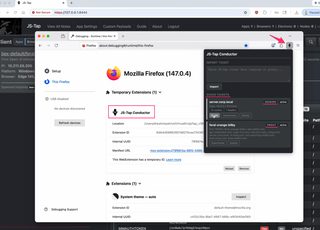
JS-Tap Conductor - This is a standalone Firefox extension that takes session data and proxy configurations generated by the JS-Tap C2 portal (session and proxy “tickets” you paste into Conductor) and reconfigures Firefox to clone the session or route traffic through a JS-Tap beacon. Session cloning captures cookies, headers, and local/session storage and spoofs the user-agent.
General Usability Improvements - As I’ve scaled out my use of JS-Tap, I’ve added features for searching and filtering clients and loot. This really helps in finding needles in haystacks.
Wrapping Up
The original DOM beacon hasn't gone anywhere, and for attacking web applications via XSS or web server-side implant, it's still exactly what it always was. The latest features are intended to target JavaScript where it has shifted to—sadly, into endpoint application environments that hand you more access than the browser ever did.
As always, this is tooling meant for authorized engagements and education. If you run into issues or have ideas on how to make it better, my DMs are open @hoodoer, or you can reach me at [email protected].
Please let me know if you run into bugs. There will be bugs. This is a very large change in the code base.
- https://github.com/hoodoer/JS-Tap (JS-Tap Repository)