JQ for Hackers

Table of contents
When I was first introduced to jq, it was overwhelming and confusing. I tried to just wing it, not realizing it was a very complex and powerful program. With more and more tools outputting JSON, I figured it was time to actually learn it. Turns out, it's pretty easy once you get the hang of it.
This blog is for the hackers, sysadmins, and anyone who wasn't forced to learn JavaScript by some sadistic college professor. It's an attempt to convince you, the grey-bearded hacker, to stop using CSV files and cut and embrace JSON.

If you're familiar with Python dictionaries, this should come naturally.
Some JSON to Play With
Lucky for us, httpx from ProjectDiscovery is a perfect tool to use as a simple example. Run the following to get a JSON object back:
echo www.trustedsec.com | httpx -jThe output will look something like this:
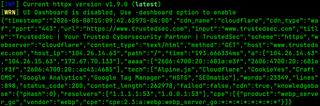
That's hard to read ‚ it's a lot of data, and it's all on a single line. Without word wrap, you wouldn't even be able to see the whole thing. You also can't grep cleanly through it.

Pretty Printing With jq
Pipe the same command to jq . and the output becomes legible:
echo www.trustedsec.com | httpx -j | jq .
{
  "timestamp": "2025-03-14T17:19:03.813358-04:00",
  "cdn_name": "cloudflare",
  "cdn_type": "waf",
  "port": "443",
  "url": "https://www.trustedsec.com",
  "input": "https://www.trustedsec.com",
  "title": "TrustedSec | Your Trusted Cybersecurity Partner | Protecting What…",
  "scheme": "https",
  "webserver": "cloudflare",
  "content_type": "text/html",
  "method": "GET",
  "host": "172.67.70.133",
  "path": "/",
  "time": "762.046417ms",
  "a": [
    "172.67.70.133",
    "104.26.15.63",
    "104.26.14.63"
  ],
  "aaaa": [
    "2606:4700:20::ac43:4685",
    "2606:4700:20::681a:f3f",
    "2606:4700:20::681a:e3f"
  ],
  "tech": [
    "Alpine.js",
    "Cloudflare",
    "Craft CMS",
    "Google Tag Manager",
    "HSTS",
    "SEOmatic"
  ],
  "words": 22245,
  "lines": 779,
  "status_code": 200,
  "content_length": 258423,
  "failed": false,
  "cdn": true,
  "knowledgebase": {
    "PageType": "other",
    "pHash": 0
  },
  "resolvers": [
    "8.8.4.4:53",
    "1.1.1.1:53"
  ]
}
That's better, but it's still a lot of information that I don’t need right now. How do I use jq to limit the output?

A Quick JSON Primer
Before we go further, you need to understand a little bit about JSON. If you want the full spec, see the JSON Schema: core definitions and terminology. We’ll go over the bare minimum for our purposes today.
JSON has seven primitive types: array,boolean,integer,number,NULL,object, and string. We're going to focus on objects and arrays.
An object is denoted with curly braces {} and contains properties (keys) mapped to values:
{
  "Name": "John"
}
This object has the property, Name with the string value, John.
The value of a property can also be an array, denoted with []:
{
  "Names": ["John", "Jane", "Jason"]
}
That's all you need to follow along for now.
Extracting Specific Fields
Say, for example, I only want the host value from the httpx output. With jq, you reference a property by prefixing it with a period:
echo www.trustedsec.com | httpx -j | jq '.host'
"172.67.70.133"
Don’t want those double quotes? No worries. Just add -r.
echo www.trustedsec.com | httpx -j | jq -r '.host'
172.67.70.133
Want multiple fields? Build a new object on the fly:
echo www.trustedsec.com | httpx -j | jq '{url: .url, ip: .host_ip, tech: .tech}'

{
  "url": "https://www.trustedsec.com",
  "ip": "172.67.70.133",
  "tech": ["Alpine.js", "Cloudflare", "Craft CMS", "Google Tag Manager", "HSTS", "SEOmatic"]
}
To grab a single value out of an array, index it like Python:
echo www.trustedsec.com | httpx -j | jq '.a[0]'
"94.247.142.1"
To iterate through every value in an array, use .[]:
echo www.trustedsec.com | httpx -j | jq -r '.tech[]'
Alpine.js
Cloudflare
CookieYes
Craft CMS
Google Analytics
Google Tag Manager
HSTS
HTTP/3
SEOmatic
Filtering With select
Once you've got a stream of objects, select is how you filter them. The pattern is select(<condition>).
Now, say you scanned a directory of favicons and want only the entries that actually have a favicon hash:
cat favicon.json | jq '. | select(.favicon != null) | {favicon: .favicon, url: .url}'Or you ran TruffleHog and want to find the file that contained a specific secret:
cat results.json | jq -r '. | select(.Raw == "SuperSecretPassword") | .SourceMetadata.Data.Filesystem.file'A Real-World Example: Parsing ldapdomaindump Output
This is where jq really earns its keep on an engagement. After running ldapdomaindump, you get JSON files for users, computers, and groups.
ldapdomaindump -u 'support\ldap' -p 'p@ssw0rd' dc.trustedsec.comHere's how to carve them up.
Extract All SAM account Names (Usernames)
cat domain_users.json | jq -r '.[].attributes.sAMAccountName[]' > users.txtExtract All UPNs, Skipping Users Who Don't Have One
cat domain_users.json | jq -r '.[] | select(.attributes.userPrincipalName != null) | .attributes.userPrincipalName[]' > upns.txtThe select(.attributes.userPrincipalName != null) filter is important ‚ without it, jq will error out the moment it hits a user that doesn't have a UPN. Alternatively, you can use the ?to signal zero or more times just like regex.
cat domain_users.json | jq -r '.[] | .attributes.userPrincipalName[]?' > upns.txtList Every DNS Hostname in the Domain
cat domain_computers.json | jq -r '.[] | select(.attributes.dNSHostName != null) | .attributes.dNSHostName[]' > computer_dns.txtPull a Specific User's Full Record (Case-Sensitive)
cat domain_users.json | jq '.[].attributes | select(.sAMAccountName[] == "username_case_sensitive")'This is useful when you've found a hash for a particular account and want to see what groups they're in, when they last logged on, etc.
Find All Domain Admins
This is the one I use the most. The first time I needed it on an engagement, I thought to myself, "Surely there's a cleaner way to do this." Turns out, nope. But it works.
cat domain_users.json | jq -r '.[] | select( (.attributes?.memberOf // []) | any(contains("Domain Admins")) ) | .attributes.sAMAccountName[]' > domain_admins.txtA few things are going on here:
- .attributes? , the ? suppresses errors if attributes doesn't exist, just like in the previous example for UPN.
- // [] ,if memberOf is NULL, fall back to an empty array so any doesn't choke.
- any(contains("Domain Admins"))‚ returns true if any element in memberOf contains the string Domain Admins.

The Mental Model
jq looks intimidating at first glance, but the core mental model is small:
.is the current object..foodrills into a property..foo[]iterates an array.select(...)filters.{a: .x, b: .y}builds a new object.-rstrips quotes from string output.?makes the element optional
That's enough to handle 90% of what you'll encounter on an engagement. So put the spreadsheet down, the 90's called ‚ they want their cut back. Embrace the JSON.