HashcatRosetta: Reading the Rosetta Stone of Password Cracking
Table of contents
Part 2 of 3. Part 1 is the reference for everything new in hate_crack since 2.0. This post is the deep dive into HashcatRosetta: what it does, how it works internally, and how it got built. Part 3 (coming soon) is the plumbing: where configuration lives now and why it moved, how releases get cut, and one very bad commit.
When I first started cracking seriously, my rule game consisted of downloading a rule file, pointing hashcat at it, and hoping. It worked well enough that I never had a reason to look inside. Then one day, I did. This is line 53 of best64.rule, which ships with hashcat and which I had run more times than I can count:
^e ^h ^t
I stared at that for a while. Three prepends and the letters e, h, t, in an order that means nothing, and I could not have told you what it did to a single password. That's best64, not some cursed monster of a file I downloaded off a forum, but the rules hashcat itself ships as the sensible default. (It has 77 of them, incidentally. Not 64. Yes, I know the name is historical, and that it started life as an actual best 64 and grew from there. I'm going to keep being a curmudgeon about the arithmetic not matching the label.)

hashcat rules are effectively write-only. The syntax is dense on purpose, because these things execute on a GPU billions of times a second, but the result is a language most of us copy and paste without reading. And that's a problem bigger than embarrassment, because the whole premise of rule-based attacks is that some rules earn their keep and most don't. If you can't read them, you can't tell which is which, and you certainly can't tune them for the target in front of you.
To this end, I wrote HashcatRosetta to translate.
Two Different Problems Solved by One Tool
HashcatRosetta does two related things. Separating them up front matters, because they solve different problems.
It explains rules. Give it a rule and a baseword and it walks you through the transformation one operation at a time. This is the dictionary half.
It analyzes what your rules actually did. Point it at hashcat's --debug-mode 4 output and it tells you which rules were applied, how often, to how many distinct basewords, and how many unique candidates they produced. This is the half that changes your methodology, because it turns ‘I ran a rule file’ into ‘This handful of rules did the work and the other fifty-two thousand were along for the ride.’
If you use hate_crack, you have already got this: HashcatRosetta ships as a submodule, it backs "Analyze Hashcat rules (opcode statistics)" under Rule File Tools, and the Rosetta attack on the main menu is the debug-log half wired up to a cross-product re-run. That menu has since grown a fourth option that isn't the debug-log half at all. It’s the LLM Mask Attack, which describes the passwords you expect in English and turns that into hashcat masks. This post is what the rest of that code is doing underneath.
Explaining a Rule
Let's settle the one from the top of this post first:
hashcat-rosetta --explain '^e ^h ^t' --baseword password
^e: Prepend 'e' → password → epassword
^h: Prepend 'h' → epassword → hepassword
^t: Prepend 't' → hepassword → thepassword
It prepends "the". The letters look scrambled because prepends stack left to right, each one landing in front of the last, so the word goes in backwards to come out forwards. That's the whole mystery. A dictionary word, hiding in plain sight in the default rule file, and I needed to write a tool before I could see it.
Now, here’s one that looks just as harmless and isn't:
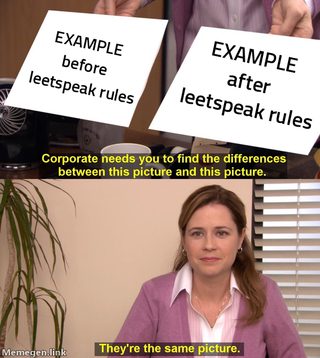
hashcat-rosetta --explain 'sa@ se3 so0' --baseword EXAMPLEFor EXAMPLE, nothing happens: three substitutions, zero changes, one wasted candidate slot. The catch? s is case-sensitive. sa@ replaces lowercase a only. Feed it an uppercase baseword and every substitution is a no-op. I thought to myself, "Surely I haven't been burning GPU time on this." Turns out, I had. If your wordlist has uppercase or mixed-case entries, and every NTDS-derived or OSINT-derived list does, a large chunk of your leetspeak rules are running as expensive no-ops against them. That's not a hashcat bug, it's just what the engine does. mangle_replace is a raw byte compare with no case folding. The docs don't mention either way, so it's invisible until something spells it out for you.
Finding Out Which Rules Actually Work
This is the part I use on real engagements.
hashcat has a debug mode that tells you, for every candidate it generates, which baseword it came from and which rule produced it. Run your attack with --debug-mode 4:
hashcat -m 1000 -a 0 --debug-mode 4 --debug-file debug.txt -r rules.rule hashes.txt wordlist.txt--debug-file is not optional, and it is not the same thing as redirecting stdout. --debug-mode 4 on its own sets the format and then parks the stream in hashcat's profile directory — ~/.local/share/hashcat/hashcat.debugfile, appended to, mentioned nowhere in the output. So, > debug.txt gets you hashcat's startup banner and your cracks and none of what you came for. It's a quiet failure twice over because you end up holding a plausible-looking file with entirely the wrong contents in it, and the file you actually wanted is somewhere you never thought to look, with every previous run's records already in it.
The output is three colon-separated fields per line, baseword, rule, and candidate:
password:$1:password1Mode 5 adds a fourth field, the wordlist the baseword came from, which matters the moment you run more than one list. HashcatRosetta auto-detects which mode it is looking at, and you can pin it with --debug-mode 4 or --debug-mode 5 if a colon inside your basewords confuses the guess.
If you run rule attacks through hate_crack, you already have these logs. It appends --debug-mode=5 and --debug-file to every rule-based attack it launches and parks the output under hcatDebugLogPath, so there is a backlog sitting on disk right now from every attack you have run.
Point it at the file for a summary:
hashcat-rosetta debug.txtThen get to the actual question, which rules are pulling weight:
hashcat-rosetta debug.txt --rules --top 25 --metric candidatesThere are three metrics, and picking the right one matters more than it sounds. --metric frequency tells you what dominated the run. --metric basewords finds rules with reach across many distinct words. --metric candidates catches rules doing redundant work. A rule that fires 10,000 times but produces only 400 unique candidates is collapsing thousands of different basewords onto a few hundred outputs.
That last distinction is the whole value proposition. Frequency alone will happily tell you a rule is important when nearly every time it fired it produced something it had already produced.

You can look at the baseword side too: hashcat-rosetta debug.txt --basewords --detail answers "why did this one word eat 24 candidate slots," which is usually the beginning of trimming your wordlist.
And if the log is mode 5, --wordlists answers the one you can't get any other way, which is whether the third wordlist in the stack is earning its place:
hashcat-rosetta debug.txt --wordlists --detailThis attributes cracks back to the list the baseword came from. It is the difference between "rockyou plus three OSINT lists cracked a pile of hashes" and knowing which of the four you can drop from the next run. --export report.json --format json dumps the whole analysis if you would rather diff it across runs than read it.
Static Analysis Without Running Anything
You don't always have a debug file. Sometimes you've just downloaded a rule file from somewhere and want to know what's in it before you commit GPU hours:
hashcat-rosetta best64.rule --analyze-rules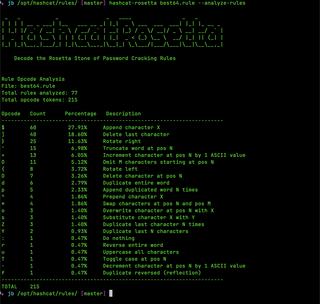
Seventy-seven rules, 215 opcode tokens, and nearly half of everything they do is two operations: append a character (27.91%) and chop one off the end (18.60%). Rotate right is another 11.63%. That's the whole personality of the file in three lines of output. best64 is a suffix-mangler, and it is very good at that and does almost nothing else. There are only four ^ tokens in the entire file, and they sit in two rules, ^1 and the ^e ^h ^t from the top of this post. If your target's habit is prefixes rather than suffixes, best64 has two rules for you and seventy-five that are aimed somewhere else.
A file that's 60% append operations is a "password + digits" file and will do nothing for you against a target that favors prefixes. Knowing that before you start beats finding out after four hours.
Reading Mask Files Too
Rule files aren't the only thing you inherit and can't read. .hcmask files have the same problem in a smaller package, and they fail in a nastier way. Hashcat rejects a bad line, prints one line about it on stderr with no line number, keeps going, and exits 0.
hashcat-rosetta masks.hcmask --verify-masksEvery line comes back either valid, with a plain-English description and its keyspace, or invalid, with the parse error and the line number. The valid keyspace gets summed, and the exit code is non-zero if any line would be rejected:
Line 1: ?d?d?d?d
  4 × digit → 10,000 candidates

Line 2: ?l?l?u?u
  2 × lowercase, then 2 × uppercase → 456,976 candidates
The point is that one bad line can't hide behind the good ones anymore.
Two things about the parser are worth stealing if you ever write one. It deliberately mirrors hashcat's own hcmask reader (src/mpsp.c) rather than the conventions the rest of this project uses, which means a leading # is a comment only as the very first byte of the line. " #x" is not a comment. It's a mask of two spaces, a literal #, and an x. And files are read as latin-1 so that $HEX[...]-decoded high bytes survive the trip.
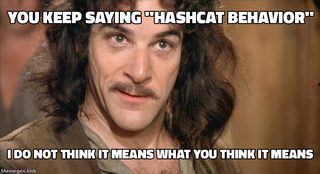
Getting the backslash handling right took a second pass, and it's the bug I'm least proud of. The original splitter handled \, and left every other backslash alone, and I'd written a comment calling that "hashcat behavior." It isn't. hashcat unescapes in a single pass over one escaped flag: a backslash escapes whatever follows it and is itself dropped, before? gets interpreted. Two real misreadings came out of that, both confirmed against the actual binary. \?d was being read as a literal backslash plus a digit, where hashcat reads it as the token ?d and enumerates 0 through 9. Worse, a\\,?1?1 was rejected outright with "referenced ?1 but only 0 custom charsets," where hashcat reads it as the charset a\ plus the mask ?1?1 and produces four candidates.
Rejecting a valid line is the worst possible failure for a tool whose entire job is telling you whether hashcat will accept your file. I'd built the thing to catch that exact mistake and then made it myself, one layer down.
While I was in there, describe() used to stop naming custom charsets at ?4 and echo ?5 through ?8 back at you as raw tokens. All eight are real. hashcat declares custom_charset_1 through custom_charset_8 and reads eight charset fields per line. That one was display-only, since the keyspace math was already right, but it's live for any mask using more than four distinct charsets.
How I Built it Wrong First
Building --explain meant writing a simulator. For every opcode, replicate what hashcat does to the word. I built that from the hashcat Wiki, the rule-based attack documentation, and a working knowledge of what the common opcodes do. Then, I got suspicious. A simulator that's confidently wrong is worse than no simulator at all, because you'll make tuning decisions based on transformations that don't match what the GPU actually does.
I stopped treating documentation as truth and made hashcat itself the oracle. scripts/verify_rules.py generates piles of random rules with generate-rules.bin from hashcat-utils, runs them through actual hashcat, runs the identical rules through explain_rule(), and diffs the two outputs. Where they disagree, hashcat is right by definition and I have a bug.
The current numbers are 7,545 oracle-tested rule-and-baseword pairs, 7,545 matched, 0 mismatches, and a per-opcode sweep reporting pass=60 regression=0 latent=0 unverifiable=0. That second number is the one I care about. Sixty opcodes, every one of them backed by a live hashcat process, and none of them simulated on my say-so.
Getting there turned up the kind of bugs you don't find by sampling. Rules using \xNN hex escapes have to be decoded before the rule is applied, and exactly once, which is a thing you get wrong in two different directions before you get it right. I simply hadn't implemented 3NX. And the casing opcodes were quietly wrong on non-ASCII, because Python's str.lower() happily case-maps Latin-1 accented bytes and hashcat does not.
Only after the harness existed did I go read hashcat's own source (inc_rp_common.h, inc_rp.cl, and rp_cpu.c) rather than the Wiki. The harness told me that I was wrong in a bunch of places. The source told me why.
•S is not an alias for t. It's a keyboard shift operation, using hashcat's cshift_lookup table.
• h and H are hex encoding operations, not case operations.
• 4, w, W, 5, 7, and 9 are not leetspeak substitutions.4 appends the memory buffer. The other five aren't hashcat opcodes at all. They appear nowhere in docs/rules.txt or types.h, and hashcat answers a rule containing one with "No valid rules left." The only place they ever meant leetspeak was my own description table, where I'd written 5-to-3 leetspeak and Reverse leet speak and never once checked whether the engine agreed.
• v is insert-every-N, not delete-by-length.
• B is a byte-add operation, not a memory operation.
• 6 and Q were missing entirely. Prepend memory buffer and reject-if-matches-memory respectively.
The Opcodes the Oracle Couldn't Reach
For a long time, that list had a hole in it, and the hole was the interesting part.
The memory and filter opcodes (! < > % ( ) = M X 4 6 Q) are CPU-side only. They're valid in -j and -k but not in a -r rule file, so hashcat won't take them at all:
hashcat --stdout -r <(echo 'M4') <(echo password)
No valid rules left.
You cannot use --stdout -r as an oracle for a rule hashcat refuses to run. So, those opcodes stayed the one part of the simulator running on my honor, which is exactly the part that shouldn't be. I had a harness that proved the easy opcodes correct and quietly skipped the ones I was most likely to have gotten wrong.
The fix was to stop treating -r as the only oracle. Those opcodes have a second engine that does implement them, the host-side -j, so they get compared against that instead, routed per opcode. The two engines are never swapped for each other, because they disagree about 3NX and pretending otherwise would launder one bug into another.
That closed the last gaps. S, h, H, 4, 6, and Q are implemented and oracled now, and S turned out to be an XOR against hashcat's cshift_lookup rather than anything resembling a case toggle. The sweep also fails the build on any opcode with no oracle coverage, so a simulated-but-unverified opcode can't ship again without somebody writing down an excuse.
The lesson is not about documentation lying. A simulator of someone else's engine is only as good as its verification harness, and ‘I read the docs carefully’ is not a verification harness. Neither is a harness that skips the scary parts.

Installing
It's a uv project:
uv tool install git+https://github.com/bandrel/HashcatRosetta.gitThe command is hashcat-rosetta, with a hyphen. There's also a Python API, and this is where uv tool install will bite you. It drops the package in its own isolated environment, so the CLI works and import hashcat_rosetta raises ModuleNotFoundError from anywhere else. For scripting, add it to the project instead:
uv add git+https://github.com/bandrel/HashcatRosetta.gitThen:
from hashcat_rosetta import DebugAnalyzer

analyzer = DebugAnalyzer()
result = analyzer.analyze_debug_file('debug.txt')
for rule, count in analyzer.get_top_rules_by_frequency(10):
    print(f"{rule}: {count}")
How I Actually Use This
The workflow that made it worth building:
1. Run a normal rule-based attack with --debug-mode 5 --debug-file debug.txt. Costs almost nothing.
2. When it finishes, hashcat-rosetta debug.txt --rules --metric candidates --top 25.
3. Build a trimmed rule file from those top rules and run it against the remaining uncracked hashes. Better candidates-per-second, because you dropped the rules that were only producing duplicates.
4. hashcat-rosetta debug.txt --basewords --detail when a specific baseword looks suspiciously productive, and --wordlists before you carry every list into the next run.
And when you find a rule in someone else's file that you don't understand, --explain it before you trust it. That's the whole reason the thing exists.
The next time you paste somebody else's giant rule file into a cracking session, at least you'll be able to read what you're running. And if you find a rule in there that is three prepends spelling a word backwards, you can decide for yourself whether that's earning its GPU cycles, instead of assuming it must be because it came from a file with an authoritative-sounding name.
Part 1 gave you thirteen new attacks and a lot more ways to generate candidates. This one is about generating fewer of them on purpose. Part 3 (coming soon) is the plumbing underneath both.
Go read your rule files. They've been trying to tell you something.