Full Disclosure: A Third (and Fourth) Azure Sign-In Log Bypass Found

Table of contents
Invisible password sprays. Invisible logins. Full tokens returned.
Nyxgeek here. It's 2026 and I've got two more Azure Entra ID sign-in log bypasses to share with you. Don't get too excited…these bypasses were recently fixed, but I think it's important that people know.
By sending a specially crafted login attempt to the Azure authentication endpoint, it was possible to retrieve valid tokens without the activity appearing in the Entra ID sign-in logs. This is critical logging…logging that administrators across the world rely on to detect intrusions…logging that could be made optional.
Today I will walk you through the third and fourth Azure sign-in log bypasses that I have found in the last three years. I will also look at how sign-in log bypasses can be detected using KQL queries. By knowing about Microsoft's past mistakes, we can try to prepare for their future failures.
Background
Since 2023, I've uncovered four Azure Entra ID sign-in log bypasses. This means I've found four completely different ways to validate an Azure account's password without it showing up in the Azure Entra ID sign-in logs. While the first two of these merely confirmed whether a password was valid without generating a log, my latest logging bypasses returned fully functioning tokens.
Previously, I had written about GraphNinja and GraphGhost -- two logging bypasses where a user could identify valid passwords without generating any 'successful' events in the sign-in logs. Neither were overly complicated. You can find blog posts describing them in detail here and here.
Name | Reported | Fixed | Description |
|---|---|---|---|
08/2023 | 05/2024 | Validate password without creating a log by specifying a foreign tenant ID as endpoint | |
12/2024 | 04/2025 | Validate password without creating a successful login event by supplying an invalid value for specific logon parameters, causing overall auth flow to fail after performing credential validation |
Real quick -- a point of clarification on the names: while I've used Graph- prefix to designate these different bypasses, perhaps it would have been more appropriate to prefix them Entra-, as they were not limited to only Graph sign-ins.
In each of these, the logging being bypassed is for the Azure Entra ID sign-in logs. Logon method is via an HTTP POST to the Entra ID token endpoint, login.microsoftonline.com, using the OAuth2 ROPC flow, with the Graph API as our intended resource/scope. We submit a username and password, an Application ID, and a target resource/scope, and we'll get a bearer token or refresh token for the Graph API in return.
An example curl command performing a "normal" authentication can be seen below:
curl -X POST "https://login.microsoftonline.com/00000000-1234-1234-1234-000000000000/oauth2/v2.0/token" \
  -H "Content-Type: application/x-www-form-urlencoded" \
  --data-urlencode "client_id=f05ff7c9-f75a-4acd-a3b5-f4b6a870245d" \
  --data-urlencode "client_info=1" \
  --data-urlencode "grant_type=password" \
  --data-urlencode "[email protected]" \
  --data-urlencode "password=secretpassword123" \
  --data-urlencode "scope=https://graph.microsoft.com/.default"
When a valid username and password are supplied, a token is returned that can be used to access the Graph API.
GraphNinja Recap
In the GraphNinja bypass, it was only necessary to target another tenant with the authentication attempt (e.g., https://login.microsoftonline.com/00000000-1234-1234-1234-000000000000/oauth2/v2.0/token). Any other valid tenant GUID would do, as long as it wasn't your victim's. The authentication response would still indicate if a valid password was found, but the login would fail because it was performed against a foreign tenant where the user didn't exist. No failed or successful authentication log was generated within the parent tenant of the actual user, as the authentication was targeting the foreign tenant. No logs were generated on the foreign tenant because only logs for valid users within that tenant are generated, and the target user did not exist within the foreign tenant. While no token was returned by GraphNinja, it would indicate to an attacker whether the password was valid without the attempt appearing in logs. Additional logging was added by Microsoft to remediate this oversight.
GraphGhost Recap
With the GraphGhost bypass, providing an invalid Client ID value would cause the overall authentication flow to fail, but not until after credential validation had occurred. By providing an invalid value for the Client ID, it would fail a post-password-validation step, the overall authentication flow would fail, and this would show to administrators as a failed login, with no indication in logs that the password had been successfully guessed. Like GraphNinja, no token was returned, but the password was validated without any indication to the admin. This issue was fixed by Microsoft with the addition of details in the sign-in logs to indicate whether the password was successful.
Now that you're caught up on what's been found in 2023 and 2024, let's look at the findings from 2025.
Enter GraphGoblin and Graph******
GraphGoblin Bypass
Let's start with what I'm terming GraphGoblin. I stumbled across this bypass while poking at the parameters in the Microsoft authentication POST. Testing the scope parameter, I first tried some simple things like supplying invalid scope values. However, I found that the scope value would be rejected if it wasn't a valid scope name, or didn't match an expected format.

Invalid scopes returned an error:
AADSTS70011: The provided request must include a 'scope' input parameter. The provided value for the input parameter 'scope' is not valid. The scope [scope] is not valid. The scope format is invalid. Scope must be in a valid URI form <https://example/scope> or a valid Guid <guid/scope>.
This error message isn't 100% honest. You can also just specify specific scopes, such as openid or Directory.Read.All. If the URL or GUID format is used, it will validate the resource being targeted, and then the scope. This validation of the scope values prevented arbitrary long strings from being evaluated.
Or did it? What if the string we submitted WAS valid, but repeating? For instance, instead of specifying a value like openid as the scope, what if we submitted a bunch of the same value, like openid openid openid?
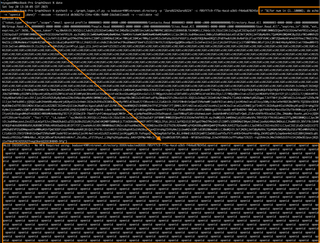
It got through! But did it work at bypassing the logs? I set an alarm for 15 minutes, came back, and checked the Azure Entra ID sign-in logs, and found NO NEW SIGN-INS! W00t! I waited another 15 minutes before really celebrating. Then I tested it with a friend's tenant, just to be sure. It was a solid bypass.
To show how dead-simple this is, a demonstration of this bypass using curl and Bash expansion can be found below:
export TENANT_ID="[tenant-guid-goes-here]"
curl -X POST "https://login.microsoftonline.com/${TENANT_ID}/oauth2/v2.0/token" \
  -H "Content-Type: application/x-www-form-urlencoded" \
  --data-urlencode "client_id=f05ff7c9-f75a-4acd-a3b5-f4b6a870245d" \
  --data-urlencode "client_info=1" \
  --data-urlencode "grant_type=password" \
  --data-urlencode "[email protected]" \
  --data-urlencode "password=secretpassword123" \
  --data-urlencode "scope=$(for num in {1..10000}; do echo -n 'openid ';done)"
Why it Worked (Maybe)
There is no way of knowing 100% why this worked without Microsoft publishing information about these issues, but I can take a guess.
Having done a fair bit of logging to databases with various scripts, I believe this was a simple matter of overflowing the SQL column length for a field, causing the entire INSERT to fail. This is a common beginner mistake when you first start to work with databases.
It's likely that the parser iterated over the list of scopes included, did not find any invalid ones, and so allowed the repetitious entry to pass and attempted to log the raw list of openid openid openid…, in its entirety, overflowing the limit of that SQL column. In testing, a reasonable max length could be assumed to be the sum of the length of all possible scope names. Perhaps they tested for that scenario but never anticipated the repeats. At any rate, if this was the case, they failed to perform simple tests against user-supplied data.
If Microsoft wants to speak publicly about this, I'd love to hear more on it, and to know more about how they approach internal security reviews of their most-critical products.
GraphGoblin Video Demo
It's not often that you see a demo of an actual Azure vulnerability, as they get patched and are gone forever. However, because Microsoft was having trouble replicating this complicated bypass, and asked for a video, I come bearing receipts.
For your viewing pleasure, I present to you what is probably the only Azure sign-in log bypass you'll ever see:
GraphGoblin Demo - Screenshots and Logs
I've also included a traditional walkthrough below…
In the following demo I am about to perform a series of three login attempts.
- The first attempt will be a failed login that generates a normal failed sign-in log. This failed sign-in also generates a 'Correlation ID' that we can use as a reference point in our logs.
- In the second attempt, I'll authenticate using the GraphGoblin sign-in log bypass technique.
- Then, I'll make one final normal failed attempt, so we have another Correlation ID as a marker.
If all of the following attempts are properly logged, the sign-in logs should show:
- Failed Login
- Successful Login
- Failed Login
Below is a screenshot of the Entra ID sign-in logs. Note the Correlation ID of the last log, and the time. It is dated 9/20/2025, at 1:49:20 PM, with a Correlation ID starting with 1dfe62e9-.

In the screenshot below, you can see the source of that failed login; note that the time and Correlation ID match.
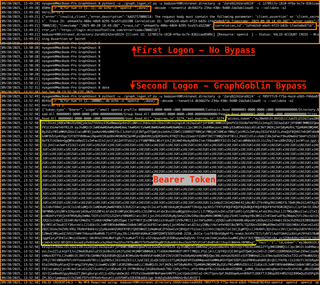
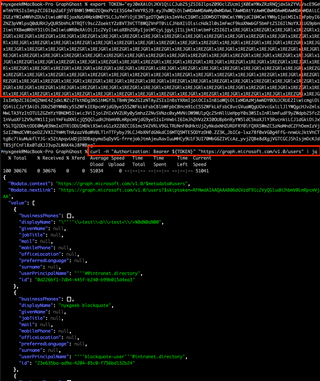
In the above image, below the failed login, you can see a valid login and a timestamp. The valid login occurs on 9/20/2025 at 13:52:38. The difference is, this time, I'm using the GraphGoblin bypass that will make this login event invisible. The login is successful and we can see a bearer token is returned.
In the following screenshot, I export the token to the variable TOKEN so we can easily use it with curl. I then demonstrate that the token is valid by making a Graph API request with it.
Now, to make it clear when reviewing logs, I'm going to make an invalid login attempt, without the bypass. This will give us a Correlation ID to use as another marker point.
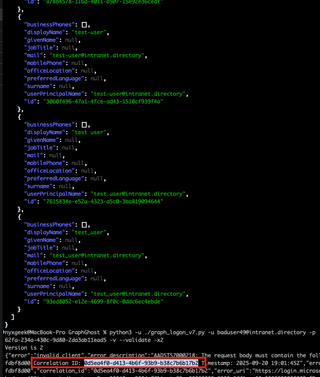
Note that the attempt is from 9/20/2025 at 19:01:45 and has a Correlation ID that starts with 0d5ea4f0-. As a reminder, the first failed login had a Correlation ID that starts with 1dfe62e9-.
If we wait 10 minutes for logs to ingest then review the logs, we see our Correlation ID starting with 0d5ea4f0- is directly after our previous failed login with an ID that starts with 1dfe62e9-. No successful login is shown.

I then make a NORMAL valid login, without the logging bypass, to show that logs are still flowing.
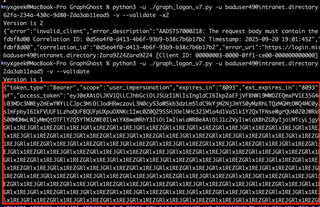
And, we can see the regular, successful authentication come in, but still no sign of the GraphGoblin method.

Additional Logging Information
After posting a video of the bypass to Twitter/X a while back, people were curious if it was a matter of the sign-in logs not displaying them in the Azure portal GUI, or if it was truly being dropped.
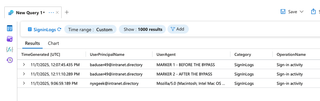
Reviewing the log analytics, I can confidently say that these were dropped entirely from the sign-in logs. In the demo video, I had sent a normal request with a user-agent of MARKER 1 – BEFORE THE BYPASS. After performing multiple authentications using the logging bypasses, I sent another normal request with a user-agent of MARKER 2 – AFTER THE BYPASS. In my Log Analytics workspace, we can see that none of the bypassed sign-in logs made it to Log Analytics. Only our MARKER 1 and MARKER 2 entries are visible from our tests.
Graph****** Bonus Bypass!
Okay, so I mentioned that I had found a FOURTH bypass. This one was ridiculously simple, and it's related to GraphGoblin. Can you guess what logon parameter was vulnerable?
I'll give you a hint: This field is customized regularly.
Another hint: If you were going to perform fuzzing of a critical web-based authentication system and its logging, you would DEFINITELY want to include this field in your testing.
Did you guess it? If you guessed the USER-AGENT field, you're RIGHT!
The secret to abusing this field so that it wouldn't generate an authentication log? You make the user-agent string really long. A total of 50,000 characters in the user-agent worked reliably. That's it. No special trick, just a long string.
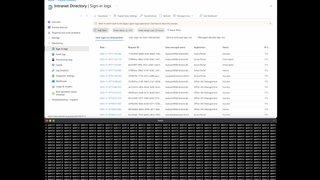
Here is a screenshot of the bypass in action:
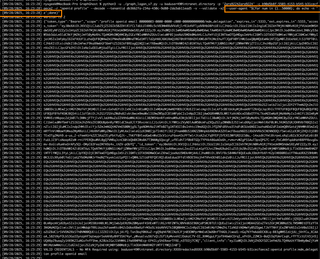
Again, I would guess this was the result of overflowing a SQL column limit.
Here is a screenshot where I made a failed login to generate a Correlation ID that starts with c542178e:

And here is a screenshot of a search in my logs from October 09, 2025, looking for that Correlation ID in the last month's logs. As you can see, no log with the Correlation ID was found, indicating the bypass was successful.
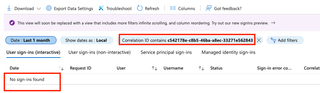
I discovered this on 9/28/2025, and a week later when I went back to write up a report on it, Microsoft had already fixed it! I'm not sure how they noticed and fixed this issue without also noticing and fixing GraphGoblin, but they did.
Timeline
- 9/20/2025 Initial discovery of GraphGoblin
- 9/26/2025 Initial disclosure of GraphGoblin to MSRC
- 9/28/2025 Initial discovery of Graph******
- 10/8/2025 Graph****** fixed by Microsoft prior to reporting
- 11/7/2025 Microsoft is unable to reproduce this so I make them a video
- 11/21/2025 Finally reproduce and start to roll out fix
- 12/1/2025 Re-escalated within MSRC re: bounty and severity, no change
What's going on here, Microsoft?
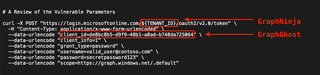
To review, here are the parts of a logon POST that had flaws that enabled the Azure Entra ID sign-in log bypasses. I've compiled them into one screenshot so you can see how many login parameters have had issues identified.
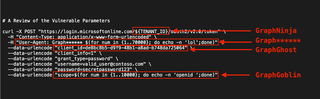
This is the gatehouse that secures hundreds, even thousands, of organizations. How is it possible that so many parts of this critical feature were so woefully untested? None of the bypasses that I've submitted these last few years were complicated. Yet, somehow, Microsoft's security review of Entra ID missed all of them.

Were issues introduced with AI coding? Anybody who has worked with AI for coding knows that it 100% can (and often will) drop portions of your code when revising it. Or did these issues get introduced slowly over the years? Or, have these problems all been there since the start of Azure over a decade ago? Unfortunately, we will never know. Again, I invite Microsoft to speak publicly on these repeated failings.
Detecting Sign-In Log Bypasses - A Futureproof Solution
Four sign-in log bypasses in the last three years, for what is arguably the most important log of all of Azure. This doesn't bode well for admins who rely on these logs as a source of truth. So what can you do, short of moving back to on prem? Well, if you shell out the cash for an E5 license, you can still detect malicious activity, in spite of Microsoft's failures.
KQL Detections
After finding these last two bypasses, I started to see if I could identify traffic from these bypassed sessions. I had been collecting Graph activity in a Log Analytics workspace along with Sign-In logs. While reviewing logs I noticed that the Sign-In logs and the Graph Activity logs both had a Session ID field. Perfect! It should be possible to take a list of all unique Session IDs from the Graph Activity logs and find a corresponding Session ID in the sign-in logs. Any Session IDs that only show up in the Graph Activity logs, and don't exist in any sign-in logs, must have bypassed the sign-in logs. Note for defenders: you will need an E5 license to collect the Graph Activity logs.
I started off with a simple query, ran it on my small test tenant, and voilà! I had a list of Graph activity belonging to my bypassed sessions.
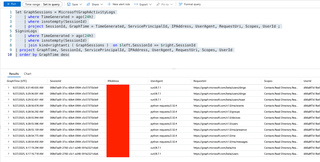
However, it soon became apparent, when testing the detection with a client at a larger organization, that there was a lot of possible 'noise' to account for. My simple checks didn't take into account noninteractive logins, nor service principal logins.
For a while, I was at an impasse. However, I soon found that somebody else had already thought of this, and had implemented it! Fabian Bader has a post covering exactly this in his fantastic write-up, Detect threats using Microsoft Graph activity logs - Part 2.
There is an entire section on finding missing sign-in logs!
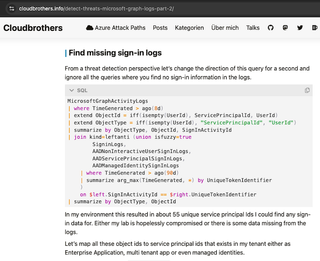
This method incorporates additional sources of sign-ins that I had not, including from service principals, managed identities, and noninteractive user sign-ins. Instead of joining on SessionId values, this KQL performs the JOIN on the more fine-grained properties – GraphActivity.SignInActivityId <-> SignInLogs.UniqueTokenIdentifier.
I still had a little bit of noise, but I added the MicrosoftServicePrincipalSignInLogs to the list of Sign-In sources and it mostly cleared up.
MicrosoftGraphActivityLogs
| where TimeGenerated > ago(8d)
| join kind=leftanti (union isfuzzy=true
        SigninLogs,
        AADNonInteractiveUserSignInLogs,
        AADServicePrincipalSignInLogs,
        AADManagedIdentitySignInLogs,
        MicrosoftServicePrincipalSignInLogs
    | where TimeGenerated > ago(90d)
    | summarize arg_max(TimeGenerated, *) by UniqueTokenIdentifier
    )
    on $left.SignInActivityId == $right.UniqueTokenIdentifier
If the above query returns false-positives, you might want to experiment with matching on the broader matching variable, SessionId instead:
MicrosoftGraphActivityLogs
| where TimeGenerated > ago(8d)
| join kind=leftanti (union isfuzzy=true
        SigninLogs,
        AADNonInteractiveUserSignInLogs,
        AADServicePrincipalSignInLogs,
        AADManagedIdentitySignInLogs,
        MicrosoftServicePrincipalSignInLogs
    | where TimeGenerated > ago(90d)
    | summarize arg_max(TimeGenerated, *) by UniqueTokenIdentifier
    )
    on $left.SessionId == $right.SessionId
If you get it tuned so that you're not getting false alerts, you may want to create an Azure Log Search Alert Rule to notify you if one appears.
I highly recommend checking out the rest of Bader's blog for more detection ideas, as that post is part of a three-blog series.
Denied by MSRC
In a completely unexpected turn of events, Microsoft informed me that they did not consider this to be an 'Important' issue, but merely a 'Moderate' security problem. Therefore, it would not be eligible for any acknowledgement or reward.
I was shocked. They had given me bounties the two previous times I identified Azure Entra Sign-In log bypasses, and for less functional bypasses at that.
Here I had a sign-in log bypass, affecting the most critical of all Azure logs, which resulted in a full token, and Microsoft is saying that it's not important. Take note of that, admins and IT managers. This is how Microsoft views the most important security log in your organization, and a primary source of truth for those without E5 licenses and advanced logging.

How Does it Score?
When submitting to Microsoft, they ask for your assessment of its CVSS score. Here is my assessment of the scoring, and the reasons for it. If you'd rather skip the nerd-out, go ahead to the detection section below.
For scoring, I used CVSS v3.1:
Metric | Rating | Notes |
|---|---|---|
Attack Vector | Network | Via an HTTP POST |
Attack Complexity | Low | Can exploit it with curl |
Privileges Required | None | Will hide both failed and successful sign-in logs |
User Interaction | None |
|
Scope | Unchanged |
|
Confidentiality | None | Not impacted |
Integrity | High | A critical log is bypassed - see note below |
Availability | None | Not impacted |
The Integrity rating is the heart of this, and it's why this should be rated as 'Important' in Microsoft's vernacular. If we consult the CVSS v3.1 documentation, we can see that they give examples of what would constitute Low or High for the Integrity metric.
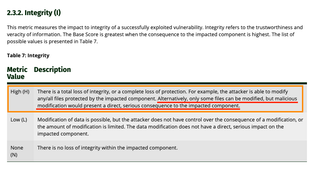
Describing a High value for the Integrity metric, the guidance notes:
"There is a total loss of integrity, or a complete loss of protection. For example, the attacker is able to modify any/all files protected by the impacted component. Alternatively, only some files can be modified, but malicious modification would present a direct, serious consequence to the impacted component."
Here we are modifying the Azure Entra ID sign-in logs by causing our logs to be omitted. The modification of these sign-in logs presents a direct, serious consequence to the impacted component.
Putting that all into the calculator, we see it comes out as a High, with a 7.5 CVSS v3.1 score.
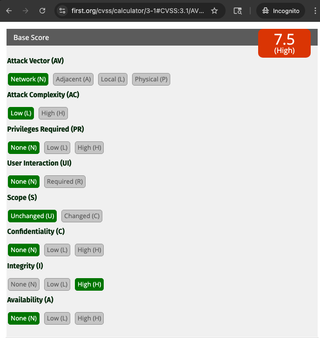
If it were for almost any other log, I could understand a Low Integrity rating. But this isn't just any log. This is the Azure Entra ID sign-in log, arguably the most important log in all of Azure. The CVSS standard specifically cites this as an example of when it would make an otherwise Low rating into a High.
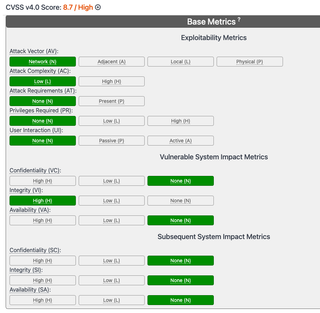
If we compute it in CVSS v4.0, which contains the same language for the Integrity metric, we come out with an even higher rating of 8.7.
Urgency of Fix
Despite Microsoft claiming this was not 'Important' in severity, they fixed it in record time. While they had trouble reproducing the exploit at first, after providing them with a video demo and my tooling, they had the issue fixed within TWO WEEKS. For reference, GraphNinja took them seven months, and GraphGhost took five.
MSRC Inconsistencies
Perhaps the worst aspect is the inconsistency. You have absolutely no idea what they're going to do, no idea how they're going to perceive your issue (or what their grasp of it is), and no guarantees if you'll get anything for your trouble and troubleshooting.
The Four Bypasses
Below is a table describing the four bypasses that I've identified and how MSRC handled them. None of the sign-in log bypasses were publicly acknowledged by Microsoft.
Name | Fixed | Description | Token Issued? | Points? | Bounty? |
|---|---|---|---|---|---|
GraphNinja | 05/2024 | Validate password without creating a log by specifying a foreign tenant ID as endpoint | No | No | Yes |
GraphGhost | 04/2025 | Validate password without creating a successful login event by supplying an invalid value for specific logon parameters | No | Yes | Yes |
GraphGoblin | 11/21/2025 | Get a token without creating a log by repeating a valid parameter value 35,000 times, overflowing the table column | Yes | No | No |
Graph****** | 10/9/2025 (fixed before I could submit) | Get a token without creating a log by specifying a very long user-agent string, overflowing the table column | Yes | N/A | N/A |
Despite GraphGoblin retrieving a full token, they have now decided that these are not 'Important'.
Going Forward
In the beginning, Microsoft gave out CVEs, and it was good. CVEs > bounties because CVEs are for life. I got a couple CVEs for Skype for Business and Lync for Mac in 2017 and 2018, but no bounties. Then, Microsoft slowed down on giving CVEs but started to give bounties. No CVEs for cloud stuff, and only for High or Critical-Severity. This was not as good, but I have realized that I have certain materialistic needs, so cash was fine.
But now, Microsoft is giving me nothing. No bounty. No fake points on their fake point board. No acknowledgement even. Microsoft is the CNA and they get to decide what is a vuln and what isn't, and there's no real recourse that I'm aware of. It's a convenient arrangement, allowing them to decide which of their failings get publicity, and which can be swept under a rug.
Their backpedaling on whether this issue is classified as 'Important' is disheartening. I will say that if they had not given a bounty on that initial GraphNinja bypass, I don't know that I would have put the same time and effort into finding others. We all have busy lives, myself included. If they hadn't paid that first bounty, there is a real possibility that 3 unfound bypasses would be waiting for an adversary to pick up.
In closing, I'd like you to look at this screenshot again, and note the failures that were found affecting the Entra sign-in logging over these last few years.
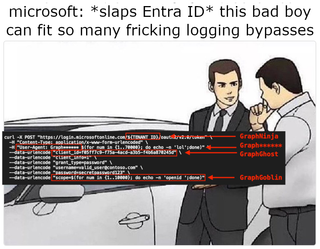
These were not complicated logging bypasses. These were all the result of simple fuzzing. Furthermore, this wasn't just any logging being bypassed, but a critical log essential to the security of the entire Azure tenant. A log that feeds into SIEMs and is used as a source of truth to detect intruders. How did these serious security flaws get introduced? How long were they there for? Why were they not caught by Microsoft's own reviews? Nearly all of America uses Azure. Many parts of the world use Azure. We have collectively placed our trust in Microsoft and their security practices. When there's a problem that impacts this many users, I believe that Microsoft has an obligation to inform the public at large. Unfortunately, we're not seeing that.