Finding Your Way on the Passkey Path
Introducing a choose-your-own-adventure guide to understanding, deploying, and supporting passkeys
September 15, 2026 update: This post has been updated in response to Microsoft's decision to make passkeys the default sign-in experience.
Several months ago, I set out to see what all the buzz was about passkeys. What started as a simple blog post quickly turned into something much bigger. Organizations used to ask themselves if they will adopt passkeys, but it turns out that Microsoft decided the when for us. As of September 1, 2026, Microsoft began a multi-phased process of registering passkeys and disabling less secure authentication methods. This comes in response to a 2025 report that phishing click-through rates rose from 12% to 54%. Breaches almost always begin with a password—a shared secret for users to manage. Passkeys remove the known secret, instead binding it to a device and origin at time of registration, so there's nothing to phish, no database to dump, and nothing to reuse.
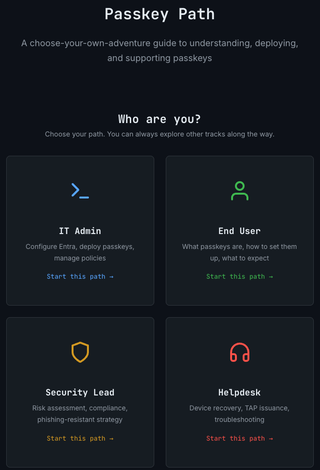
Most of what’s out there is technically correct but operationally lacking. Such a broad topic cannot be narrowed to focus on a single narrative. That’s why I wrote Passkey Path, a guide that satisfies multiple audiences and gives the reader only the information they need based on interest or role. Whether you need to learn the basics or dig into the details, Passkey Path has something for everyone.
Rolling out passkeys in a production environment is a systematic change in all things IT. Passkeys shift the end-user perspective of what it means to log in and challenge how security teams define MFA. The helpdesk no longer resets passwords, but the recovery flow they now own is the new attack vector. For IT admins, passkey implementation is far from a simple checkbox. Top to bottom, passkeys change everything.

Ok, so that meme was probably a bad choice unless you’re on the side of “Thanos had a point.” Regardless of Marvel lore, rolling out passkeys is very much worth it, as long as it’s well-coordinated and calculated. Here’s where you might start.
End Users (Consumers)
We’re all consumers of some kind, and chances are high that you’ve been prompted by at least one of your applications to set up a passkey. Whether you’re starting with the foundational question of “what is a passkey?” or you're ready to enroll your first FIDO2 security key, the end-user path has you covered. This path presents the basics and walks through setting up passkeys, signing in, and what to do when your device dies on a Sunday night.
Security Leads
“Security is everyone’s job.” Whether this phrase makes you smirk, shrug, or celebrate, it should at least carry a little weight. You may or may not care about compliance frameworks, but I think having an understanding of how downgrade attacks occur is pretty important for everyone (or perhaps I’m the only one fascinated with adversarial tradecraft).
Helpdesk
If you thought the helpdesk path was going to be boring, you didn’t realize this is where most of the social engineering content landed. Passkeys are phish-resistant, not phish-proof. When passwords are no longer an attack vector, the path of least resistance usually shifts to the passkey recovery flow. This path also covers how to issue a Temporary Access Pass (TAP), which you may not have even known existed (I didn’t).
IT Admins
Everyone’s role in deploying passkeys is important. I’m not going to say that the IT Admin has it the hardest, but they do have the highest chance of a Resume Generating Event (RGE). Without a good phased rollout strategy, large groups of users get locked out at the worst possible moment. Conditional Access, AAGUIDs, and attestation are all critical aspects of the bigger picture.
The Reader Experience
Built by the ADHD mind, for the ADHD mind, Passkey Path uses the above 4 tracks, but there is no starting point. With 25 pages of content and 67 cross-links, its value is in its flexibility. If you fit in multiple roles or you only need a piece of one, you’re the normal case, not the edge case. Pick a starting point and explore from there.
One of my favorite additions to this project is the progress and achievement system. The site tracks your progress client-side, so you won’t accidentally read the same page twice. An achievement system is added for those looking to gamify their experience, earning badges as you complete paths.
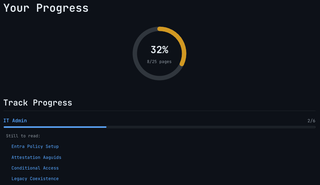

With over 2 hours of estimated reading time, you’re bound to find something you’re looking for. Follow a path or don’t. Passkey rollouts don’t follow a set structure, so Passkey Path doesn’t either.