Colonel Clustered: Finding Outliers in Burp Intruder
Table of contents
TL;DR, gimme the goods: https://github.com/hoodoer/ColonelClustered
Extension has been submitted to the Bapp store, awaiting approval.
This is a Burp Suite extension I’ve been meaning to write for many years, yet somehow I never seemed able to finish the project until now. The reason I’ve wanted to create a clustering feature for Burp Intruder is because I find how pentesters typically use Intruder to be intellectually unsatisfying.
When we’re using Intruder, we’re typically looking for a difference in the server responses based on our fuzzed inputs. The metrics we use to identify those differences are commonly response size, status code, content-type, and response time. None of these are good quality measures of the actual content of the server response, but they are readily available and easy to sort by.
Intruder does capture every response, but manually reviewing thousands of them for subtle content changes is impractical. If a meaningful difference occurs that doesn't trigger a change in response size or timing, it effectively becomes invisible and we could miss something important.
While we don’t have time to read all the server responses ourselves, there’s no reason we can’t have algorithms do that for us, and that’s exactly what Colonel Clustered does. It groups request/response pairs together based on similarity of response content.
Algorithms for clustering text have been known for decades—the popular K-Means algorithm dates back to the 1950s. This is not fancy LLM magic, this is just old school math.
Typically, these algorithms require a lot of manual knob-turning to get useful results, but Colonel Clustered takes advantage of the 'batched' nature of Intruder results. Because we have the entire dataset available at the time of analysis, the Burp extension can autofit its own parameters. This costs a few extra CPU cycles, but it completely removes the guesswork for the user. There are no settings to tweak because the algorithm calibrates itself to the data at hand.
How it Works
So, let’s talk about how Colonel Clustered works. The first step is tokenization of the responses. There are different tokenizers for different content types, with strategies that match the form of that server response. You can read more details on the underpinnings of Colonel Clustered here.
After tokenization, some pre-grouping is performed to try to minimize the number of responses to be analyzed. Then we come to the clustering algorithms.
I spent a good amount of time trying out different approaches to the problem and ultimately settled on two (2) different clustering algorithms. I found that a DBSCAN (https://en.wikipedia.org/wiki/DBSCAN) based clustering algorithm ran quickly and worked well most of the time. A more computationally intensive algorithm that builds a similarity matrix worked well pretty much all the time, but for huge amounts of requests/responses, this algorithm simply takes too long (don’t throw 10k requests at that one!).
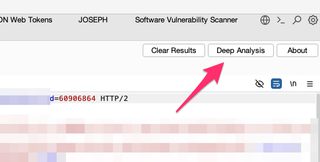
By default, when you send requests/responses to Colonel Clustered, it automatically starts the fast DBSCAN-based algorithm. There is a “Deep Analysis” button to launch the more intensive clustering algorithm if you need additional analysis. Both algorithms provide a progress bar, and analysis can be cancelled if it’s taking too long.
Using Colonel Clustered
What does this process look like and what can it find? Let’s start with my favorite example, the needle in the haystack. All responses are the same size, with one (1) minor difference for a specific input. Let’s look at this example response.
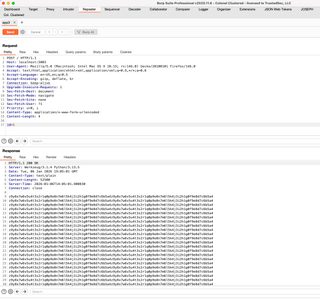
For one (1) ID value, one (1) of these hundreds of lines is different with this example application (app3.py in the test_servers directory of the project). This would be exceptionally difficult to find in Intruder without clustering.
We’ll set up a quick Intruder fuzzing of this ID parameter.
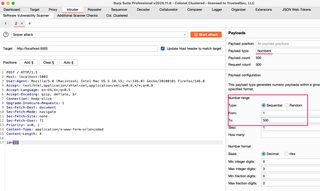
Running our Intruder attack, we see that every single response is exactly the same size and roughly the same timing. We have little chance of finding the outlier in the default Burp Intruder view.
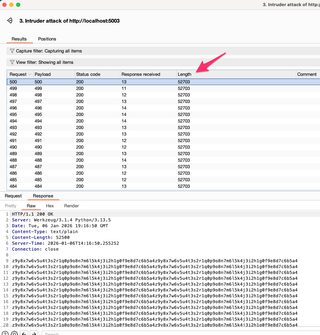
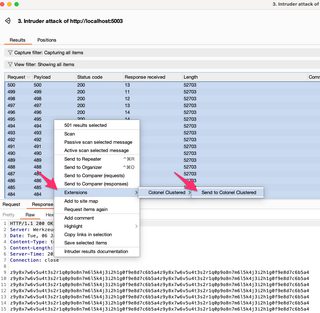
From here, select all the requests in Intruder, right click, and send to Colonel Clustered.
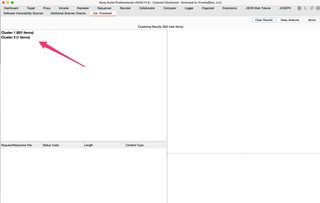
Switch over to the Col. Clustered tab to see the results. The fast scan doesn’t take long typically. We can see in this example two (2) clusters have been identified, with one (1) cluster having a single member.
We can select these clusters to see their “member” request/response pairs and select individual request/responses to view in the right-side panes.
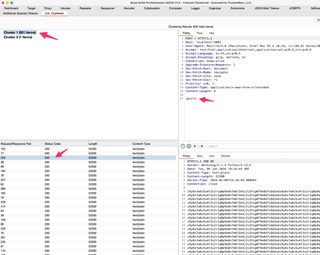
So, what is our magic outlier here? Selecting our cluster with a single member should give us our outlier, and we can use Burp Comparer to find out what the difference is.
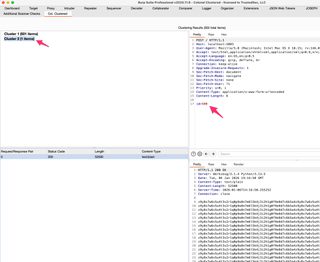
And here’s our needle in the haystack.
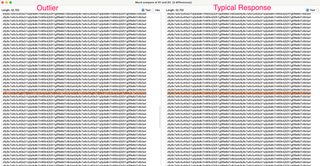
This minor difference would be nearly impossible to find without text clustering techniques.
Let’s look at an example of the fast algorithm not working well and how the Deep Analysis algorithm solves the problem.
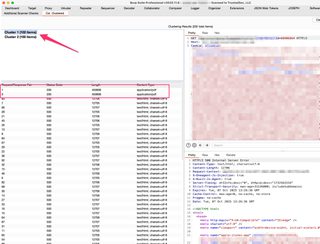
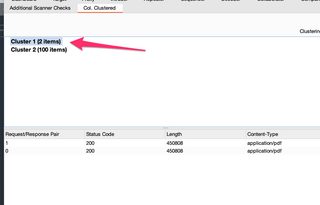
Now, these two (2) requests are lumped into a cluster with many others, even though they’re clearly different. These would be easy to spot in Intruder using normal methods of checking response size, status code, and content-type, but it’s interesting that the fast/default algorithm clusters these poorly.
This is easily fixed with the Deep Analysis algorithm.
Sure enough, the “better” algorithm easily puts these two (2) outlier responses into their own cluster.
In my testing, for most cases the faster algorithm works great, but don’t be afraid to try to slower algorithm. You can always cancel it if it’s progressing too slowly.
Colonel Clustered has been submitted to Portswigger for inclusion in the Bapp store, but they’re backlogged on extension reviews quite a bit. For now, you can install the extension by downloading the .jar from the repo:
https://github.com/hoodoer/ColonelClustered/releases/download/v1.0.0/ColonelClustered.jar
The tool is open source, so feel free to build it yourself if you desire. Build instructions are included in the README in the repo:
https://github.com/hoodoer/ColonelClustered
I’ll update this blog post when the extension is added to the Bapp store.
If you have any questions or comments, feel free to find me online in the usual spots (@hoodoer).