Adventures in Primary Group Behavior, Reporting, and Exploitation

Table of contents
If you’ve administered Active Directory (AD) for any significant time, chances are you’ve come across the primaryGroupID attribute. Originally developed as a method for AD to support Portable Operating System Interface (POSIX)-compliant applications, the attribute has been better known by a different name: An Attack Vector. Commonly referenced in a DCShadow attack, an adversary can set a user’s primaryGroupID to 512 (Domain Admins) and effectively become a member of that group.
One of the most important concepts to grasp here is this: AD group membership is the combination of 'members' in a group as well as any user with the primary group set.
Deep down, the two attributes are separate; AD just attempts to combine the two for convenience. However, this convenience is not universal and various AD tools report on group membership differently. This inconsistency in reporting can cause issues with monitoring and alerting on group changes and group enumeration. (This is not a new revelation; we can date this conversation all the way back to 2005.)
Finally, since the primaryGroupID is an independent attribute, it is possible for an attacker to modify the Discretionary Access Control List (DACL), effectively hiding group membership from all users in the forest, even Domain Admins.
Exploitation
When I first investigated primary groups, I assumed that an attacker could use this attribute to sneakily maintain the privileges associated with the group without appearing in the group membership. This turned out to only be partially true.
When attempting to remove group membership for a primary group using AD Users and Computers (ADUC), the Administrator is met with this message:
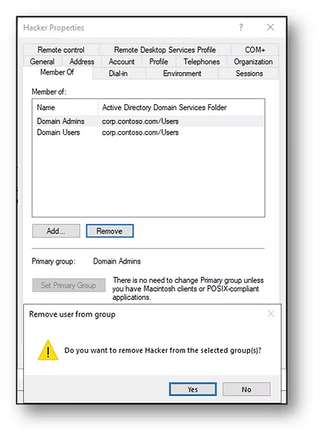
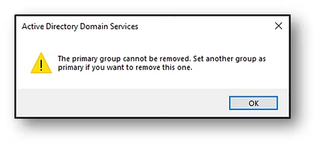
Even when using the PowerShell cmdlet Remove-ADGroupMember you get a similar error message:

The next logical step was to avoid traditional tools and attack the AD database directly. Performing a DCShadow attack would bypass Local Security Authority Subsystem Service (LSASS) and would allow direct modification of the primaryGroupID attribute. So, loading up mimikatz, I performed an attack to set primaryGroupID to 512, as outlined in the screenshot below:

Prior to these changes, the Hacker user account was only a member of the Domain Users group. By default, Domain Users is also configured as Hacker's primary group.
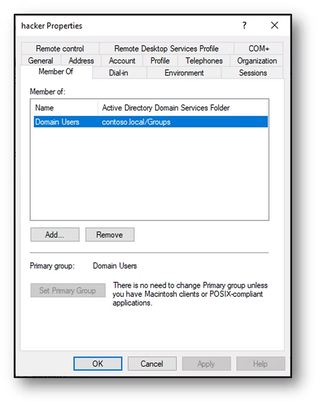
After the attack, the Hacker user account primary group has been changed to Domain Admins but has lost its membership to the Domain Users group.
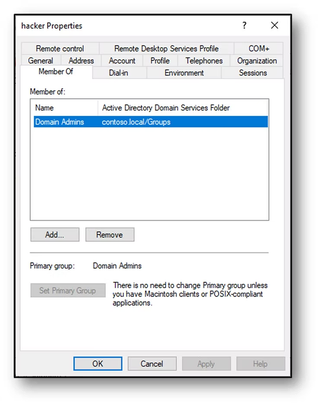
A DCShadow attack replaces the primary group but it also strips the corresponding group membership for the previously set primary group. This attack is not limited to the Domain Admins group. Using any group will result in the same outcome.
Eager to find a method to exploit the primary group, I tested one last tool. Unfortunately, the DSInternals functionSet-ADDBPrimaryGroup yielded the same results:

In my testing, I have determined it is not possible to decouple these two attributes. Changing the Primary Group ID (PGID) on a user will always coincide with a group addition (see above). Further proof of this is the removal of membership from the Domain Users group. To reiterate, changing a user’s PGID also removes their membership from the original primary group.

While these attacks can be 'sneaky' (by directly updating the AD Database), existence of a new Domain Admin would surely be discovered. That is, unless you are using the wrong commands to report on group membership.
Behavior and Misconceptions
Further research into the primaryGroupID revealed that group membership reports differently depending on the method used to perform the query. Regardless of how the primaryGroupID is set, using the PowerShell cmdlets Get-ADGroup and Get-ADGroupMember returns different results:
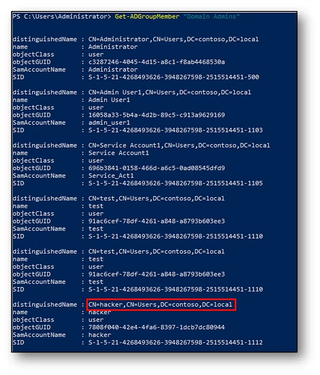

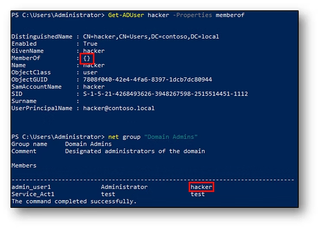
The Hacker user account has been added to the Domain Admins group and configured with it as the primaryGroupID. Seen above, Get-ADGroup does not list Hacker as a member, whereas Get-ADGroupMember does. When we look at it from the user perspective it’s equally confusing. The Get-ADUser cmdlet shows an empty memberOf attribute, yet running net group will list Hacker as a member.
When moving into the GUI, ADUC and Admin Center will both list all members including those with primaryGroupID set. However, using ADSI Edit, the member attribute for the Domain Admins group does not include users with the primaryGroupID configured.
To recap where we are so far, here is a list of which tools returnprimaryGroupID members and which don’t:
Returns Members with primaryGroupID | Does Not Return Members with primaryGroupID |
Net Group Domain Admins | ADSI (Looking at Group) |
ADUC/Admin Center | Get-ADGroup Domain Admins -properties member(s) |
Get-ADGroupMember Domain Admins | Get-ADUser < user> -properties memberOf |
Once recursive queries and nested groups are introduced into the equation, nothing can be trusted. In this example, the Domain Admins group contains two users and one nestedDAs group. The nestedDAs group contains two additional users. The hidden user account has its primary group set to nestedDAs. Performing a recursive query using Get-ADGroupMember or by using a Lightweight Directory Access Protocol (LDAP) filter does not return hidden as a member.

Monitor Your Monitoring
During our AD security assessments, TrustedSec asks all clients two very important questions.
- Are you monitoring privileged groups for membership changes?
- Are you monitoring privileged groups for enumeration?
While these questions seem straightforward, how does primaryGroupID impact these questions? If directly looking at the group objects, is it possible that user objects are slipping through the cracks? Setting up test scenarios may be the best way to truly identify if this blind spot exists in your environment.
In short, check your scripts and tools. Confirm that any reporting or monitoring being used is properly reporting on members with primaryGroupID configured. Failure to do so may result in inconsistent reporting or could mean you have some unknown Administrators.
Real Exploitation
Now that we have debunked the primaryGroupID persistence myth, let’s investigate a real attack scenario. Yuval Gordon wrote an article that explains a method of abusing the primaryGroupID by modifying the DACL on a user object. In the context of these examples, the DACL would be applied to the Hacker user account. It effectively sets a deny permission for the 'Everyone' group on the ability to read the primaryGroupID attribute.
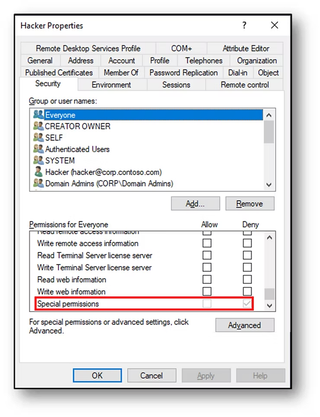
This technique only works for objects not protected by AdminSDHolder. Membership in any of these groups periodically has permissions restamped and would remove the deny DACL rights. Therefore, the Domain Admins group is not a realistic target.
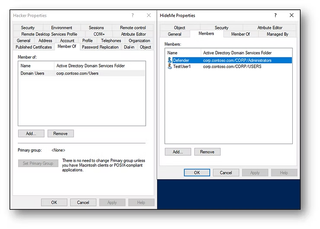
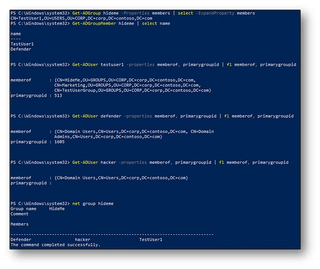
Once a user has the deny permissions configured and any (unprotected) group set as the primary group, it becomes invisible on both the user and the group object. In this example, the user Hacker is a member of the HideMe group. Notice the HideMe group is missing from the member tab and the primary group reports as < None>. Hacker also does not appear in the member tab of the HideMe group.
Even more impressive, the configuration is illusive to all PowerShell commands. The only tested method that properly returns Hacker as a group member is net group:
Gordon offers the following script to query for users without a primaryGroupID, or more accurately, without a readable primaryGroupID:

In addition, checking for any non-standard primaryGroupID may reveal any misconfigured users. A similar attack method is possible when setting the deny DACL on the group object. This will also hide group membership, but the primary group is still readable on the user object:
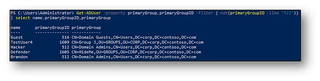
Unless there is a valid reason to retain a non-standard primary group, all users should be set to Domain Users (513).
Goofing Off
Hackers like to make things do something they aren’t supposed to do. Just goofing off during testing, I found that it’s possible to add a user to a group twice. Using mimikatz or DSInternals on an account that is already a member of Domain Admins and that has a primary group set as anything else results in a double-DA state—one instance marked as a group member, the other as the primary group. I don’t know what this means but I hope it’s the only time you see a hacker as a Domain Admin.

To Sum it Up…
This adventure into the primaryGroupID touched on the use of attack tools and sneaky methods that may allow attackers to persist in your environment. The two key takeaways that everyone should understand are:
1. You should be reporting on the current primaryGroupID of all user objects in AD. Scrutinize any user that may be granted privileged group membership in this way. Note that privileged does not always mean Domain Admin. Any non-standard users should be reset to Domain Users. The following PowerShell script will return any non-standard users in the environment:
Get-ADUser -property primaryGroup,primaryGroupID -Filter {-not(primaryGroupID -like “513”)}
 | select name,primaryGroupID,primaryGroup
2. You should be reviewing and testing all scripts, tools, and monitoring that report on group membership. Membership using primaryGroupIDsmay be missed depending on the PowerShell cmdlet or method used to report on group members. Logging and reporting on group changes may have a blind spot when it comes to the use of primaryGroupIDs.
**This blog has been updated from it's original posting, published on the Trimarc website on May 23, 2023.